• Hello MLAers! We've re-enabled auto-approval for accounts. If you are still waiting on account approval, please check this thread for more information.

Grainy Color on PB 180c?

Scott Baret

68LC040
I have a PowerBook 180c, and have owned this computer for many years now. It's a great little machine, but I have one issue with it--the color.

The color looks really grainy on it--particularly when doing color tests or in paint programs.

Here's an example: I opened the monitors control panel and clicked the 16 color setting. Many of the colors looked as though they had patterns in them. For example, the red had lighter red dots scattered evenly throughout it.

What causes this and how can it be fixed? This machine has a great active matrix display, so why do we have these color difficulties?

I'm running System 7.1 if that makes any difference.

 
If they're dense, it could be the shape of the sub-pixels. They're quite visible at lower resolutions.

 
Interesting thought. I'm going to have to take a photo of this to see if this may be the case. Check back tomorrow, hopefully I'll dig it out after work and take a photo of what I'm describing.

 
Apple also used various LCD manufacturers for their laptops, and it can make a big difference in how the display looks. They used at least two different companies for the LCDs in the 540c and the difference between the two panels is night and day.

 
Last edited by a moderator:
I'd have to see a picture of what you're looking at, but it honestly sounds about normal to me for an LCD of that vintage. I had a 486 laptop with an 8.4" active matrix screen and I recall being able to quite distinctly see the color triads. (The black gridwork around each subpixel made up a good percentage of the screen area.)

Another thing you might notice about sufficiently old panels like that is that some of them use as little as 9-bit color depth. (IE, only 8 intensities for the red/green/blue components.) Since the full VGA palette was 18 bit (and I think Macs have always used 24 bit palettes, although I'm not 100% sure on that) the difference in color range could sometimes have not-so-subtle effects on 256 color images that used a palette with close color gradients. Effects like that probably won't show up in 16 color mode, though.

 
OK, so here's the real weirdness...if I may pick on one color for a minute here (the other colors have the same problem, but I'll stick with one for this example)...

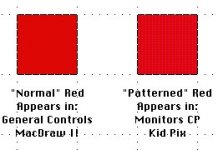
The red looks patterned in the 16 color mode on the Monitors control panel, as well as in some programs (an example being Kid Pix). However, if I use General Controls and make my desktop entirely red, it looks perfectly fine!! The red also looks normal in MacDraw II.

I made a picture in MacDraw to show what I'm talking about, copying the pattern as best I could.

PB180cRED.jpg

This makes me wonder if it's more software-related.

Here's a bit more insight which may or may not be useful. I don't have an original set of PB180c disks and simply have a regular copy of 7.1 with the correct enabler on the hard drive. Is there something I'm missing for this which may have been specific to the PB180c?

 
That looks like the subpixels to me. The artifacts appear most visibly on what is displayed as nearly 100% of a primary color.

 
Last edited by a moderator:
Back
Top