• Hello MLAers! We've re-enabled auto-approval for accounts. If you are still waiting on account approval, please check this thread for more information.

Geforce4 MX440 64MB flashable?

indibil

6502
Hi, this week is all about graphics...

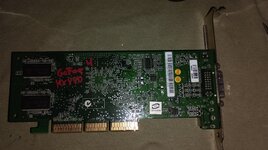
Along with an FX6200 that I managed to flash, I received a Dell GeForce4 MX440 64MB AGP x4/x8.

Link

According to the chip and memory specs, I should use a 270/200MHz ROM.
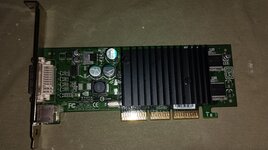
IMG_20250415_183728.jpg
IMG_20250415_183742.jpg

Since it's AGP x4/x8, I covered pins 3 and 11. If I didn't, the Mac wouldn't boot.

I ran the tests on a G4 Digital Audio, which has AGP x4.

I have tested both the OEM ROM and the PC hack by adjusting the clock and DDR speeds, found at this link:

themacelite.wikidot.

I always use the TLL866 and replace the original EEPROM with a flashed one.

With both, the chime sounds when I boot up, but I only get a black screen, even when I boot up by holding the ALT key.

I read in this link that the GF4 requires hardware modifications, but it doesn't give any further details:

cybercoment

Is this detail true? If so, what hardware modifications does a GF4 MX440 require?

Thanks.

 
Carrying on from Re: Mac OS 9 booting on: iMac G4 Flat-panel (Detailed Posts)

Regarding the GeForce 4MX fcode that is included in the iMac G4 Flat-Panel 1.67 GHz (PowerMac6,1).

Did Apple make a 1.67 GHz PowerMac6,1? What's the model number? Apple link? EveryMac link?

I've dumped the assembly and fcode parts of the provided Mac ROM, extracted the Nvidia fcode image (appears to be revision 2032), and compared it with the EliteMac Nvidia 2032 ROM. There's many differences that make me wonder if it's possible to use the Apple fcode image on an Nvidia card (after adding the PCI Option ROM header and nvstraps). The Apple fcode image doesn't include a ndrv while the Nvidia fcode does. That shouldn't matter if the ndrv on disk loads properly.

I can't say whether it would be better to use the code from the Nvidia fcode or the Mac ROM fcode for your PCI card.

That's probably all the work I'll put into this project. I can answer questions about the attachments here.

What OEM ROM did you try? Is it one of the ones I dumped in the Nvidia attachment?

What is the device ID of the PC GeForce 4MX card? The fcode from the Mac ROM is setup to handle a few device IDs (listed in the "Driver 9 Nvidia.4th" file).

I use nvflash.v5.95.0.1-win from Tech Power Up in Windows 10 to flash my Nvidia GeForce 7800 GT Mac Edition card.
https://www.techpowerup.com/download/nvidia-nvflash/

I use my https://github.com/joevt/OpenBIOSStuff project to dump the fcode of the Mac ROM and the PCI ROMs. See the BBEdit worksheet files for the commands.
 

Attachments

Carrying on from Re: Mac OS 9 booting on: iMac G4 Flat-panel (Detailed Posts)

Regarding the GeForce 4MX fcode that is included in the iMac G4 Flat-Panel 1.67 GHz (PowerMac6,1).

Did Apple make a 1.67 GHz PowerMac6,1? What's the model number? Apple link? EveryMac link?

I've dumped the assembly and fcode parts of the provided Mac ROM, extracted the Nvidia fcode image (appears to be revision 2032), and compared it with the EliteMac Nvidia 2032 ROM. There's many differences that make me wonder if it's possible to use the Apple fcode image on an Nvidia card (after adding the PCI Option ROM header and nvstraps). The Apple fcode image doesn't include a ndrv while the Nvidia fcode does. That shouldn't matter if the ndrv on disk loads properly.

I can't say whether it would be better to use the code from the Nvidia fcode or the Mac ROM fcode for your PCI card.

That's probably all the work I'll put into this project. I can answer questions about the attachments here.

What OEM ROM did you try? Is it one of the ones I dumped in the Nvidia attachment?

What is the device ID of the PC GeForce 4MX card? The fcode from the Mac ROM is setup to handle a few device IDs (listed in the "Driver 9 Nvidia.4th" file).

I use nvflash.v5.95.0.1-win from Tech Power Up in Windows 10 to flash my Nvidia GeForce 7800 GT Mac Edition card.
https://www.techpowerup.com/download/nvidia-nvflash/

I use my https://github.com/joevt/OpenBIOSStuff project to dump the fcode of the Mac ROM and the PCI ROMs. See the BBEdit worksheet files for the commands.

In the macos9lives thread I explained a few posts earlier that it was originally an iMac G4 1GHz with GF4, which I overclocked the bus and SWAPed the CPU to an MC7447.

https://rosysumenteinquieta.blogspot.com/2025/07/hace-unos-dias-os-mostre-con-imagenes.html

Thanks for analyzing the iMac ROM, but I don't know how to extract the GF4 ROM from the dump, nor do I know how to add anything to make it usable on an AGP card and take up 64kb or 128kb.

I've tried many ROMs, all from EliteMac, and as I mentioned a few posts earlier, other people have tried unsuccessfully with this specific model, which has AGP x4 and x8. That's why I thought the ROM from a G4 iMac, which comes with the same version of GF4 as this one, would work. I didn't have your ROM dumps, but I understand they're similar to the EliteMac ones for AGP x2 and x4, right?
 
I looked at these ROMs from MacElite:

OEM4MX1088AGP 2x/4x270/270 MHz?MB TSOP DDR64KBDownload (ZIP)
OEM4MX1091AGP 2x/4x270/270 MHz?MB TSOP DDR64KBDownload (ZIP)
OEM4MX1100AGP 2x/4x270/270 MHz?MB TSOP DDR64KBDownload (ZIP)
OEM4MX1121AGP 2x/4x270/270 MHz32MB TSOP DDR64KBDownload (ZIP)
OEM4MX2032AGP 2x/4x270/270 MHz64MB TSOP DDR64KBDownload (ZIP)

Since the Nvidia fcode from the Mac ROM has revision 2032, I only compared the Nvidia fcode from the Mac ROM with the fcode from the MacElite 2032 ROM.

The 1088 ROM appears to be unusable since all carriage return characters were replaced with line feed characters.

What OEM ROM did you try? Maybe you can attach them and I can see what changes you made.

What is the device ID of the PC GeForce 4MX card?

Do you have the original PC ROM?
 
Hello.

I only have the last two ROMs I tested, which I've attached. I didn't make any modifications, I don't know how to do them, I just used some NVtool to modify the memory MHz, as the name suggests.

I've been looking for the original ROM and can't find where I saved it, and I don't have the original unsoldered EEPROM.

As for the device ID, since I can't boot with it, I can't see it. I've tried booting with a PCI graphics card and inserting the AGP, with the monitor on the PCI card, and after the chime, the computer seems to freeze. I don't see any image, and I can't go to the boot menu or anything. I can't get the device ID. Pins 3 and 11 of the AGP are covered.

Without that information, I don't think it'll be possible to do anything, right? That's why I thought maybe I could try this card with the iMac ROM.

This is the link I found at the time for another one like it. It says it's unusable after flashing.

http://themacelite.wikidot.com/gf4mx-64mb
 

Attachments

I only have the last two ROMs I tested, which I've attached. I didn't make any modifications, I don't know how to do them, I just used some NVtool to modify the memory MHz, as the name suggests.
Is NVtool a linux or windows or Mac app? Where can I find that?

I've been looking for the original ROM and can't find where I saved it, and I don't have the original unsoldered EEPROM.
The original ROM is needed to copy soft straps info as described in http://themacelite.wikidot.com/nv-rom
Did you copy the soft straps from PC ROM to one of the Mac ROMs?

As for the device ID, since I can't boot with it, I can't see it. I've tried booting with a PCI graphics card and inserting the AGP, with the monitor on the PCI card, and after the chime, the computer seems to freeze. I don't see any image, and I can't go to the boot menu or anything. I can't get the device ID. Pins 3 and 11 of the AGP are covered.
What Mac are you testing this PC Card with? What firmware version does it have?

Without that information, I don't think it'll be possible to do anything, right? That's why I thought maybe I could try this card with the iMac ROM.
It makes things more difficult.

I'll look at the two new roms you attached.
 
Hi, when I said NVtool, I meant I used a program for OSX PPC to modify the MHz, but I don't remember which one, many months ago. It's similar to what you can do with ATIccelerator, just change the MHz values and save. I didn't add any straps, I don't even know how to do it.

I'm still searching but can't find the original PC ROM. Maybe I didn't save it, a mistake on my part, or maybe I relied on the WikiDot ROMs.

I've tried it on several G4s with AGP x4, the latest tests on a DA and an MDD.
 
I've tried it on several G4s with AGP x4, the latest tests on a DA and an MDD.
What Open Firmware versions do they have? I can maybe make a patch to skip loading the fcode for the AGP slot so that it might boot. Unless the problem is hardware related instead of software related.

Do you know how to connect to Open Firmware using telnet?
https://forums.macrumors.com/thread...l-work-in-a-beige-power-macintosh-g3.2303689/
https://forums.macrumors.com/threads/how-does-one-telnet-into-open-firmware.2300359/
Find out what IP address the Mac uses on the network in Mac OS X. Then use that in Open Firmware.
" enet:telnet,10.0.0.11" io
Then you can dump info for everything.
dev / ls unselect-dev " devalias" evaluate " printenv" evaluate dump-device-tree words
 
Wow, I've never connected via telnet with Open Firmware. But I need the patch to boot the computer with the GF4, right?

I've tried booting the computer with the GF4, and after the "chime," it seems like it won't boot, it won't display, it won't do anything with the Command key (it doesn't seem to enter the boot menu because if I press power it won't turn off), and target mode doesn't work when booting with the F key. It seems like changing the firmware to a Mac firmware is useless. That link I posted mentioned it.

But I have something to consider. I found someone selling the exact same GF4 for PC (It appears to be manufactured by DELL), for €8, and I bought it (it will take a few days to receive it), so when I have it, I can run the necessary tests. First, should I plug it into the Mac along with a PCI card and check the ID? Then, should I dump the contents of the original ROM?

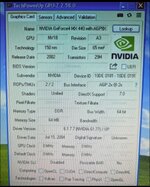
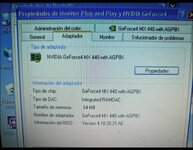
The seller had some photos attached; I don't know if they might be helpful.

Can we buy time with the original ROM?

Thanks for your help.

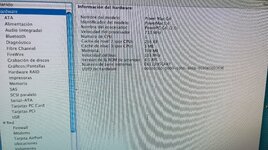
Screenshot_2025-07-19-13-42-13-176_com.wallapop.jpg
Screenshot_2025-07-19-13-43-07-392_com.wallapop.jpg
 
Wow, I've never connected via telnet with Open Firmware.
Have you tried between the time I posted the links and your reply? If so, then you could have replied with some useful info.

But I need the patch to boot the computer with the GF4, right?
You need something, since it isn't booting now. A patch I'm thinking about might allow boot. Need to know the Mac firmware version.

I've tried booting the computer with the GF4, and after the "chime," it seems like it won't boot, it won't display, it won't do anything with the Command key (it doesn't seem to enter the boot menu because if I press power it won't turn off), and target mode doesn't work when booting with the F key.
At least it chimes.

It seems like changing the firmware to a Mac firmware is useless. That link I posted mentioned it.
Details about the required mod would be interesting to know.

I found a link that discusses the Pin 3 and Pin 11 requirements for PC AGP 8X cards in AGP 4X ADC Macs.
http://themacelite.wikidot.com/pins-3-and-11

But I have something to consider. I found someone selling the exact same GF4 for PC (It appears to be manufactured by DELL), for €8, and I bought it (it will take a few days to receive it), so when I have it, I can run the necessary tests.

Can we buy time with the original ROM?
We can try some stuff with the first PC card while you wait for the second PC card.

First, should I plug it into the Mac along with a PCI card and check the ID? Then, should I dump the contents of the original ROM?
Yes, and Yes. Do you have a PC, if so, try the nvflash version that I mentioned.
Don't forget to tape pin 3 and 11 to disable AGP 8x for AGP 4X ADC Macs.

The seller had some photos attached; I don't know if they might be helpful.
There's some useful info there.
 
Have you tried between the time I posted the links and your reply? If so, then you could have replied with some useful info.
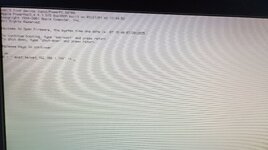
I've tried telnet, but it didn't work. I tried it with an eMac next to me, but I get nothing. I write in the DA but it freezes after entering the command. On the G4 DA, if I use the GF4, I can't even access OpenFirmware. I'm not sure if I understood the instructions correctly; I don't have much experience with OpenFirmware.

IMG_20250720_081647.jpg
You need something, since it isn't booting now. A patch I'm thinking about might allow boot. Need to know the Mac firmware version.
IMG_20250720_080745.jpg
At least it chimes.


Details about the required mod would be interesting to know.

I found a link that discusses the Pin 3 and Pin 11 requirements for PC AGP 8X cards in AGP 4X ADC Macs.
http://themacelite.wikidot.com/pins-3-and-11
Yes, I know I have to cover them, if you don't do it the G4 won't even start.
We can try some stuff with the first PC card while you wait for the second PC card.
I don't have any AGP era PCs, so I flash with the TL866.
Yes, and Yes. Do you have a PC, if so, try the nvflash version that I mentioned.
Don't forget to tape pin 3 and 11 to disable AGP 8x for AGP 4X ADC Macs.
When I receive it I will provide you with all that information.

There's some useful info there.
I saw the ID in the photo, but I'm not sure if it's enough. Does it look like the one you saw in the iMac ROM?
 
@joevt I've already received the other GF4, but it doesn't seem like it's going to be easy.

I've installed it in the DA along with a Radeon PCI card, and the PC ROM still won't boot the Mac. Something in the hardware must be preventing it; it must require some hardware modification.

Then I removed the EEPROM, and to my surprise, it's not an M25P10, but an SST45LF010 with a completely different pinout. The GF4 has a double socket, so I guess moving the next one would work with an M25P10.

But the TL866 software doesn't support the SST45LF010 or its equivalents, LE25FV101T or W45B010, so I can't dump the EEPROM.

I don't think we can get any further; neither my clumsiness with Open Firmware nor the GF4 x8 are working.

Thanks for your help.
 
I've installed it in the DA along with a Radeon PCI card, and the PC ROM still won't boot the Mac
You taped the pins 3 and 11?

An AGP to PCI adapter or bridge would let you connect the card in a normal PCI slot. Then you could get the ROM.
 
You taped the pins 3 and 11?

An AGP to PCI adapter or bridge would let you connect the card in a normal PCI slot. Then you could get the ROM.
Yes, of course, I've covered 3 and 11 like the other one, otherwise it won't even boot. The same thing happens to me as with the flashed one: it turns on, I hear the chime, and nothing else—no image, no boot menu, no target...

I don't have an AGP-PCI adapter.
 
Yes, of course, I've covered 3 and 11 like the other one, otherwise it won't even boot. The same thing happens to me as with the flashed one: it turns on, I hear the chime, and nothing else—no image, no boot menu, no target...
So "won't even boot" means no chime?

Bad flash or PC ROM has chime but no image? Is there disk activity? Does it reach the Finder but you just can't see it? The keyboard caps lock key works?

Boot without the card. Then enable screen sharing. Shutdown. Install card. Reboot. Use another Mac to connect to the G4 with screen sharing.

I don't have an AGP-PCI adapter.

AGP to PCI adapters are usually AGP 1X, keyed for 3.3 V.
Your GeForce4 MX440 64MB AGP x4/x8 has keys for 3.3V and 1.5V?

https://en.wikipedia.org/wiki/Accelerated_Graphics_Port says:
Some cards incorrectly have dual notches, and some motherboards incorrectly have fully open slots, allowing a card to be plugged into a slot that does not support the correct signaling voltage, which may damage card or motherboard. Some incorrectly designed older 3.3 V cards have the 1.5 V key.

Your GeForce4 MX440 64MB AGP x4/x8 might work in a AGP 1X/2X adapter, according to this:
http://www.playtool.com/pages/agpcompat/agp.html

Search "AGP2PCI" or "AGP2PCIe" on ebay.ca for examples.

Also this one:
https://www.cpu-world.com/forum/viewtopic.php?t=31173

Maybe some others.
 
@joevt I've mentioned this before. Without covering 3 and 11, even any G4 won't boot. If I cover them, I only hear the chime, but it doesn't go beyond that. No option key, no target mode, no finder, or anything, both with the flashed card and with the PC ROM. Neither one lets me go beyond the chime.

As mentioned in the link I posted a few posts earlier, this card must need some hardware modification to be able to use it on a Mac.

Based on my photo in the first post, I'd say it has the keys for all AGP cards; it's UNIVERSAL. I've looked for adapters, and including shipping, they cost around €100. I don't think it's worth spending that money for an €8 card. I could almost buy a GeForce 4 TI PC and flash it.
 
I only have the last two ROMs I tested, which I've attached. I didn't make any modifications, I don't know how to do them, I just used some NVtool to modify the memory MHz, as the name suggests.
nv_hack_PC_4mx_1088_agppci_64k.rom is the modified (not OEM) version from the "Modified NVIDIA PPC ROMs" section of the MacElite downloads). It appears to be uncorrupted (unlike nv_oem_4MX_1088_agp_64k.rom in the "Original NVIDIA PPC ROMs" section of MacElite downloads that I mentioned in #4 ). It has some changed bytes in the NVDA,BMP section so you can't create an unmodified OEM version from this rom.

Your modified nv_oem_4mx_2032_agp_64k_270_200.rom is the same as the nv_oem_4MX_2032_agp_64k.rom that I mentioned in #4 but it has some bytes changed in the NVDA,BMP section.

As mentioned in the link I posted a few posts earlier, this card must need some hardware modification to be able to use it on a Mac.
Maybe the Mac is confused about the startup screen? Boot with no AGP card - using a Mac PCI graphics card. Make some display modifications in the display preferences panel. Reboot and check Open Firmware to make sure the screen dev alias points to the PCI card. Then shutdown and install the PC graphics card. Then restart.
 
I've tried it on a couple of Macs, this one DA and a QS. The same thing happens on both. It works with a Radeon 9000 AGP graphics card; if I add a Radeon 9200 or 7500 PCI card, it also works, and I can boot from the PCI card. They work with just a PCI card. When this GF4 x8 card is connected, only the chime appears, nothing else. It prevents booting.
 
Back
Top