


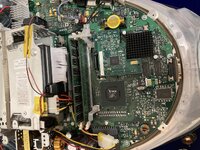
I opened my iMac DV and decided to tackle everything at once. Barely 3-hours later, I had completed everything needed to make my iMac a perfect little '90s time capsule with little worries (flyback clock is ticking, of course).
1. Speakers.
Lots of people have found the "one inch" speaker replacement foam and kept the rest of the assembly but I didn't want such tedious work so I went with the second most popular solution with a twist!
There are many places you can find the knock-off JBL 1" 4ohm 3W replacement speakers which supposedly fit right into the G3's sound chambers but I wanted to keep as much of the original characteristics as possible. This in mind, I tried to transplant as much of the old speaker assembly onto the new knock-off speakers.
Examining the speakers, I could see that the original and replacements had a plastic frame to support the cone and a metal back to support the magnetic core. I pried the speakers of both types apart and realized that the replacement cone/foam plastic assembly and its attached wire coil fit perfectly into the original core!
I used contact cement to adhere the replacement cone-and-coil onto the original core and metal backing and I have to say that despite many people claiming that the knock-offs are tinny and harsh, this grafting operation yielded what I would consider >80% of the original sound quality of these iMacs. The only point deducted is for the fact that they have a tendency to clip at higher levels than the originals can handle. I simply adjust the volume to 75% or less and no clipping is encountered.

2. Slot Load.
This was so simple I was actually surprised it could be fixed without sweat. It's well known that the rubber square belt wears out and becomes stiff. I tested mine to verify and I can say that it is hardened to the point of holding its shape rather than being pliable and has no friction to turn the rollers. A new belt was verified to grip the roller very well.
The second and more apparent issue is the rubber roller which contacts the disc to inject and eject. The rubber rollers are sleeves which ride over a polished metal bar. The rubber doesn't have any friction against the bar so even if it spins it can't grip the disc.
This is solved with a very common trick for bicycle grips: hairspray. I just used some firm hold hair spray. One drop in each sleeve, then sliding the sleeves back onto the metal bar. Within half an hour the rubber was very firmly attached to the bar and no sign of spinning was detected.
After the three-hour surgery encompassing all of the points listed, I slid a disk in and it performed flawlessly!
3. Battery.
Um. Well. I didn't want to go the lithium route so I just took a button cell that had tabs welded on and bent the arms over the tabs of the battery slot. the voltage is almost precisely the same as the lithium and it doesn't really matter how long it lasts since they're so cheap and plentiful compared to the half-AA lithium stuff.
4. FANS!
I've seen some pretty frightening atrocities regarding fans in these machines. I couldn't understand how somebody could go so overkill. The machine was designed to use passive convection cooling so what was the point of adding 3,000CFM of forced exhaust and giant unsightly hack jobs with zip ties and such? Blehk!
I wanted a solution that: A. Merely stirred the otherwise stagnant air around the bottom (CPU) side of the board and assisted it in moving to the back (upmost slanted corner of the board) so it wouldn't stick around on the bottom side B. Was not loud enough to disrupt the nature of the machine as designed C. Was NOT visible and D. Was entirely reversible
I found some 3010 micro radial fans. They're 5V, 30mmx10mm and almost entirely quiet while offering as much airflow as a huff or sigh lol.
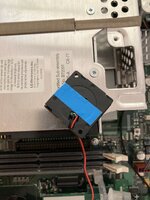
I used a Y-splitter for the hard-drive power cable and tapped into its 5V pin and ground pin for the fans, then mounted the fans beside the hard drive with double sided foam tape. If I were to do anything different, I would not have used the foam tape on the small edge of the fan (topmost part in the pic, positioned directly beside the hard drive) as it seems to be the only point where vibration (noise) is transmitted to the outside of the Mac and thus barely audible over the hard drive. Barely.
I peeled the label off of the fan so that the foam tape would be adhered directly to the plastic but I made sure that it covers the hole of the axle bearing.
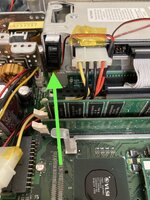
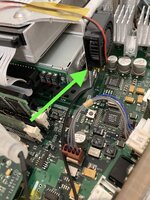
The only drawback I've found so far is that power remains even when the iMac is asleep. I see two unused rows of Vias on the Logic board and I think one of them is a 5V which is switched off when asleep. If I cared to tap into the board, this might be the long-term solution. The vias are between the RAM slots and drives bay.
Upon starting I can now instantly detect a faint hush of air from the top vent holes of the iMac which proves to me that the air is being forced through from the bottom even before thermal convection begins.
It's jank. It works. That's the definition of heuristic.
1. Speakers.
Lots of people have found the "one inch" speaker replacement foam and kept the rest of the assembly but I didn't want such tedious work so I went with the second most popular solution with a twist!
There are many places you can find the knock-off JBL 1" 4ohm 3W replacement speakers which supposedly fit right into the G3's sound chambers but I wanted to keep as much of the original characteristics as possible. This in mind, I tried to transplant as much of the old speaker assembly onto the new knock-off speakers.
Examining the speakers, I could see that the original and replacements had a plastic frame to support the cone and a metal back to support the magnetic core. I pried the speakers of both types apart and realized that the replacement cone/foam plastic assembly and its attached wire coil fit perfectly into the original core!
I used contact cement to adhere the replacement cone-and-coil onto the original core and metal backing and I have to say that despite many people claiming that the knock-offs are tinny and harsh, this grafting operation yielded what I would consider >80% of the original sound quality of these iMacs. The only point deducted is for the fact that they have a tendency to clip at higher levels than the originals can handle. I simply adjust the volume to 75% or less and no clipping is encountered.
2. Slot Load.
This was so simple I was actually surprised it could be fixed without sweat. It's well known that the rubber square belt wears out and becomes stiff. I tested mine to verify and I can say that it is hardened to the point of holding its shape rather than being pliable and has no friction to turn the rollers. A new belt was verified to grip the roller very well.
The second and more apparent issue is the rubber roller which contacts the disc to inject and eject. The rubber rollers are sleeves which ride over a polished metal bar. The rubber doesn't have any friction against the bar so even if it spins it can't grip the disc.
This is solved with a very common trick for bicycle grips: hairspray. I just used some firm hold hair spray. One drop in each sleeve, then sliding the sleeves back onto the metal bar. Within half an hour the rubber was very firmly attached to the bar and no sign of spinning was detected.
After the three-hour surgery encompassing all of the points listed, I slid a disk in and it performed flawlessly!
3. Battery.
Um. Well. I didn't want to go the lithium route so I just took a button cell that had tabs welded on and bent the arms over the tabs of the battery slot. the voltage is almost precisely the same as the lithium and it doesn't really matter how long it lasts since they're so cheap and plentiful compared to the half-AA lithium stuff.
4. FANS!
I've seen some pretty frightening atrocities regarding fans in these machines. I couldn't understand how somebody could go so overkill. The machine was designed to use passive convection cooling so what was the point of adding 3,000CFM of forced exhaust and giant unsightly hack jobs with zip ties and such? Blehk!
I wanted a solution that: A. Merely stirred the otherwise stagnant air around the bottom (CPU) side of the board and assisted it in moving to the back (upmost slanted corner of the board) so it wouldn't stick around on the bottom side B. Was not loud enough to disrupt the nature of the machine as designed C. Was NOT visible and D. Was entirely reversible
I found some 3010 micro radial fans. They're 5V, 30mmx10mm and almost entirely quiet while offering as much airflow as a huff or sigh lol.
I used a Y-splitter for the hard-drive power cable and tapped into its 5V pin and ground pin for the fans, then mounted the fans beside the hard drive with double sided foam tape. If I were to do anything different, I would not have used the foam tape on the small edge of the fan (topmost part in the pic, positioned directly beside the hard drive) as it seems to be the only point where vibration (noise) is transmitted to the outside of the Mac and thus barely audible over the hard drive. Barely.
I peeled the label off of the fan so that the foam tape would be adhered directly to the plastic but I made sure that it covers the hole of the axle bearing.
The only drawback I've found so far is that power remains even when the iMac is asleep. I see two unused rows of Vias on the Logic board and I think one of them is a 5V which is switched off when asleep. If I cared to tap into the board, this might be the long-term solution. The vias are between the RAM slots and drives bay.
Upon starting I can now instantly detect a faint hush of air from the top vent holes of the iMac which proves to me that the air is being forced through from the bottom even before thermal convection begins.
It's jank. It works. That's the definition of heuristic.
Last edited:


