• Hello MLAers! We've re-enabled auto-approval for accounts. If you are still waiting on account approval, please check this thread for more information.

Floppy disks mount duplicated on Mac 512K

mitchW

6502
I am having an issue with my recently restored 512K. That 512K was upgraded (RAM, SCSI, Mac Plus ROMs, etc.) - so it is essentially a Mac Plus., but I am not sure if upgrades are the culprit.

Original 800K drive was beyond repair (bent heads), so I managed to find and repair a 1.44MB drive (MFD-71W), that should work in this Mac.
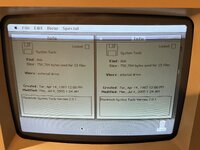
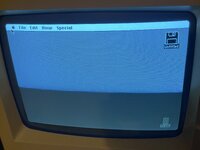
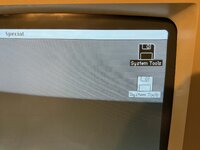
That drive works, ejects disks, formats disks, etc. But no matter what System software I boot (I used 1.1 and 5.5), I get duplicate mounted disks on desktop. So I get two System Software disks mounted on desktop, despite I only inserted one floppy. If I eject one disk, it will eject it, but the other will stay mounted.

When I checked the info, it sees one disk as it is in internal drive, and other in external. Of course I only have internal floppy drive hooked up!
Even if I boot to MacPaint 400K disk, it does the same thing, or if I boot off the HD20SC, it is also the same.
Did anyone have a similar problem? I would like to get it solved.
 

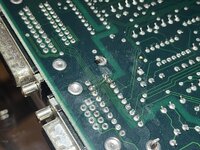
Attachments

  • IMG_9711.jpeg
    IMG_9711.jpeg
    3 MB · Views: 6
  • IMG_9710.jpeg
    IMG_9710.jpeg
    2.8 MB · Views: 6
If I remember correctly there are two enable signals, one for internal and one for external, both from the IWM. Curious if they might be shorted causing the internal to respond as both external and internal. Or maybe something’s wrong along these lines with the IWM. I think there is a shared filter pack between the IWM and the two floppy ports (internal ribbon connector and external port) that could perhaps be shorted as well.

BTW, you said the 1.44 floppy should work.. it certainly won’t work as a 1.44mb floppy since the 512k and Plus (and most SEs) had the IWM instead of the SWIM chip.
 
Yes, i will say the same thing, never seen that before but probabaly an issue with the board, cable or component on the LB.

you cannot complain, you have a second drive for free.
 
Yes, 1.4MB floppy does work in Mac Plus, but only as 800K drive. The original cable has a red stripe, but previous owner cut the 2 lines (pin 9 and 20), so essentially this converted it into yellow strip cable. But if I am not mistaken, this modification was only required for some early 800K drives. Newer drives (also my 1.4MB unit) apparently work with either cables. I can try reversing the modification to see if it will work any better.

Next, as I have a spare Mac 512K logic board (stock, only has newer ROMs from 1985-ish), I hooked that one up to the same floppy drive with the same floppy cable and it worked flawlessly, just one floppy disk was mounted on desktop. So this will confirm my suspicion that both cable and the drive are okay.

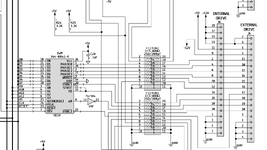
As far as I checked the logic board schematics, it could be an issue with a filter, some select logic / buffer or a bad IWM. Or could simply be an issue with ROM revision and not using the right floppy cable.
 
I'd probably think a filter issue, there can be ghosting issues if they are not working properly. Best thing to do is to test the filters (basically a resistor pack) against states values in the Pina guides:

Thanks, but I don't see any values of the resistor packs in this PDF. It mostly covers analog board repairs / upgrades.

I did find schematics for 512K board and I am including a floppy controller part here. Any suggestions what I should measure first?
 

Attachments

  • Screenshot 2025-12-29 at 20.03.11.png
    Screenshot 2025-12-29 at 20.03.11.png
    298 KB · Views: 1
Back
Top