• Hello MLAers! We've re-enabled auto-approval for accounts. If you are still waiting on account approval, please check this thread for more information.

Error *APPLE*0000001000F*1* on Mac IIcx

Does anyone know how to interpret the error *APPLE*0000001000F*1*?
The IIcx provides it via serial.
The machine is stuck at gray screen with no mouse pointer.
With the original roms I have the good chime and immediately after the bad chime.
with the rominator I only have the good chime but it always stays stuck at the same point
I tried changing the adb chip but nothing changed.
Already tried changing CPU and different memory modules.
 
This seems like it could be an interesting puzzle to solve. The leaked SuperMario ROM sources give a lot of info about these codes. Can you double-check that you have provided all of the characters? I think between the *APPLE* and the *1* there should be 12 hex digits, and you only have 11.


My understanding is the last 4 characters are the error code, and the first 8 characters are further info about that error. If indeed the last 4 characters are 000F, we might have a bit of a problem because that particular code isn't defined in any of the info I'm aware of. I wonder if back in the days of the IIcx and SE/30's tests it actually had a meaning?
 
Hi. Yes, sorry. The code is missing a zero. *APPLE*00000001000F*1*
According to the documentation the error is 000F. As you say, i could not find it anywhere.
I am not able to understand at what point the iicx stops. The first step is scc and is obviously ok. Than Via chip and startup chime. So the Via is ok and audio too.
I see grey screen and no sad mac. Therefore the roms and rams should be healthy. But with original rom i had a bad chime (after good chime) and with rominator no bad chime. Rominator doesn't test RAM and so this could be the problem because the original ROMs do. But if there was an error on the rams I should have a black screen or the sad mac with the error code and via serial I should have a specific code for the rams.
Furthermore, if I remove one of the 4 modules I only get bad chime and black screen both with the original roms and with the rominator.
If the swim was broken I would get a specific error.
last step before checking the scsi and booting is the adb that I replaced. Immediately after the initialization of the adb the mouse should appear which does not appear. So even if the scsi was broken, I should still see the mouse.
I recapped the board and i checked many times all the traces near the capacitors.
 
If indeed the last 4 characters are 000F, we might have a bit of a problem because that particular code isn't defined in any of the info I'm aware of

Pretty sure $000F was used as the 'wrapper' for pre-SE compatible errors, which remained in use for CPU exceptions in early boot. If, for example, on an SE/30, you administer an NMI at the flashing disk screen, you should get a sad mac with $000F / $0000000D, which is "NMI".

Hi. Yes, sorry. The code is missing a zero. *APPLE*00000001000F*1*

Given that the format here (16 bits of error and 32 bits of detail) is the same format as these error codes, I suspect they're the same. In *those* codes, $000F $00000001 would be a bus error in early boot. Not that that's *particularly* helpful - you'll perhaps need to dig around with the interactive bits of the diagnostic mode to work out what's happened here.

I should add: this lines up with what you were saying about getting the grey stippled screen: this is happening after POST and isn't being raised by the self-test- instead, it's being raised by the default CPU exception handler. As you correctly note, if the memory test failed (or anything else the Test Manager was doing at the start of boot) you'd have a black screen, not a halftoned one.
 
Last edited:
Pretty sure $000F was used as the 'wrapper' for pre-SE compatible errors, which remained in use for CPU exceptions in early boot. If, for example, on an SE/30, you administer an NMI at the flashing disk screen, you should get a sad mac with $000F / $0000000D, which is "NMI".

Ahh, that makes sense. I saw that it was defined as "Reserved for Macintosh compatibility" but couldn't understand what they were getting at. That makes total sense and I agree that it's probably a bus error then.
 
From what you told me, the post ends correctly (otherwise I would have a black screen or sad mac). Error code 000F is a exception generated by the CPU. So there should be something broken on the bus or someone sending some bad data. Correct?
via serial I gave the commands to test all 4 megabytes of RAM. It gave me back a 000000000000 which I believe is code for "all ok".
So the data bus (all 32 lines) should be electrically good.

I've seen that the address bus doesn't carry all 32 bits to every device. The rams receive lines from 3 to 25, the roms from 2 to 18, the vias from 9 to 12, SCC 1 and 2, Nuchip from 23 to 31. Given that scc works, that the rams work, and I have a video signal on video card, I can say that the address lines are all electricaly healthy.
Does this seem like a correct hypothesis to you?
So if the post is passed I would have to look for the culprit among the components that are activated after the post.
the scsi chip is the last device to be activated. Could it be his fault?
 
If you're getting 0xF then you should be past SCSI initialization. Check the value stored at 0xC70 for the place where the exception occurred.
 
tell me if I did it right

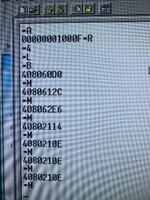
*L00000C70
*B0004
*M

The stored value is
408060D0
The others are the contents of subsequent memory locations
 

Attachments

  • img.jpeg
    img.jpeg
    458.2 KB · Views: 23
That should be correct, but it seems like the right information isn't there.

Typically what you should see is
Program counter where the exception occurred - XXXXXXXX
Processor status register - XXXX
Additional info depending on the exception

Instead you are getting:
408060D0 - SCC Interrupt Handler
4080612C - Level 5 Interrupt Handler
408062E6 - Level 6 Interrupt Handler
40802114 - NMI Interrupt Handler
4080210E - Undefined Interrupt

Based on the values it seems you are somehow reading 0x70 rather than 0xC70. Double check you've got the right value input for the starting address, otherwise something else is going wrong with memory addressing.
 
you're great :)

You are right. I probably wrote lowercase c instead of C and it was interpreted as zero
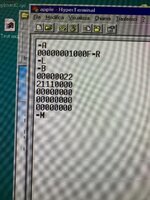
Here are the correct data. I read 16 consecutive bytes
 

Attachments

  • WhatsApp Image 2025-03-05 at 09.01.24.jpeg
    WhatsApp Image 2025-03-05 at 09.01.24.jpeg
    441.3 KB · Views: 17
Well I'm not too sure, if the program counter was truly at 0x22 then there's a good chance that generated the bus error, because that's in between two exception vectors (0x22 and 0x24) and since it likely interpreted that as move.l D6,-(A0) then if the contents of A0-4 was a bad location in memory then that would generate the bus error.

The better question is how the program counter ended up at 0x22. I'm not sure how much of the stack survived, if you read memory location 0xC6C it should hopefully contain the stack pointer at the time of the exception, and then if you can dump the memory from that location it's possible it will show what lead up to that bad address.
 
thanks again for the support.
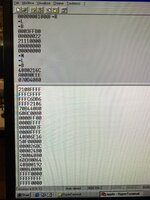
The first group of bytes are contained starting from location 0xC6C
The following 16 bytes from location 0003FFB0; is this the correct address?
 

Attachments

  • WhatsApp Image 2025-03-05 at 20.21.02.jpeg
    WhatsApp Image 2025-03-05 at 20.21.02.jpeg
    250.8 KB · Views: 9
That looks correct. It looks like it started initializing ADB but never finished, and then during that it looks to be trying to service an interrupt on VIA1 (possibly from the ADB or RTC). It's still hard to tell what exactly is going wrong though, I may have to look at it some more.
 
Dissecting the stack from the start:

Code:
40800192
The return address from InitADB, meaning InitADB was started but never completed.

Code:
2000        Status Register
40806DD8    Program Counter
0064        Exception vector offset (Level 1 interrupt)
The stack frame for a level 1 interrupt generated by the VIA.

The interrupt was triggered while this infinite loop was running waiting for ADB initialization to finish:
Code:
40806DD4:   andi    #$F8FF,SR
        .Loop:
40806DD8:   btst.b  #ADBInit,(ADBFlag,A3)
40806DDE:   bne.b   .Loop

The VIA interrupt handler then saves registers to the stack to restore later:
Code:
0000FF00 = D0
0000FFFF = D1
0000007F = D2
0000FFFF = D3
40806E16 = A0 (An ADB routine that was installed in another piece of code)
50F00000 = A1 (VIA address)
000026DC = A2
000024B0 = A3

The current MMU 24/32-bit mode value is saved on the stack:
Code:
0080

Next it runs the proper interrupt handler based on the interrupt register from the VIA:
Code:
408060AC

Right after that is the stack frame for the bus error. It was likely modified a bit by the error handler but this should be the reconstruction:
Code:
2111        Status Register
00000022    Program Counter
A008        Short bus cycle, bus error
0EEE        Internal Register
070D        Special Status Word (Longword write data fault)
40802108    Next two bytes of the instruction pipe
FFFFFFFC    Fault Address (Location to write to)
FFFF        Internal Register
FFFC        Internal Register
6DB6FFFF    Output Data (Data to write)
2106        Internal Register
70B4        Internal Register
This tells us there was bus error on the boundary of 0x22, supposedly attempting to write the longword 0x6DB6FFFF to address 0xFFFFFFFC.

Here is what the exception vectors likely look like in low memory at the moment:
Code:
08: 408020FA
0C: 408020FC
10: 408020FE
14: 40802100
18: 40802102
1C: 40802104
20: 40802106
24: 40802108

The last three vectors can technically be interpreted as code:
Code:
1C:
    negx.l  D0
    move.l  D4,-(A0)
20:
    negx.l  D0
    move.l  D6,-(A0)
24:
    negx.l  D0
    move.l  A0,-(A0)

If A0 contained 0x00000000 and it tried to execute move.l D6,-(A0), A0 would be decremented and underflow to 0xFFFFFFFC. I believe that address is one of the autovector, which should only be generated during an interrupt along with /AVEC. I assume either the processor does not allow this write or the GLUE logic never acknowledges it without /AVEC being asserted.

The thing I still haven't figured out is how it's ending up executing code there in the first place. I'm guessing it's running the ADB interrupt handler, but that's not a short routine so I'm not sure where it is in there.

If you can I would suggest checking areas around the VIA and ADB chips, check the traces between the two, etc.

 
Back
Top