• Hello MLAers! We've re-enabled auto-approval for accounts. If you are still waiting on account approval, please check this thread for more information.

Easy to follow guide on tracing UE8 lines on SE30?

Spacerog

6502
Is there an easy to follow guide on toning out the traces of UE8 on the SE30 board? I have the schematic but I don't really know what I am looking at. Like why are the pin numbers out of order? Are those even pin numbers?

I found a nice diagram of the sound chips with lines drawn over the photo so you could tell what connected to what, made it real simple to tone everything out. Does anything like that exist for UE8 and UC6+7?
 
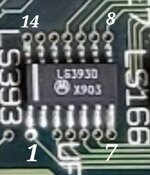
I wasn't sure if you meant the schematics or the chip, so I figured I'd cover both. All chips have a notch, line, or indentation to represent the top of the chip. In a dip configuration that will mean the first one to the left will be pin 1 (see pic). You count around the chip to find the corresponding pin number you require.
There is a newer se/30 schematic out there that has a matrix at the end of the schematics.its a lot easier to read and follow than the older ones. Plus the matrix gives you an easy guide that will show all the connections to address/data bus.
 

Attachments

  • Screenshot_20250424_110541_Chrome.jpg
    Screenshot_20250424_110541_Chrome.jpg
    56.1 KB · Views: 8
I think I figured it out. The pin numbers on the schematic being out of order really threw me. I've toned out about half the board now and so far everything is testing good. I see the matrix in the schematic I have but I can't make any sense of that.
 
Back
Top