I say that mainly because if you'd had bad RAM, you never would have been able to see the ? disk icon. That involves running some code, which involves (at a minimum) pushing and popping function arguments and return addresses from the stack, which is in RAM. So even if the RAM test somehow missed a RAM problem, the computer would have crashed the instant it tried to do anything with RAM.
As for why replacing some RAM affected the startup sound, I'm not sure. If there's a marginal solder connection somewhere, just about anything can be enough to flip a 1 to a 0 or vice-versa. I wouldn't be surprised if the distorted startup sound returns again, just as the dot pattern changed slightly after you washed the board. Marginal/flaky connections will cause erratic behavior.
I'm still unclear on your comment about connections being gone, and just left stumps. Are you talking about the original state of the board vs its state after the 512k RAM upgrade was performed? Or do you mean that something on those connections has changed/broken since you've been working on it?
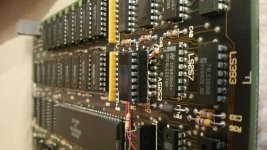
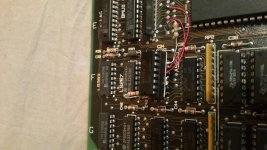
That thing with the socket and the red wires and resistors poking out is clearly a homemade job, and would be your #1 suspect even without the other evidence pointing to a possible '253 problem. I would carefully inspect each pad on that socket, and each of those resistors and red wires. For any pad that looks slightly cruddy or brown or tarnished or cracked, that's a suspect for a flaky connection. Use a soldering iron and a little flux to remelt the solder, add some new solder, and make it look nice and shiny.
If you're still wanting a replacement floppy drive, you could use the Floppy Emu, which is a SD card solid-state disk drive replacement that I designed. For that computer, you could use the Emu Model A which is $79. I'm local to you, so you could even do an in-person pickup if you were desperate to get something this weekend. But I'd suggest following the disk drive disassembly and cleaning procedure on the wiki, since if there is a problem with your current floppy drive that'll probably take care of it.

 Hello Guest! We're hosting a challenge to welcome vintage Intel macs to the MLA during the month of July! See this thread for more information.