• Hello MLAers! We've re-enabled auto-approval for accounts. If you are still waiting on account approval, please check this thread for more information.

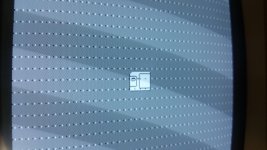
Dots on Macintosh 128k screen

Sorry for no replies from me, I've been a bit busy. But just to clarify, I have NO mouse or keyboard, or any peripherals of any sort. Just the machine and a power cord. I have some System 1.1 floppies on the way, as well as 4 new ram chips identical to the ones on the board. I recently got the floppy drive unstuck (4 hour job, no joke... it was glued shut!) and I can verify that it at least tries to read a disk (I have old IBM 800k disks I tried), and will eject it and display the blinking "X" over the floppy drive symbol. So I would believe it is probably only one chip, judging that it still seems to operate fine, and just the VRAM is bad. If it helps, I have an LC II with almost the exact same issue and it boots system 7.5.3 no issues.

 
You do know that the 128k can't read 800K disks of any kind, right? You may have just been using the 800k disks to check the disk mechanism, but for booting (and reading) only Mac formatted 400k disks will work.

 
Yes, I was just testing the drive to make sure it told me that the wrong disk was in the drive, and it spit it back out. which it does! :)

 
I have to believe your RAM is fine if the computer works that far. But I can't think of what might cause that particular pattern of dots in the video image... might be a weak short between one of the address bus lines, and something in the video shifter? Maybe try giving the logic board a nice cleaning, and see if it helps.

 
Update- I have cleaned the board with distilled water and soap, rinsed it thoroughly and it's now drying. When I was cleaning, I noticed that 8530 SCC didn't seem to have the same factory solder in the connections, and they also looked a bit orange around the connection. I looked up this chip, and just like Gorgonops referenced in how one byte was being shifted, this is the chip in charge of that. I found that this chip has been replaced with a different part, and also has a socket, so I removed it along with all the other chips on the board that I could. Once it dries and I can test it again, I'll give another update, and hopefully this time, there will be no dots, then I get to move on to the next step of this restoration (getting a mouse!)

 
Update- Made the situation worse, it would seem. There are now another set of dots, and the startup sound is the same.

20160617_145919.jpg

EDIT: The startup sound is a bit less distorted and slower and I can almost make out the chime now. Perhaps that SCC chip is the real problem?

 
Last edited by a moderator:
Hmm, this looks like the same set of dots as your earlier photo to me. What do you see that's changed?

I don't think the SCC is related to this. I spent some time earlier today starting at a schematic trying to guess what might be the cause, and I think it's probably one of the '166 shifter chips at locations 13F and 14F, or the BMU0 PAL at location 2E. It might also be one of the '253 mux chips that select between the CPU address bus and the video generator address. That's going by the schematic here: http://www.digibarn.com/collections/diagrams/mac-512klogicboard/mac-logic-schematic.jpg

You have a glitch that repeats every 8 horizontal rows on screen. That's every 512 bytes worth of video data. This suggests to me that you should look at the video address line whose value repeats every 512 bytes. I got sort of bogged down trying to determine exactly which one that would be, with the all the row, column address stuff. 

The distorted-sounding chime is also a clue. Sound generation has a lot in common with video generation on this board, and both of them gain access to RAM during short periods when the CPU isn't using it, and they supply different addresses to RAM that are independent of the CPU address bus. If I recall correctly, the sound hardware actually uses the video generator address somehow. Since the sound is also glitchy, that suggests your problem likely isn't with the video shifter chips (the '166 chips), but with the address generator or address muxing chips.

OK, none of that really helps you in any practical way, sorry. If you get an ATX extension cable and hack off the extra pins, then you can use it to position the logic board outside the case while the computer is on and running. Then you can probe the live board, like just touch the legs of the suspect components with your finger and watch to see if the video display changes.  

 
Unfortunately, I'm not very skilled in this kinda stuff... but I'll give it a go and see what I find. I've already ordered another 8530 for dirt cheap, so just in case it is, it will solve it. If you look closely at the two pictures, the black and white dots are now spaced farther apart after the cleaning.

Also... you said 253?

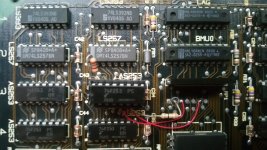
20160617_171048.jpg

That's the same one this odd chip is placed on top of...

 
Last edited by a moderator:
Ah, I see what you mean about the dots. It's still a pattern that repeats every 8 rows, so I don't think anything fundamental has changed.

There are four '253 chips that determine the source for the address sent to RAM. Most of the time these chips will connect the CPU address bus to the RAM's address inputs, but during the video period they will instead connect the video generator's address counter to the RAM's address inputs. If there's a problem with that, you could have a machine where normal RAM addressing works fine, but addressing for video and sound is buggy. Since you've got a '253 in that photo that's been resocketed and has a bunch of patch wires and resistors, I think that's a likely source for the cause of your trouble. Maybe try carefully cleaning around each of those connections with isopropyl alcohol and a Q-tip. If any of the solder connections look iffy, resolder them with new solder. You could also try replacing that '253, since it's in a socket and easy to swap, but I think the connections are more likely to be the problem than the chip itself.

The idea about touching the chips with your fingers might sound wacky, but I've found it to be helpful for troubleshooting odd glitchy behaviors. You're using your fingertrip and not a chunk of metal, so it won't short anything. And it's 5V with low current on the logic board, so you're not going to hurt yourself. (Don't try this on the analog board!) What it does is slightly alter the capacitance on the pins you're touching, and this can be enough to visibly change the behavior for a pin that has a weak short somewhere, or a nearly-open circuit, or suffering from cross-talk. You just swipe your finger quickly down the pins on each side of each chip, and if you reach a point where your glitchy behavior suddenly changes, then you know to investigate further there. On a well-running system, the finger test shouldn't cause any noticeable changes unless you've got some sensitive analog circuitry.

 
Last edited by a moderator:
Well, just here's the problem. The connectors on the IC socket seem to have been soldered on in different locations as well, but those connections are gone now and just left stumps. I also played around with the chip last night, and I was able to remove it, which caused a horribly distorted startup sound, and a RAM error sad mac.

If I could just find out which leads those old connections go to, perhaps that could be the solution...

 
Last edited by a moderator:
... why did you remove it? Did you at least preserve a record of how it was connected and where all the jumper wires ran to? If we had or could figure out the schematic to the RAM expansion modification it would have helped determine if said modification was the source of the issues; there's a very reasonable chance it had nothing to do with the video issues.

 
... why did you remove it? Did you at least preserve a record of how it was connected and where all the jumper wires ran to? If we had or could figure out the schematic to the RAM expansion modification it would have helped determine if said modification was the source of the issues; there's a very reasonable chance it had nothing to do with the video issues.
Oh no, I didn't remove it, I just took out the IC to see what would happen. It's still in there.

 
Unfortunate update, getting a 0f0064 sad mac... It would appear that a new floppy drive is needed to get this thing any farther. And unfortunately, eBay has no internal ones to offer.

 
  0F0064 Couldn't Read System File into Memory or 64K ROM Mac reading a HFS formatted disk
Again, probably bad RAM. It probably can't load the system file into the RAM properly. You're still getting those dots anyway, right?

The fact that you fixed the distorted chime with new RAM chips is a bid strange. Technically the mac is supposed to check its memory at startup. If it ain't good, it throws a sad mac. Yours didn't at first. That's odd. It "thought" the RAM was ok. But it was not. 

It seems now that it can't use that RAM. Probably because it's still not good. I don't think the drive is to blame. Maybe the floppy itself? Tell us more about it.

Where did you get that disk? Some ebay sellers actually use 1.44meg disks, formatted as 400k disks, and that's not good! You should try another disk, or try this disk on another MFS-only machine (128k or 512k). Maybe it is an HFS formatted disk?

 
The disk was from RescueMyClassicMac, which I'm confident is a good supplier. Also, let it be known that I have next to no resources to test with, just a sorta half working LC II (which was able to read the disk no problem in OS 7.5.3) I will try getting more RAM, but the thing is, I tested the memory in groups of 4's, on each socket on the board. It was only till I got to sockets 9-12 on the bottom row did something change. At this point I might as well just get replacement chips for the whole board, it's just very confusing to me... this being my first vintage Mac/PC restoration process :)

 
Cool, progress! But because your dots on the screen are still there, I don't think replacing those RAM chips really changed anything, unfortunately. A computer with bad RAM really doesn't work at all. It won't show a flashing ? disk icon, and certainly won't try to boot from a floppy. So I'd strongly suspect your original RAM was fine and didn't need to be replaced, and the problem lies with some of the other parts I mentioned before.

As for your floppy drive, I'd give 95% odds it's also fine. The computer got pretty far into the boot process, so it's clearly reading successfully from the floppy. It's possible there are an unusually large number of read errors that eventually cause some kind of failure, and cleaning the drive might help. I've seen both the flashing "Welcome to Macintosh" and the 0F0064 sad mac occasionally on machines that had problems. Often if I simply try it again, it would work. 0F0064 also happens if you try to boot a Mac 128K or 512K from a System 6 startup disk (or anything that's not an MFS disk). 

The connectors on the IC socket seem to have been soldered on in different locations as well, but those connections are gone now and just left stumps. ...

If I could just find out which leads those old connections go to, perhaps that could be the solution...
Could you explain this a little bit more? If there were some connections on that modified chip that are no longer present, that's clearly going to be a problem. :)

 
Back
Top