• Hello MLAers! We've re-enabled auto-approval for accounts. If you are still waiting on account approval, please check this thread for more information.

Dots on Macintosh 128k screen

Hello, I've looked all over to find this issue and figured I'd try to solve it out here. I recently got this Mac and I've replaced the analog board after finding out the one it had in it was bad, and booted it up to find this. I have no mouse or keyboard, only the blinking floppy drive. In addition to the dots on the screen, it also has a weird boot chime. Almost as if it was pitch shifted down a few octaves and distorted. Do I need a new logic board? I've tried reseating the RAM and ROM to no avail.20160614_231405.jpg
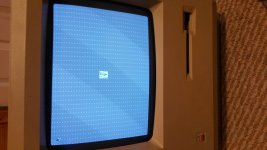
 
Wait, you re-seated the RAM, on a 128k Mac? That shouldn't be possible. The RAM is non-expandable and soldered directly to the LoBo.

If you could actually re-seat the ram, that speaks to it being repaired previous and someone put in sockets for the RAM.

This kind of distortion, if I'm not mistaken, is classic for corruption of the video ram space, which is shared with main memory, so you probably have RAM rot, which is unfortunately common in 128k's because they use Apple RAM, and in this case, it was made rather poorly and has not withstood the test of time. RAM from that era in general isn't so great, they were still getting the bugs worked out on what we consider standard RAM semiconductor designs as we know them now.

Replace the RAM and video issue should clear up.

 
Last edited by a moderator:
Can you take a pic of your logic board and post it here?

If someone put in sockets then you'll have no trouble replacing the RAM on your machine. Uniserver sells RAM kits for the 128k. 

 
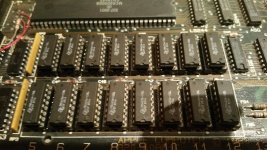
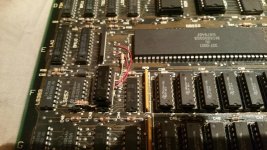
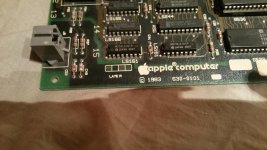
Thanks for the quick replies, everyone. I would really like to get this machine up and running again. Here are some pictures of the logic board. As you can see, the RAM is seated, but not soldered on. There's also a strange chip on top of another, which I'm also not sure of.

20160615_044013.jpg

20160615_044017.jpg

20160615_044024.jpg

 
Looks like your 128k Mac had a custom RAM upgrade some time ago. A lot of custom upgrades added a chip right next to the processor (just wires in your case).

Can you boot it up at all with a floppy? If so check "about the finder", it should say 512k or more. Don't use the very early floppy disks (i.e. system 1.1g), otherwise it won't tell you how much memory you have; use System 2.0 (finder 4.1) or System 3.2 (finder 5.3).

Now it's entirely up to you. You can either restore it to its original spec by removing all the wires and buy new 8kb RAM for it (16*8kb= 128kb of RAM) or replace the socketed RAM chips with new 32kb RAM chips (16*32kb=512kb of RAM). Second solution is easier.

512kb or more is much more useful. Some programs like Dark Castle, Shufflepuck or MacMan can't run on 128k Mac but can (not sure about shufflepuck) on a 512k.

If you're a stubborn collector who likes to have everything original (like me  ;D go original.

 
If you want to replace those TMS4256 15NL, I found someone on ebay who sells them.

I think only one chip is bad. You could swap one at a time and reboot. Only 16 combinations!

 
 Don't know if will work, but you can try Piggybacking a good chip on top to locate the faulty one.

Worked for me on an Apple IIe.

 
I would probably want to stay original. to do that, would you just take off that chip and put in the 8kb chips? If so, which chips are best for that? What's the size of the chips inside of it currently? Also on a side note, I have no way of testing anything as the floppy drive still doesn't work, and I have no mouse or keyboard.

 
Yep, someone already replaced all the LoBo RAM at least once, as those are not the original RAM chips. I doubt that is the problem then. Its most likely the "custom" upgrade failing that is causing the problem. Get rid of that and see how things go.

 
Last edited by a moderator:
I would probably want to stay original. to do that, would you just take off that chip and put in the 8kb chips? If so, which chips are best for that? What's the size of the chips inside of it currently? Also on a side note, I have no way of testing anything as the floppy drive still doesn't work, and I have no mouse or keyboard.
No, just yanking the chip and wires off and plugging 4164s in in place of the 41256s isn't going to restore it to a 128k configuration. In these homegrown conversions there are several pin/trace cuts that are made to the motherboard to change the memory map appropriately and convert a line that's "NC" on 4164s into an address line. Unless you restored everything back completely to stock it's not going to magically "know" it's supposed to set itself up for 128k again.

Also, just to be pedantic: the chips for a 128k are not "8kb". DRAM chips are arranged as a grid of X many addresses by Y many bits. The original Mac has 16 sockets, each of which has one data line, so in a 128k the array consists of 16 64k by 1 bit DRAMs. Traditionally a lowercase 'b' means "bits" so these are 64kbit chips, not 8kb. I suppose you could call them 8KByte chips but a circuit that used one of them to provide an 8k x 8bit memory would need to fill an eight bit wide word buffer for every RAM access, which would require eight separate R/W cycles to actually transfer the data to the chip. (Or, roughly speaking, to provide 8K of RAM to a 1Mhz CPU without delays the RAM subsystem would have to run at 8Mhz.)

I seriously would recommend just replacing the bad 41256 (that's probably what it is) and leaving it a 512k. It's a far more useful system that way and I doubt that undoing the damage will restore any "collector's value" to the system. (A real collector's item has to have the original solder *and* the original Apple-logo Micron RAM in it.)

 
Well that's kind of a bummer, I was hoping to get it back to 128k. But I guess that's not gonna happen with my limited knowledge of all this equipment, so I'll just buy some new RAM ICs and hope for the best. Does this damage the price a lot if the original RAM isn't in the unit? I was hoping on selling this thing since I'm strapped for cash at the moment.

 
I've been thinking about this some more, and I'm not sure I'm 100% convinced that the RAM is the problem. It's getting to the floppy icon, while I'd think if the RAM was so bad that it was dropping a bit every two bytes (one possible explanation for the screen display) it would have failed the memory test hard.

So it gets to this point and is *blinking* the floppy disk icon (not just frozen on it), but you get no mouse movement or disk activity? I kind of wonder if there could be something going on with the DMA hardware that fetches the video/sound data (they use the same mechanism) and/or an issue with the VIA. (Which controls the keyboard, mouse, and real-time clock interrupt, among other things.) I was googling around to see if I could find a schematic for a DIY 128k->512k RAM upgrade on the board you have; so far I have failed, but I did find an article about installing a pre-made board for the upgrade (said board containing that extra chip that in yours is just piggybacked on) that mentions that early boards like that have some known issues with the VIA subsystem that there's a specific fix for. (Involves soldering on a resistor pack to keep some lines from floating; said fix was incorporated into later boards.)

 
Well, no mouse cursor because no mouse is attached, right? Do you still get a mouse cursor on the screen of a 128k if no mouse is attached?

Wouldn't the floating line issue have appeared back when the upgrade was done, or does it take time to appear?

 
Last edited by a moderator:
There's a mouse cursor up in the upper left of the screen, I'm just a little unclear on the language of the OP, IE, does:

I have no mouse or keyboard, only the blinking floppy drive.
Mean "I have no mouse or keyboard attached" or does it mean "I wiggle the mouse and bang on the keyboard and nothing happens"?

The resistor fix to the VIAs was apparently to fix an intermittent/flakiness problem. I'm curious exactly what the root cause of it was, but my guess would be that Apple either didn't terminate some unused lines (which are then floating and causing an error condition on some reads on the VIA) or they skipped some pullup resistors. In the case of the latter I *could* see an issue getting worse with age as other analog parts on the board age, but... but I was just tossing that out there for laughs as a possible contributing reason for the keyboard and mouse not working.

 
Do you still get a mouse cursor on the screen of a 128k if no mouse is attached?
Yes, you do. The mouse cursor always spawns in the upper left corner of the screen. Unless something is wrong with your Mac, that is.

But rushfan82's 128k does display a mouse cursor.

---

I wasn't entirely sure myself this was RAM related. If one chip had failed, it would have displayed a sad mac! 

Now, I'm not a technician as proved above ;)  but there must be VRAM on that board somewhere, right? 

 
I wasn't entirely sure myself this was RAM related. If one chip had failed, it would have displayed a sad mac! 

Now, I'm not a technician as proved above ;)  but there must be VRAM on that board somewhere, right? 
The original toasters don't have dedicated VRAM. The main DRAM control circuitry runs synchronously with the video generation circuitry and dedicates 50% of the available access time for reads for RAM refresh. (And sound generation, which piggybacks off the same system, which makes the garbled-sounding chime suspicious.) It's basically the same system as used by most 80's home computers. (And modern computers with GMA video cards, for that matter.) At minimum a toaster Mac has to use a little less than 22k for a video buffer (there's an option to use a second page), so, scarily enough, a 128k Mac is *really* a 106k Mac.

I really have to suspect that RAM proper is okay if the CPU is able to run and keep the disk icon blinking on the screen. It looks to me like the bad dots are spaced about 16 pixels apart, but what I find odd is that they're not on every scanline. If they were I'd suspect a bad video shift register, but as it is it's sort of baffling. Much of the circuitry for the video address generation is condensed into a few custom PALs, I would hope that one of them isn't bad.

 
Last edited by a moderator:
Back
Top