• Hello MLAers! We've re-enabled auto-approval for accounts. If you are still waiting on account approval, please check this thread for more information.

CRT discharge for retrobrite?

How would I go about discharging the CRT for doing Retrobrite? Could I just remove both the CRT and analog board without disconnecting anything?

Also, what should I use for a submerged retrobrite-ing?

 
There will be other opinions, but I did three of these last year - you can remove the CRT/Analog board as a unit and not have to disconnect anything - be very careful with the back of the tube and the card that is plugged in there and have a nice workplace to set the unit.

I use regular Walmart peroxide (3%) and a spoonful of Oxiclean and leave it, fully submerged, out in the sun - I use old plastic bottles filled with water and sealed up, to displace the peroxide in places like the inside of the SE bucket and raise the level higher - uses less peroxide that way.  I have also purchased large bottle of higher concentration (cheaper that way) and diluted it down to 3%.

I have experimented with different concentrations and this way gets the job done and is also the most forgiving, so that you don't need to watch it constantly.  If it takes more than one day, I just leave it overnight and put it out the next day.

A couple of tips:

Remove the little apple logo, because those can fade - the writing and decals are more durable.

Have a reference piece to compare so that you know when you are finished. 

 
Last edited by a moderator:
I use regular Walmart peroxide (3%) and a spoonful of Oxiclean and leave it, fully submerged, out in the sun - I use old plastic bottles filled with water and sealed up, to displace the peroxide in places like the inside of the SE bucket and raise the level higher - uses less peroxide that way.  I have also purchased large bottle of higher concentration (cheaper that way) and diluted it down to 3%.
So most of the bucket should be hydrogen peroxide? I don't need to mix any water in, right?

 
That is correct.  You don't need to dilute the off-the-shelf 3% peroxide.

You can add water to raise the level, but that would dilute it and it would take longer to finish the process.

 
I can't seem to edit my other post...

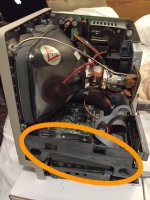
Just want to confirm before I go ahead and discharge my SE/30 crt. I clip one alligator clip to the screwdriver, and one to the metal frame? Attached is a photo with what I'm talking about.

Also, the motherboard will be removed however the Floppy drive will not, along with anything else like the analog board. So really the entire thing will be in that case except the motherboard. Will doing this and clipping the end to the frame harm anything? And I definitely do NOT need this plugged in either... haha

IMG_0429.JPG

 
Last edited by a moderator:
Yes, that is correct. Some people connect the clip to that corner CRT screw with the white ground wire connected to it, because that's what the service manual says to do. But alligator clips slip off of it fairly easily so it is a bit safer to connect to the frame instead, in my opinion. The other components will be fine.

 
Unless you have an early SE, the CRT should be self-discharging unless there are problems with components on the board.

Please take this advice with a disclaimer. This has worked for me, but I offer no guarantees; you are at your own risk if you follow it.

I have never discharged a CRT in a later model SE or Classic. I have removed anode caps many times from dozens of machines in the course of over a decade and have yet to be shocked. I have also taken anode caps off the 12" LC topper monitors without discharge.

To remove them, I use an insulated pair of pliers to grip the cap itself, squeezing in on the metal piece and taking it out. (In the LC monitors, I actually barehand them since the pliers I have don't do the trick). 

I usually give the monitors at least 5 minutes after switch-off.

I once read that discharging a CRT could cause more damage than anything if you aren't careful with it, so I elected from the start not to discharge unless necessary. I have done it before though (on a very early SE where I wasn't sure if the resistor existed; I'll be doing it again on my Plus soon as well).

Again, please take my advice as-is and at your own risk if you choose to follow what I do. There are risks involved, and I accept those risks when I work on these CRTs. I cannot be held responsible for any damages or shocks, as I have properly warned you that this procedure is not guaranteed to be 100% safe.


 
Last edited by a moderator:
Well, since it is self discharging, that is great and all, but it can't hurt to be 100% sure. What do you mean it can harm it?

 
Ok I'm reading in some threads to discharge to the ground lug?? Is this needed or the main metal frame I circled okay? I mean the mobo will be out (but not the ab or Floppy drive)...

 
Ok discharged to the frame since I could not get anything clipped to the lug.

No snap or anything. That means the bleeder is working still.

Now trying to remove the anode cap. How the heck to you remove it? Don't want to break anything either....

 
Last edited by a moderator:
Sure, if you don't mind a chance of getting electrocuted, you don't need to discharge the CRT. I don't trust the bleeder resister to work, simply put. And I don't like getting electrocuted. The process is simple as can be.

Grounding to the frame is perfectly fine. And it stays attached better, so it's safer.

The anode has sort of the reverse of an alligator clip inside, where the spring pushes outward instead of inward. Peel one side of the suction cup away, and you'll be able to see it and align your fingers to pinch it closed. I pinch the insulated wire and the folded-over suction cup.

 
Ok got it.

Now the task of removing the wires... how should I go about doing this? They are really packed in... close to the beck and yoke. Too close.

 
Back
Top