My Color Classic saga continues. An LC 550 logic board brought my CC up to "CC II" status. It's so much faster! And so much RAM! All is well save for two problems:
- No audio on the internal speaker or headphones (sound works fine with original CC logic board)
- It won't boot with the 68882 FPU installed (FPU is a 33 MHz; again, works fine in original CC logic board)
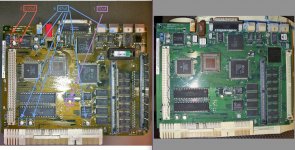
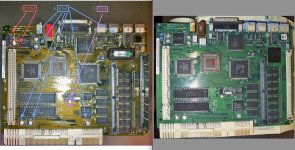
The logic board was in bad shape, and I was expecting hiccups. Note the condition of the SCSI, mic and speaker ports (SCSI works fine):
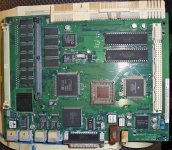
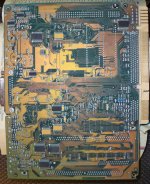
I'm guessing it's moisture-based corrosion? Also here's the bottom... normal? The original CC board is just green.
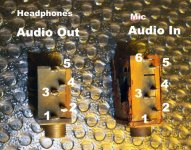
Anyway, I figured that the audio problem could be due to the rust on the mic port and/or the speaker port (and maybe shorting out), so I brought out the soldering iron and removed them:
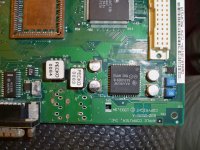
There was plenty of rust covering the surface of the board, and I cleaned it up. Knowing enough to take it apart but not enough to diagnose it, I've reached a dead end. Is there a way to verify the ports? Each has 6 or so pins, but I don't know what should conduct to what pins. Is this board a candidate for washing? Another case of bad caps? I wish I knew the pinouts so that I could just short the proper pins on the board; I'd be perfectly happy with internal audio only. Or do these jacks do more than just connect speakers to the board? I have 'backups' on the original CC board, but I'm leery of destroying a CC board.
I am pretty sure the FPU isn't working because there is visible corrosion beneath the socket (on the top/surface mount side of the board). I tried going at it with 90% rubbing alcohol, but it's hard to get in there. I don't think it helped.
- No audio on the internal speaker or headphones (sound works fine with original CC logic board)
- It won't boot with the 68882 FPU installed (FPU is a 33 MHz; again, works fine in original CC logic board)
The logic board was in bad shape, and I was expecting hiccups. Note the condition of the SCSI, mic and speaker ports (SCSI works fine):
I'm guessing it's moisture-based corrosion? Also here's the bottom... normal? The original CC board is just green.
Anyway, I figured that the audio problem could be due to the rust on the mic port and/or the speaker port (and maybe shorting out), so I brought out the soldering iron and removed them:
There was plenty of rust covering the surface of the board, and I cleaned it up. Knowing enough to take it apart but not enough to diagnose it, I've reached a dead end. Is there a way to verify the ports? Each has 6 or so pins, but I don't know what should conduct to what pins. Is this board a candidate for washing? Another case of bad caps? I wish I knew the pinouts so that I could just short the proper pins on the board; I'd be perfectly happy with internal audio only. Or do these jacks do more than just connect speakers to the board? I have 'backups' on the original CC board, but I'm leery of destroying a CC board.
I am pretty sure the FPU isn't working because there is visible corrosion beneath the socket (on the top/surface mount side of the board). I tried going at it with 90% rubbing alcohol, but it's hard to get in there. I don't think it helped.