• Hello MLAers! We've re-enabled auto-approval for accounts. If you are still waiting on account approval, please check this thread for more information.

Color Classic "II"--no audio, won't boot with FPU

elSchus

6502
My Color Classic saga continues. An LC 550 logic board brought my CC up to "CC II" status. It's so much faster! And so much RAM! All is well save for two problems:

- No audio on the internal speaker or headphones (sound works fine with original CC logic board)

- It won't boot with the 68882 FPU installed (FPU is a 33 MHz; again, works fine in original CC logic board)

The logic board was in bad shape, and I was expecting hiccups. Note the condition of the SCSI, mic and speaker ports (SCSI works fine):
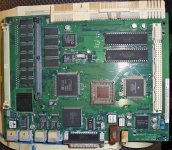
100_1604.JPG

I'm guessing it's moisture-based corrosion? Also here's the bottom... normal? The original CC board is just green.
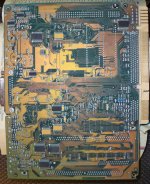
100_1607.JPG

Anyway, I figured that the audio problem could be due to the rust on the mic port and/or the speaker port (and maybe shorting out), so I brought out the soldering iron and removed them:
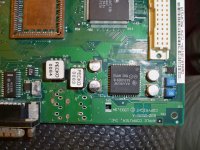
100_1613.JPG

There was plenty of rust covering the surface of the board, and I cleaned it up. Knowing enough to take it apart but not enough to diagnose it, I've reached a dead end. Is there a way to verify the ports? Each has 6 or so pins, but I don't know what should conduct to what pins. Is this board a candidate for washing? Another case of bad caps? I wish I knew the pinouts so that I could just short the proper pins on the board; I'd be perfectly happy with internal audio only. Or do these jacks do more than just connect speakers to the board? I have 'backups' on the original CC board, but I'm leery of destroying a CC board.

I am pretty sure the FPU isn't working because there is visible corrosion beneath the socket (on the top/surface mount side of the board). I tried going at it with 90% rubbing alcohol, but it's hard to get in there. I don't think it helped.


 
There is a switch in the audio output port that tells the Mac if you have inserted a plug. This switch disables the internal audio when a plug is inserted. The rusty port very likely had a malfunctioning switch in it.

One or two of the pins in the port are hooked up to this switch. Have you checked to see if you have internal audio now that you have removed the ports? It won't hurt your Mac to run it without these ports, so long as you make sure that your solder is cleaned up around where the ports were and not shorting anything. You could probably replace the ports with the ones from your old CC board, they're probably the same.

 
I should have added that I did try the board without the mic and headphone ports installed--no audio. Assuming I cleaned it up properly, does this mean that I've ruled out the bad audio ports?

 
It doesn't rule it out unless we know that an open speaker jack switch means that there is no plug inserted. It is possible that this switch is closed with no plug inserted and opens when a plug is inserted. If this is the case, removing the speaker port makes the Mac think a plug is constantly inserted.

To test, you could use a continuity tester on your CC board on the audio out port's pins to see which pair open & close when you insert/remove a plug. It would be most conclusive to use some sort of non-conductive object that can be inserted, enough to physically activate the switch, either that or a stereo plug that is not connected to anything. I wish I had some old Macs handy, I'd test it for you! But alas, they are far away.

 
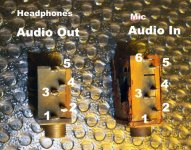
Here we go-

100_1616-edited.jpg

No plug inserted

Headphones/Audio Out

- No pins are connected. Pin 1 conducts to the thread (ground?) on the jack.

Mic/Audio In

- 3 connects to 4

- 5 connects to 6

With plug inserted

Headphones/Audio Out

- 1 connects to 2

- 1 connects to 4

- 2 connects to 4

Mic/Audio In

- 1 connects to 2

- 1 connects to 4

- 2 connects to 4

- 5 connects to 6

Disclaimer: My heavily corroded parts could be faulty.

Conclusions: It does appear that an open speaker jack switch = no plug inserted. The connected pins on the line in shouldn't make a difference to audio output, should they? Besides, they conduct, so presumably they were working when they were on the logic board.

These results, coupled with the FPU issue, the visible corrosion, and brief message board surfing here:

http://www.megadon.co.uk/wb/whiteboardshow.pl/syrinx/wbfile=Mac%20Classic%20Repair.wb/page=default.html

http://www.mail-archive.com/vintage-macs@googlegroups.com/msg02082.html

Leads me to think that washing is the next step, with recapping after that if no improvement.

 
What kind of plug did you insert? If it was a pair of headphones, the speakers in the headphones will cause extra connections on your continuity tester. You have to use something like an adapter or a shish-kabob stick that won't change the circuit. Or a chopped off headphone cord. There should only be 2 pins that change on the audio out port. The audio in port (the bigger one) has no such switch to my knowledge, but I could be wrong.

I don't know anything about your experience with this stuff, you seem to be doing quite well. Here are all the combos to test on audio out, I'm not sure if this is helpful for you or not. There are plenty of electronics noobies here, whether you're one of them or not, you're welcome either way.

1, 2

1, 3

1, 4

1, 5

2, 3

2, 4

2, 5

3, 4

3, 5

4, 5

 
Thanks, Dennis, for your interest and help. I know a little bit about circuits and hardware from a decade of tinkering, but I have no textbook training. Basically, every time something goes on one of my old machines, I learn something new about electronics. :D

I did use a pair of working headphones and checked all the combinations you list. When I have time I'll see if I have some donor headphones I can cut. However, the fact that none of the headphone jack pins conduct to each other means that the sound should work without the port installed at all, right?

Living in Orlando, I am fortunate to have Skycraft (http://www.skycraftsurplus.com/) nearby. Now that I have a shopping list (caps, headphones, and maybe a 3.5 mm mono TS jack/port), it's worth a drive over.

I did the washing last night...we shall see how it went after another day or two. I can still see come corrosion on the FPU socket, albeit less than before.

 
Some audio out jacks are switching so when you plug into them, they disconnect a speaker in series. The one that's corroded would not be good to use to diagnose with since it might not be conductive at the contacts. Those jacks are pretty standard, so check the pinout in a component catalog and then short the pin(s) on the logic board.

 
Thanks for the suggestions, and those will be my next steps once I get back online. Unfortunately, I have taken a step backwards; after the washing I now have a non-booting 550 logic board. The original CC board still boots normally, but using the 550 logic board (PRAM battery installed or not, RAM installed or not, VRAM installed or not) leads to the power light turning on and the hard drive spinning up but nothing else.

 
I spoke too soon--just needed to reseat the ROM chips. And now the co-processor works! So the washing solved one problem but not the audio issue. I'm going to spend some time with the pinouts of the audio jacks to see what, if anything, needs to be shorted.

 
Apologies for bringing back a dead thread, but I have an update. It turns out that I was getting audio with headphones/speakers attached, but nothing through the internal speaker. My solution was to leave a set of speakers attached. To avoid wasting electricity, I left them unplugged when the CC was off, adding a small annoyance of needing them plugged in and dedicated to this purpose.

Anyway, turns out that the best solution was to leave the machine off for a few months. Turned it on yesterday, heard the chime, and did a double take because I was standing between the speakers and the CC--the sound was coming from the CC. I am happy to have a 100% working CC II (at least for now :D ) even if I can't pinpoint why it's working.

 
have you changed the capacitors?

my IIsi had intermittent audio, changed the caps and it was back loud and clear.

 
could you check the values of C1 and C2… are they 100uf 16v?

i want to add your mainboard to the this re-cap thread we got going, so far i do not have a Color Classic II , but i can use your high rez picture if you don't mind?

Thanks

 
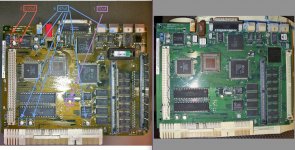
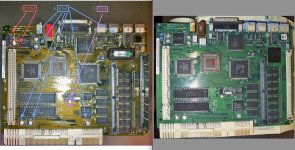
looks like the LC 520 board is Extremely close to the Color Classic II Board!.

With the exception of the battery system and the 25 - 33 mhz 68030 speed difference.

Screen shot 2012-12-05 at 2.47.55 PM.jpg

Screen shot 2012-12-05 at 2.47.55 PM.jpg

 
Thank you for this great information! The labels on most of the caps were gone when I got the board. My best information is here: viewtopic.php?f=9&t=17724, and unfortunately, I don't have a label for C1 or C2. Your list provides a lot more than I had before, however.

I didn't replace the caps, but I'm sure it's in the future. Once the machine dies, I will re-cap it if all the values are known by then.

Please feel free to use my photos. To be clear, my machine is a U.S.-spec original Color Classic with a LC 550 board inside. So my photos are of an LC 550. To the best of my knowledge, this board is nearly identical to the CC-II (right?). They have different gestalt IDs, though, so I'm not sure.

 
That is why the FPU is not working… i had the same issue with my LC III, changed the caps.. and the FPU and Sound started to all work flawlessly.

 
Back
Top