• Hello MLAers! We've re-enabled auto-approval for accounts. If you are still waiting on account approval, please check this thread for more information.

Color Classic Inverted

Has anyone had a Color Classic with the colors inverting on the display?  I have tested the system with 2 different Color Classic boards, as well as an LC 575 board (all 3 testing fine in another Color Classic) with the same inverted colors result.  It appears to be primarily affecting the red/blue channels.  White is still white, black is still black.  So not a perfect inversion of everything.

Since the problem doesn't appear to be tied to the logic board itself, I'm guessing either the analog board or a damaged pin on the logic board connector at the front of the Mac is causing the trouble.

If you have had this problem let me know how you fixed it, otherwise wish me well on my adventure to figure it out  :D .

 
Im gonna say caps or something along that line, on the analog. Also check for cracked solder. Of course, wait for a person who actually knows first... :p

 
Last edited by a moderator:
Can you take a picture of the fault? Might be able to give you a good start. It is known the potentiometers get noisy and electrically drift on these analog boards and you have to work them back and forth, or spray them and work them back and forth. 

 
Last edited by a moderator:
Hi everyone, thanks for the input so far.  I'll get some photos of the issue and the analog board.  So far my googling efforts have led me to CRT based TVs that experience the same problem.  Unfortunately, the most common advice is to toss the television and buy a flat screen   :O   .

 
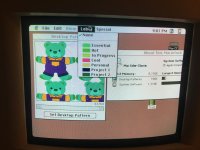
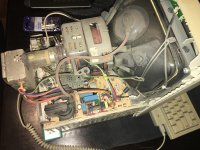
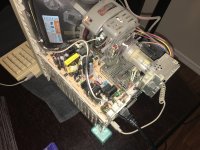
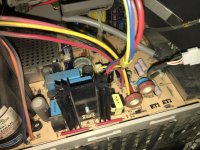
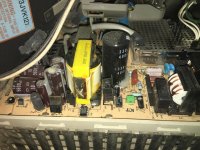
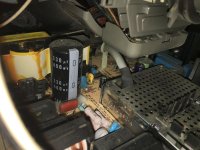
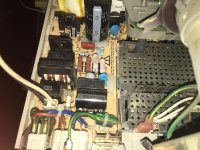
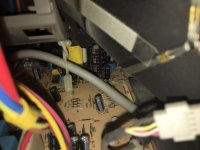
Here is a photo of the messed up colors and several of the analog board.  Close inspection doesn't seem to indicate any leaking capacitors.  Many are lifted up enough off the board to be able to see space under them, and there doesn't appear to be any leaking.

warped colors.JPG

overhead 1.JPG

overhead 2.JPG

closeup 1.JPG

closeup 2.JPG

closeup 3.JPG

closeup 4.JPG

closeup 5.JPG

 
Also, thank you SlateBlue, I looked through the service manual you provided and attempted to make color adjustments.  Nothing seemed to get the colors back to their correct values.

 
Sorry to say that again, but caps are probably the issue, had the same issue plus a wavy screen before replacing most of them.

None were leaking.

 
Thank you for the input.  If /u/techknight also doesn't have any other suggestions I will probably go with /u/bibilit's advice of capacitors that aren't working properly anymore and replace.

Bibilit, did you also do the proper 640*480 mod when you went to swap the capacitors?  Since this is my secondary CC, I'll probably end up trying it out on here before doing the modification to my main unit.

Also, did you use solder iron or hot air?  Never had to do a cap swap before.

Carboy7, yes lol it was hilariously sad.  Initially I thought it was the old owner's customizations until different startup zip disks and logic board swaps couldn't get past the issue.  :D   8-o   :(

 
nope nope nope, not caps this time. 

Your problem is the degaussing circuit. its non-functional resulting in purity drift.

You need to check the solder joints for the coil plug itself and the black square thermistor for the degaussing coil. the degaussing thermistor should read really low in ohms and they raise when its heated (degaussing on). If this thermistor is open, it has failed. 

You can clear this up if you have the old trigger-style soldering gun, and waving it in front of the screen slowly backing it away. This will act as a manual degausser and will tell you if the circuit really is at fault or not. The only other way this can happen is if someone or something has messed with the purity adjustment rings in the rear of the CRT yoke. 

The coil can be identified by this black tubular looking thing surrounding the face of the CRT. the 2 black/white wires come out and terminate into a plug towards the rear of the analog board in front of the power switch. 

 
Last edited by a moderator:
Thank you techknight!  I will investigate that.  Unfortunately, I don't have a trigger style soldering gun, only a pencil unit.  Any other household items that would generate a field to try to manually degauss the display?

I know the black/white cable you are speaking of, it is visible in the second to last photo (closeup 4.JPG), connecting near the power switch and fuse, correct?

Assuming that is correct, in that same photo, can you point out the thermistor?  I have a voltmeter that can measure resistance as well.  I can try measuring it if I know which part it is.

Under normal operation the ohms should increase as system temp warms up.  So I'm guessing if it is broken (stuck open), the ohms will stay flat at 0?

 
its the black cube right next to the plug where the coil goes. 

I forget what the actual resistances are supposed to be. But cold, that resistor is within a few ohms. maybe 10 ohms or more. 50 ohms max. Then soon as current flows through it, the thermistor heats up and the ohms jumps to 50K ohms or even higher. MUCH MUCH higher, which basically makes the coil go open circuit. Thats why when you flip on the switch on old CRTs, you hear the "BUMMMMmmmmppp" and thats it. Thats the degausser. Also the older stuff like this, the current is continuously flowing through it so soon as it thumps, and resistance jumps high, it stays high and warm until the power is cut off. 

Newer monitors use a cut-out relay. It clicks on, waits 5 to 10 seconds for everything to "happen" and then it clicks the relay off to basically save the life of the thermistor, as well as to stop the picture from "shaking/wobbling" which some degaussing coils will do. 

As far as other household items, I cant think off the top of my head, but anything with a big transformer in it. 

 
Last edited by a moderator:
Okay.  In theory, could I put my other Color Classic side by side, facing the opposite direction, and plug the degaussing cable into that unit, and turn them both on?  This should temporarily correct the damaged faulty display and tell us it is definitely the thermistor not working correctly?

 
Techknight, with the computer running, I'm measuring ~17.7 ohms on that black and white connector (there is just enough space at the top of the connector to fit the pins from the voltmeter in.  That was with the voltmeter set to a scale of 200 ohms max.

 
Another update:

After sitting soft-powered off (still plugged in, main power switch still in the on position, but shut down) for a couple hours, I went to put the tools away and felt the thermistor.  It is scalding hot.  Could definitely cause a burn if I kept my finger pressed on in.  I immediately flipped the power switch to the off position and unplugged the power cable.  Techknight, I think you are right.  What ever is causing my display issue is definitely related to that component and the degaussing mechanism.  I don't imagine it should be staying that hot when the computer is off.

What are my next steps?  I checked eBay for Color Classic thermisters and found nothing.

 
Back
Top