• Hello MLAers! We've re-enabled auto-approval for accounts. If you are still waiting on account approval, please check this thread for more information.

Barcode Scanner

aplmak

6502
Hey guys/gals I have a barcode adb scanner and it works well. It powers up and scans but I would like to use it to inventory with bar codes. I don't know how to interface it with a program. Can it be done with Hypercard? I remember seeing old Apple video's of them scanning boards and inventory with Macs. I have Barcode Pro 3.5 but that is just a program to have bar codes made... I need to create a database to scan them.. Any ideas of a program that can read with the scanner and if I need a control panel or extension???

Thanks in advance....
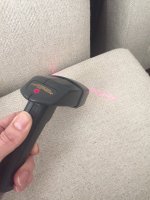
IMG_0867.JPG

 
I don't know if it's the same with ADB, but for USB scanners it's just another keyboard input. Go to a place where you can input text - bloop - the barcode info is there as text.

I would hope it would be that easy with ADB, but who knows. Should be easy to test, though...

 
Gotcha I'll give it a try... I did it in word but it just froze up word.... I'll try it in hypercard...

 
Nah can't get it to work... I even put a keyboard on the throughput y part of the cable and the computer doesn't see the keyboard. It lights up and scans. I scan a code from the manual to put it into "Macintosh Mode" and it scans fine.. beeps and I can scan it multiple times. But when I go to scan any other barcode it goes dead... No more scanning unless I unplug it and replug it back in... Strange.... 

 
@aplmak Look in the manual and see if there's a barcode to Exit setup (and/or confirm changes.)  It could be that you're setting up the scanner for options (such as Return versus Enter, or Tab instead of Return, barcode type, etc.), but not exiting setup, so when you go to scan a regular barcode, it borks.

 
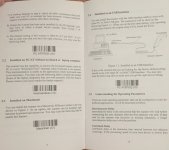
I think your right! There is barcodes in the manual for setup. I tried it on a pc’s ps/2 with the original cable not the adb one and same effect.. something with the setup. But honestly would you have to do this every time it’s shut off???

 
My god it worked on the pc after scanning the setup code!!! But I’m not sure it working on the Mac.. you can see 2.3 says with an adb cable and I’ve tried that.. the next page says usb interface on a Mac.. I’ll try the adb code again.. but you were right!!

C35C02C7-283C-4574-AE27-BE129AE3A251.jpeg

 
Tried the Mac again.. on a TAM and a G3 Wallstreet... it takes the Mac setup code then when you scan something it just makes a loud continuous noise. Upon reset if I use the PC code it continues to work and scan but nothing appears on the Mac in simpletext like it did in notepad on the pc. The keyboard through cable on it for the Mac also wouldn’t let the keyboard work.. I dunno

 
@aplmak Does the previous page(s) have an Enter Setup barcode?  Scan that first, then scan 2.3, then scan a Save or Confirm or whatever barcode they might have.  It should save the settings to the scanner.  You shouldn't be losing the setup after the scanner is powered off.  I suspect that it's in PC USB mode right now, so it's not working on your Macs.  I think you need to enter Setup, scan 2.3 code, then scan the Save barcode.  At least, hopefully that's how it works.

On my barcode scanner at work, it looked similar to yours, except there were always at least 3 barcodes, with the first and ending barcodes for entering and saving setup.  The first and last barcodes were always repeated on all the options.  My manual also had a special barcode for exiting without saving.

You've shown that it works on the PC USB (and since the ADB pass-through isn't working) I suspect it needs to be set up to utilize it as indicated in the manual.

 
Last edited by a moderator:
There are a lot of different programs out there that can help you do this, but it's important to make sure that your barcode scanner is compatible with the program you choose.
You mentioned Hypercard - that's a bit of a blast from the past! While it might be possible to use Hypercard to create a database and interface with your barcode scanner, there are probably better options available these days.
One program that I've heard good things about is Smart Engines OCR. It's a Windows program that allows you to scan barcodes and transfer them to your computer wirelessly. You can then use the data to create a database or inventory system.
 
Back
Top