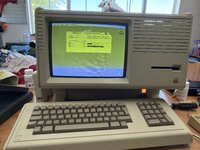
Apple Lisa Horizontal Waviness (aka “Was There Supposed To Be A Big Plume Of Smoke?”)

Zhinü

6502
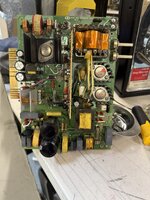
Decided to recap my Lisa recently after a couple of people told me that the 1.8A PSU + video board can suffer from bad caps. I ordered these parts, which I later found out I forgot to order a 100uf cap for the analog board (replaced it with a 100uf cap in the order and skipped one of the 100uf caps on the PSU).

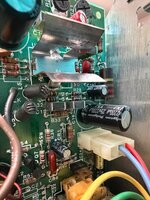
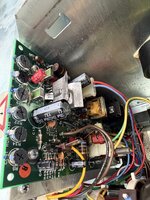
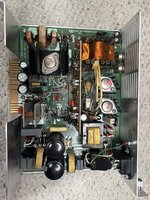
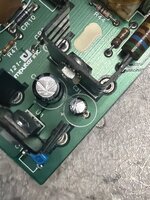
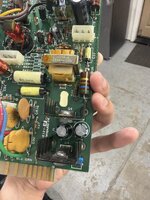
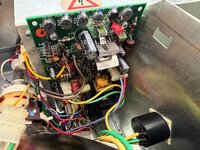
When I turned the Lisa on for the first time after recapping the boards, I instantly got a massive plume of smoke from the front left (PSU power connector/speaker area), but also the usual click when the Lisa turns on. Obviously I panicked and unplugged the Lisa, but when I went to check for a blown component, I couldn’t find anything. The caps I put on both look fine, and there’s nothing obviously burned (outside of what was burned from the original RIFAs blowing up).

Furthermore, I’m still getting some horizontal ripple on the screen, but it seems to “improve” (lack of a better word) as the Lisa stays on, which points to a cap potentially?

Any guesses on what could have gone up in smoke, and also cause horizontal ripple in the video? Sorry for the bad photos, will take better ones ASAP!
 

Attachments

  • IMG_0715.jpeg
    IMG_0715.jpeg
    8.3 MB · Views: 20
  • IMG_0716.jpeg
    IMG_0716.jpeg
    8 MB · Views: 12
  • IMG_0717.jpeg
    IMG_0717.jpeg
    2.9 MB · Views: 9
  • IMG_0718.jpeg
    IMG_0718.jpeg
    7.6 MB · Views: 9
  • IMG_0719.jpeg
    IMG_0719.jpeg
    4.1 MB · Views: 11
  • IMG_0720.mov
    IMG_0720.mov
    20.7 MB
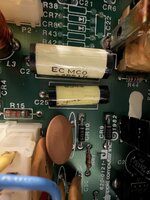
All the safety caps were replaced with Kemet safety caps, the gray box ones. You can see them at the bottom of this image.

The smell seemed more electronic then like, RIFA, for lack of a better way of explaining it.
 

Attachments

  • IMG_0711.jpeg
    IMG_0711.jpeg
    4.4 MB · Views: 18
DosFox found one of the issues, he noticed that the 330uf cap was backwards on the board and bulged out. I don’t think this specifically is causing all of the issues but I replaced it with the original cap to at least rule that out.
 

Attachments

  • IMG_0738.jpeg
    IMG_0738.jpeg
    4 MB · Views: 19
  • IMG_0741.jpeg
    IMG_0741.jpeg
    4.4 MB · Views: 21
Waviness is often caused by ripple on the DC from the main rectifier cap. Often people replace these based on just capacitance (same) and voltage (same or higher) but for some applications the ripple current spec on the part needs to be considered. If the rectifier is working mains, there is usually a low frequency rating, in Amps. If it is working on the horizontal or in a higher speed switching application there is a high frequency specification. You can see these numbers on digikey for example. For rectifier caps I try to get the largest ripple current rating for the space available. In general, the smaller the cap the lower the AC current it can tolerate.
 
Waviness is often caused by ripple on the DC from the main rectifier cap. Often people replace these based on just capacitance (same) and voltage (same or higher) but for some applications the ripple current spec on the part needs to be considered. If the rectifier is working mains, there is usually a low frequency rating, in Amps. If it is working on the horizontal or in a higher speed switching application there is a high frequency specification. You can see these numbers on digikey for example. For rectifier caps I try to get the largest ripple current rating for the space available. In general, the smaller the cap the lower the AC current it can tolerate.
Do you happen to know which caps on the Lisa are used for AC rectification?
 
Looks like not much on the video board but of course lots on the PSU. The smoke is very concerning - something has failed and I’d bet it is on the PSU. Have you used a voltmeter to check the voltages on the output connector? Check them all and measure both DCV and ACV. I bet you are going to find some big ripple on one of them, I’d start with 33V since that is used by the video board but also check 5, 12, -5, -12.

As for caps on the PSU there are lots of ones that see some AC current. C12,C13 near the AC line and then each output has a rectifier cap that works at the switcher frequency. For example the 33v has C9, C10, the 5v and C18, C19, C21, etc,

Post the DC and AC measurements taken at the PSU output connector. Good luck!
 
I didn’t do it from the power-supply but I did pull the video card out to see if I could see the ripple on the pins prior to them going into the video card.

With the video card removed I’m getting 0.446v of AC on vertical sync, and 12V DC has 0.010v of AC (max). This is tested with a Klein Tools MM700 so it might be inaccurate, but I don’t have a oscope handy. When the card is plugged in (but flyback and CRT unhooked), the vertical sync (tested at C9) hangs around 0.289v AC. Meanwhile, the 12V DC drops to 0v AC.

None of the other pins have any AC voltage, before or after the card is plugged in.
 
Worth saying that Adrian Black (of Adrian's Digital Basement on YouTube) attacks an issue like this one on episode 8 of his nine-part repair series:


My Lisas exhibit it too, to some degree, and it's easy to find other people online who describe having the same problem. I've just learned to live with it, but other people may not consider it acceptable.
 
Worth saying that Adrian Black (of Adrian's Digital Basement on YouTube) attacks an issue like this one on episode 8 of his nine-part repair series:


My Lisas exhibit it too, to some degree, and it's easy to find other people online who describe having the same problem. I've just learned to live with it, but other people may not consider it acceptable.

So I decided to try and test mine, and… yep, that’s the issue. I was turning the pot the wrong way, but with it maxed to the right side the ripple stops.
 
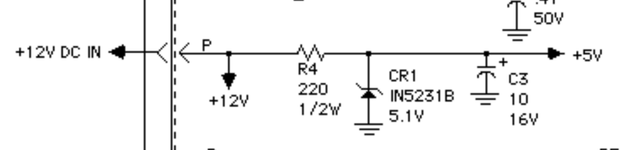
So i've found out that on the Apple Lisa, the way the 5v is generated causes noise/ripple on the CRT when the horizontal phase potentiometer is adjusted.

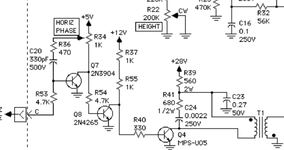
"The problem is due to poor filtering in the power supply, which couples the ripple on the 5 volt supply into the 33V supply for the video circuit board...The ripple enters the video circuit via the Horizontal Phase control on the video board. The effect of the ripple is minimised by rotating the Horizontal Phase control to the counter-clockwise extreme." source

I'm trying to figure out the best way of fixing that outside of just adding a film cap to move the screen without adjusting the horizontal phase potentiometer. While checking through the comments through the video, I saw two recommendations:

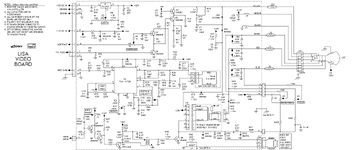
1. Replace R4 and CR1 with a 7805 regulator
2. Put a tant/ceramic cap bypassing CR1 to "smooth" the signal out.

What's the best option here in terms of fixing this issue? Below are the schematics on the video board.
 

Attachments

  • VideoBoard.gif
    VideoBoard.gif
    35.8 KB · Views: 1
  • Screenshot 2026-06-29 182355.png
    Screenshot 2026-06-29 182355.png
    64.7 KB · Views: 1
  • Screenshot 2026-06-29 162055.png
    Screenshot 2026-06-29 162055.png
    18 KB · Views: 0
Back
Top