
-
 Hello Guest! We're hosting a challenge to welcome vintage Intel macs to the MLA during the month of July! See this thread for more information.
 -
We've made some quality of life improvements to the Trading Post. More info here.
You are using an out of date browser. It may not display this or other websites correctly.
You should upgrade or use an alternative browser.
You should upgrade or use an alternative browser.
Adtron SCSI Compact Flash drive?
- Thread starter snuci
- Start date


http://cgi.ebay.com/281188955190 - seller happyhairgirlThese would be perfect to fit into one of those 2.5" SCSI external "pocket" drives that were kicking around here recently.
Unrelated: I have some 3.5" SCSI to PCMCIA adapters here. Would anyone like to swap one of these 2.5" adapters for one of them? They're untested right now, but if anyone is interested, I will test with a PCMCIA-CF before shipping. PM please, so as not to derail this thread.

Which, the 3.5" SCSI-PCMCIA, the 2.5" drive boxes, or the Adtron SCSI-CF?
Mod note: everyone, please don't quote the post right behind you, unless it's to clarify what part exactly you're replying to, by quoting only that. In this house, we read down the page.
Mod note: everyone, please don't quote the post right behind you, unless it's to clarify what part exactly you're replying to, by quoting only that. In this house, we read down the page.


the SCSI boxes. I was following that thread, because i thought about tossing an adtron in one of those.


I really need to get off my butt and test mine out. I could really use a 2.5" to 3.5" adapter though since tearing apart Powerbook 100 series isn't much fun at all. Plus I can test and see how it behaves in various desktop Macs and PCs.... and an Amiga. What was the ROM revision on the card that couldn't see the 16GB card? Its a strong possibility the unit will work with 8GB cards, but won't see anything above 8.4GB due to Int13h limits.

The firmware in mine is 1999 version 2.02a. I'm totally fine with 8GB or 4GB but I just want to be sure before purchasing. I will be trying to re-purpose the 16GB for an Amiga 1200 this weekend and give up my 4GB for one of these. I'd also like to put one of these in a NeXT Cube so either of the smaller sizes is fine but I just want to maximize the size and forget about it. Any testing you can do would be great.

Which version of hard disk toolkit? I know 2.5 works. Did you try just one CF card in either slot? It's picky about CF cards. I had to erase mine in a digital camera before it would use what I had. Do your CF cards have lock switches on them? That will trick it. Some cables that plug into the card may or may not have the correct pin missing for the card and it may be plugged in backwards. If your putting it in a desktop you must have the 2.5 to 3.5 adapter that may also be your issue. It's not a power monster and may not play nice with the adapter. I hope I have given you some ideas you have not looked into. Good luck.

I tried just one card in 1 slot, 1 card in the other slot, and 2 cards in both slots. Same result in each case. I erased the CF cards using my ATA CF card adapter. I also tried partitioning them to under 1GB in size each, and still didn't work. Micronet reports that the carriage is empty, even when there's a card inserted.
Finally did my testing. First off, this device does support 8GB CF cards. My Transend 8GB 133X CF card was recognized without a problem. I'll also add that it supports very small CF cards too as a Canon branded 8MB CF card worked without a problem.
Connection to desktop machines was with a Cables-to-Go 2.5" to 3.5" SCSI adapter. What I did have a problem with is with host controllers. My 486's Adaptec AHA-2740W EISA card (40MB/sec WideSCSI with 50/68pin plugs) wouldn't see it at all, but I have had problems with that card seeing devices in the past. My PCI AHA-2920C card (10MB/sec fast SCSI) worked fine with it. Anyway this device is.... slow.
Here is the native speed of the device running off of a Promise UltraTX2 ATA100 card as a baseline:
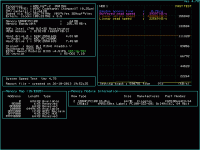
These speeds check out with Transend's data sheet.
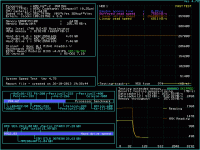
For comparison, here is the card running off of the onboard IDE ports, likely using PIO transfer mode (DMA disabled). This is very close to what I get running this CF card on an ISA bus controller:
The Adcom off of the Adaptec SCSI card:
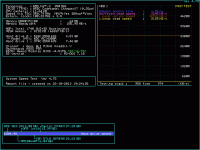
OUCH. Performance in anything remotely modern with this device is going to be lousy. Good thing the only 2.5" SCSI devices out there are old and slow anyway. Its a good choice for old computers like Powerbooks though. Whats sad is the SCSI controller on the Adcom adapter supports 20MB/sec transfers, so the bottleneck is likely the firmware, ATA interface, or CPU. I would love to get a hold of one of the ACARD adapters or the Power Monster and see how they compare to this. I wouldn't be surprised if they are much faster.
Connection to desktop machines was with a Cables-to-Go 2.5" to 3.5" SCSI adapter. What I did have a problem with is with host controllers. My 486's Adaptec AHA-2740W EISA card (40MB/sec WideSCSI with 50/68pin plugs) wouldn't see it at all, but I have had problems with that card seeing devices in the past. My PCI AHA-2920C card (10MB/sec fast SCSI) worked fine with it. Anyway this device is.... slow.
Here is the native speed of the device running off of a Promise UltraTX2 ATA100 card as a baseline:
These speeds check out with Transend's data sheet.
For comparison, here is the card running off of the onboard IDE ports, likely using PIO transfer mode (DMA disabled). This is very close to what I get running this CF card on an ISA bus controller:
The Adcom off of the Adaptec SCSI card:
OUCH. Performance in anything remotely modern with this device is going to be lousy. Good thing the only 2.5" SCSI devices out there are old and slow anyway. Its a good choice for old computers like Powerbooks though. Whats sad is the SCSI controller on the Adcom adapter supports 20MB/sec transfers, so the bottleneck is likely the firmware, ATA interface, or CPU. I would love to get a hold of one of the ACARD adapters or the Power Monster and see how they compare to this. I wouldn't be surprised if they are much faster.
186 CPU. probably the CPU. lol.
However, that should make mmcmaster feel better, his SD adapter is faster.
However, that should make mmcmaster feel better, his SD adapter is faster.
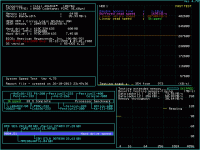
I wouldn't be surprised if the CF Card was running in PIO Mode 0, a paltry 3.3MB/sec. I think this card was conservatively designed anyway given its target market of industrial machine use. I didn't check to see what speed the SCSI interface actually ran at. I wouldn't be surprised if it was the standard 5MB/sec SCSI-1 mode. Would be an interesting device to firmware hack to see if more speed can be coaxed out of it.
Well, then I hope it's my adapter. I plugged it directly into my IIci bypassing the Adaptec card, and same issue. I'll try and find the same adapter njroadfan has.
This is the one I have, by the way: http://www.cablesonline.com/25lapscsihar.html
This is the one I have, by the way: http://www.cablesonline.com/25lapscsihar.html
Similar threads
- Replies
- 0
- Views
- 207


- Replies
- 25
- Views
- 1K

