
-
 Hello Guest! We're hosting a challenge to welcome vintage Intel macs to the MLA during the month of July! See this thread for more information.
 -
We've made some quality of life improvements to the Trading Post. More info here.
You are using an out of date browser. It may not display this or other websites correctly.
You should upgrade or use an alternative browser.
You should upgrade or use an alternative browser.
Adding Wi-Fi to my Mac SE/30
- Thread starter ants
- Start date







And here we go, Vonets module from China finally arrived.
The mPCIe port on the module is messed up though, notice how in the socket the upper contacts are shifted to the right compared to the lower contacts?
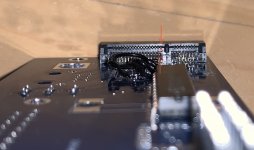
The VM300 however has the contacts exactly lined up on top and bottom so it will create short circuits when inserted into the mPCIe slot.
Luckily all the signals we need are present on the bottom row of contacts. So to use this you will have to tape over the top row with some capton tape to insulate it.
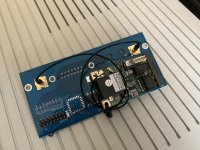
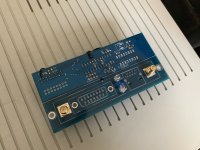
I had to use 12V instead of 5V to power the VM300, so it seems I will have to go for another run of PCBs.
At 5V the module itself would work and connect to my Wifi but the LAN connection to the SE/30 would not come up.
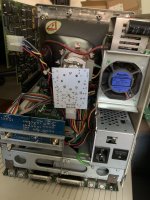
After a lot of fiddling this is the result:
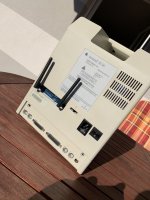
The mPCIe port on the module is messed up though, notice how in the socket the upper contacts are shifted to the right compared to the lower contacts?
The VM300 however has the contacts exactly lined up on top and bottom so it will create short circuits when inserted into the mPCIe slot.
Luckily all the signals we need are present on the bottom row of contacts. So to use this you will have to tape over the top row with some capton tape to insulate it.
I had to use 12V instead of 5V to power the VM300, so it seems I will have to go for another run of PCBs.
At 5V the module itself would work and connect to my Wifi but the LAN connection to the SE/30 would not come up.
After a lot of fiddling this is the result:


Count me in too. Such wonderful work, as always.@Bolle this looks amazing! If you do happen to sell the board with the WiFi please let me know. I’m ready to pay you a pile of cash
I believe it serves as a replacement for the ethernet daughterboard - you can see the 16 pin connector that leads to the Maccon main board.Is this an all-in-one plug and play wireless solution if you already have the Asante card?

Exactly what I was hoping. I have the Maccon.I believe it serves as a replacement for the ethernet daughterboard - you can see the 16 pin connector that leads to the Maccon main board.


I planned it to be usable that way but I could not get mPCIe connectors that were tall enough to clear the output transformer needed for wired ethernet that's sitting underneath the VM300.any ability to disable the wifi card if you need to save power to debug or use the wired connection (if the jacks are installed)?
So for now it's only either wired or wireless. Only way to disable the VM300 is to either unplug the module or the transceiver board altogether.
The VM300 is operating off the 12V rail which is usually never a problem in the SE/30 when it comes to power issues.
Last edited by a moderator:
Yeah, I'd love one of these too if you do make some to sell.
Last edited by a moderator:


If it works this will come along with the MacCon clones I am going to build for the SE/30.

It is now February 2021. One year has passed. What is the pricing and availability on this WIFI kit, and is it being made available separately or included with a MacCon Ethernet Clone? Is the kit 100% complete, including the needed antennae pair?
And just to reconfirm, it is only possible to use WIFI or wired Ethernet and not both at the same time, correct?
Thanks.
I won’t be making any of these because of the problems with the mPCIe connector described earlier in this thread.
I was looking into other DD-WRT based single board access points/routers and if one of those can be used for this but did not find anything that fits the use case.
So far I was only selling the boards as a wired only option included with my MacCon clone/accelerator adapter combo cards. Also my supply of transceiver ICs is slowly getting used up so there won’t be too many more of those coming.
I was looking into other DD-WRT based single board access points/routers and if one of those can be used for this but did not find anything that fits the use case.
So far I was only selling the boards as a wired only option included with my MacCon clone/accelerator adapter combo cards. Also my supply of transceiver ICs is slowly getting used up so there won’t be too many more of those coming.
Last edited by a moderator:

@Bolle
I've just found this thread and did not (yet) read it all. I just want make sure that you aware of this device: Onion Omega2
I've successfully connected to WIFI using a Linux Laptop as a PPP Bridge with the "slirp" package. I am also still experimenting with an ESP32 setup but thinking about that, I might just forget about the ESP and start using this Onion Device with OpenWRT. It should more or less "just work"
I've just found this thread and did not (yet) read it all. I just want make sure that you aware of this device: Onion Omega2
I've successfully connected to WIFI using a Linux Laptop as a PPP Bridge with the "slirp" package. I am also still experimenting with an ESP32 setup but thinking about that, I might just forget about the ESP and start using this Onion Device with OpenWRT. It should more or less "just work"
Similar threads


- Replies
- 5
- Views
- 541

