• Hello MLAers! We've re-enabled auto-approval for accounts. If you are still waiting on account approval, please check this thread for more information.

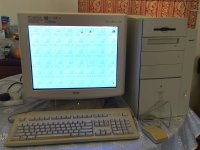
9600 604ev@500MHz

Not the latest found actually, Grabbed this unusual beast from eBay last year

The seller apparently was not very familiar with the vintage mac and  he sold a lot of other vintage pc as well

From the pictures shown on eBay

a 9600 PM labelled as 200Mhz but...

the motherbroad from the picture was clearly a Kansas one

I was expecting at least a 350mHz 604ev :wub:

I didn't ask further as the price was right and it looked pretty clean inside.

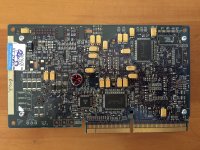
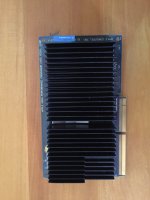
On arrival, I opened the case and found the CPU daughter card labelled as engineering sample with no mention of the actual speed.

It freezed every now and then but ran rock solid once I added "new" ram to it few months ago
j.jpg

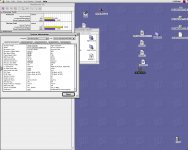
MAcbenchfullresult2.jpg

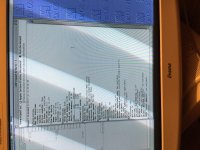
frstscrn.jpg

 
Last edited by a moderator:
Howdy! Welcome.

A 500Mhz Mach V! Nice score.

I have a 604ev "Engineering Sample" daughter card but mine is labeled as 350Mhz.

 
Howdy! Welcome.

A 500Mhz Mach V! Nice score.

I have a 604ev "Engineering Sample" daughter card but mine is labeled as 350Mhz.
Thanks you for your kind words

I thought I was doomed when I found someone hand-written "Fired" over the engineering sample label on the daughter card.

It booted up just fine after installing a new PRAM battery but kept on freezing every now and then. Before I was prepared to buy another "normal" mach V CPU to replace this overclocked one, my "new" 168pin DIMM arrived. After installing those RAM, surprisingly it ran rock solid and never hanged again. Maybe the better spec newer RAM help stabilize the overclocked CPU :blink:

BTW I remembered there was a [LAB A] label somewhere inside the case.  Probably it is a test machine of some sort ... it has its ROM DIMM slot occupied and even the CDROM had an engineering sample label on it

I'll try taking some more photo of the motherboard in the new couple of days

 
Interesting find.  It's always nice to open a computer and find something aside from pure stock components.

I'm surprised the Macbench scores are so low (aside from the FPU though).  I wonder if setting the cache to write-back and enabling speculative access would help. I remember reading that reaching 450MHz was usually pretty solid but I don't remember 500MHz being reliable.

 
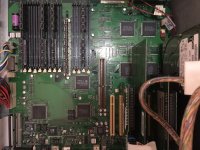
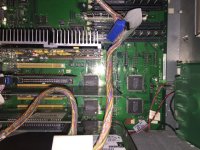
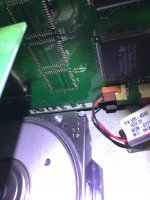
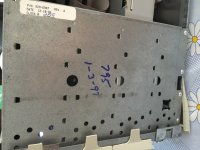
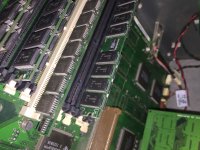
More photo

Memory doesn't serve me very well :wacko: , the CPU label did indicate the speed, it started life as a 300mHz, overclocked to 500 and finally bricked

IMG_4890.JPGIMG_4904.JPG

The motherboard doesn't look like a normal kansas board, some missing rom chips?

can anyone here shed some light?

IMG_4892.JPG

IMG_4888.JPGIMG_4884.JPG

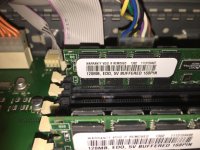
newly added brand new EDO RAM

IMG_4889.JPG

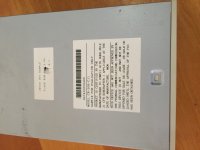
Sticker on the cdrom

IMG_4896.JPG

others

IMG_4885.JPGIMG_4893.JPG

 
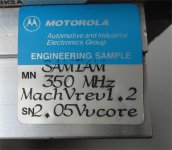
Here's the label on my card, SamIAm was the Motorola/Apple code name for the card.

My card doesn't have a snazzy black heat sink.

It came out of a system like yours.

samiam_604ev.jpg

 
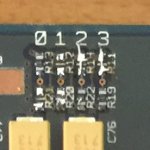
so can someone show the difference from a 300 to the 500 on the daughter card for overclocking?  This would be pretty cool to overclock others.

 
Hi, powerbase

Is that something I can set within MacBench?
Nah, you'd have to use something like Powerlogix's CPU-Director or XLR8's Mach Speed Tools to do so.  Mind you, I'm not sure if they'll support a 604, though.  I've never tried on anything below a G3.

 
you can plainly see the card said 300 under the 500 which is handwritten, so it worked on the card so its fine.  All those card based processors were interchangeable.  I put a 9600 cpu in a slower 8xxx version tower and it showed the correct processor speed.  I cant image since this card was clearly overclocked why it would be an issue?  The G3's from beige to blue and white could be done by simply changing jumper settings on the motherboard.  I would think that is basically the case on the card.

 
Pretty sure you don't have to mover resistors, just create a solder bridge. Its easier. At least that is certainly the case in most overclocks like the Pismo, for example.

 
Modifications to that 9600 board shown above are no ROM chips installed and no cache chips installed.   But none of the Kansas (9600 Enhanced) boards had cache chips installed, because the cache was moved to the Mach V card.

The 44 pin rectangular positions were for the ROM chips.   The square chip positions are where the cache chips went.

Here's a link to the original overclocking info courtesy of the Wayback machine.

https://web.archive.org/web/20000418021913/http://www.bekkoame.or.jp:80/~t-imai/ilcpce1.html


Interesting.    That implies that the CPU card runs at 100 MHz (4.5X multiplier yields 450MHz).   Did the in-line cache run at a divisor of the CPU speed?  Or does it just run at the 100MHz CPU card speed.   

The logic board in these systems get all of their clocks from the CPU card (there's like four of them), so the card must export 50 MHz clocks to the logic board.

In my experience, 9500 and 9600 machines will typically work up to about 62MHz, so it might be interesting to try clocking the CPU cards' bus speed up to around 120 MHz.    However, to make this work, one must set the Clock ID pins to the higher settings    These pins are on the CPU card and tell the motherboard what bus speed to expect and therefore what kind of timings to use.    

I believe that (for those who remember) the vast number of early CPU cards that just wouldn't do bus speeds above 45MHz is because the upgrade makers didn't know how to set the Clock ID pins.   They were probably set to the lowest setting, and 45 MHz was as far above that as the system could manage with inappropriate system timings.

Later, PowerLogix came out with the PowerBoost Pro (PPC604e upgrade card) which, on close examination, adjusts the Clock ID pins as  well as the actual clock speeds and multipliers as one adjusts the speeds (I think there's actually some kind of little PIC microcontroller on there to handle it).     With the PowerBoost Pro I could consistently get 62 MHz bus speeds out of the Kansas 9600 (a downgrade, because the PowerBoost Pro isn't a Mach V) or out of a 9500 or S900 with the motherboard cache disabled.

 
Back
Top