
Internal SCSI CDs were customarily SCSI ID3, the Mac/Boot Drive was ID0. Was there an Apple convention for internal SCSI Zip Drives?


I thought they'd switched to IDE Zips in the Beige Boxen?In Beige G3s they used ID 5.

Beige G3s came with both at various times for some reason.I thought they'd switched to IDE Zips in the Beige Boxen?
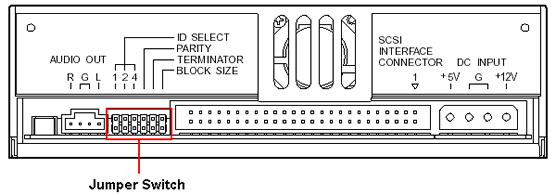
4 seconds on Google :Tried that already, searched both pics and hits, futile waste of time as IDE and Internals muddy the mix. I've started asking general questions of the gang here. Thinking would be that whatever something doesn't pop up in on site search quickly, it's info to be circulated?
ISTR it was ID5 & ID6?
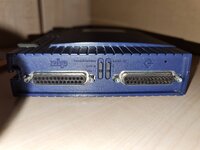
16 is only for later types of SCSI. It's 8 for SCSI 1 as was.Thanks much! Sorry, I'm half asleep and the ultimate point of my topic would be building a table of ID availability anyway. Mac only has 8 SCSI IDs available of the 16 in the spec.
SCSI ID 00 - Boot Drive - Unavailable
SCSI ID 01 -
SCSI ID 02-
SCSI ID 03 - Internal Opticals - Apple convention
SCSI ID 04 -
SCSI ID 05 - External Zip Drive - Conflicts with Apple Convention for Internal Zips
SCSI ID 06 - External Zip Drive
SCSI ID 07 - The Mac itself - Unavailable
Looks like I've got ID01 and ID02 available for a Zip inspired binary selector switch?
Can anyone thing of any conflicts with that pair?

Then it probably wasn't narrow SCSI like the Mac was, had two busses, or was weird. Narrow SCSI is usually 8 IDs. Hence all the disks having 3 jumpers.ISTR UNIX workstations using all 16 IDs in the SCSI 1 era, no?
Yep my Beige is a Rev A. Doesn't even have IDE cabling for a second device on each bus.Beige G3s came with both at various times for some reason.
Edit - duh me, because the IDE was screwed up on early Beige G3s. Two busses, but each would only take one device, so that's hard disk, and CD-ROM.
Later versions of the Beige G3 had better IDE that could work with two devices on one bus, so they might have switched over then.
Some of the IDE boards are so confused that even "c" doesn't work and you have to use CMD+opt+shift+delete or whatever it is.I'm somewhat not sure (but I could be wrong given I have very limited experience with this) because I still have to hold down the c key to get the system to start from the performa disc instead of the hdd. or perhaps the ide&scsi mismashed logic boards are somewhat excluded from a singular boot scan list?







