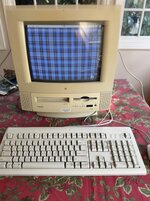
5260/120 issue

I got a 5260/120 from CL yesterday for $30. Came with Stylewriter 1500, modem etc.. After cleanup, fixing the FDD and cleaning some faulty extensions, I got it to work. Alas, after a day or so, it froze and the screen went blank, and not I cannot get it to boot any longer. The PS is OK (5 and 12V on the money and the HDD spins). Upon power on, I hear a healthy chime, but no HDD actuation noise, and a black screen. I replaced the 3.6V battery, reset the Cuda chip, to no avail. What else do I need to look at ?

Thanks in advance !
 
Thanks. I mostly know compact macs that still show a display when the HDD is toast, with a flashing question mark Mac. Do I understand that the 52xx Macs do not show a screen when the HDD is dead ? And would it boot with a system floppy ?

A dead HDD had crossed my mind, so I disconnected it and still got the same symptoms.....
 
Also pull the logic board out and check for corrosion next to the battery. The 4.5v batteries are leaking these days and cause damage to sensitive parts of the board. Mainly the SCSI, which if that was a mess might stop the machine booting even though the disk is IDE.
 
I have a pair of these and they are tough to work on. When you slid the logic board out to change the battery, did you look inside the slot to see if there is anything like dust or spiders blocking the connector? Possible use some contact cleaner and make sure it's slides back in properly. Also, make sure the battery you used to replace the old one is working as I believe this Mac requires one to boot. Zap the PRAM.
 
Also pull the logic board out and check for corrosion next to the battery. The 4.5v batteries are leaking these days and cause damage to sensitive parts of the board. Mainly the SCSI, which if that was a mess might stop the machine booting even though the disk is IDE
Yes I also checked, and there is hardly any corrosion around the battery. I removed the Velcro backing and spent 30mn inspecting all the traces, and I see nothing suspicious

3.6v? Am I going daft? Don't these have 4.5v Rayovacs from factory? If so, what did you replace it with?
I had a few 3.6V PRAM batteries for the Mac SE (1/2 AA) that have 3.6V. My understanding is that as long as it's >3V, it should be OK (mine is almost 3.7V). I'll play some more with that
 
I have a pair of these and they are tough to work on. When you slid the logic board out to change the battery, did you look inside the slot to see if there is anything like dust or spiders blocking the connector? Possible use some contact cleaner and make sure it's slides back in properly. Also, make sure the battery you used to replace the old one is working as I believe this Mac requires one to boot. Zap the PRAM.
I cleaned out the contacts on the board itself, but will look in as well.

By the way, I'm not sure if it has anything to do with it, but the screen went blank after I connected a Color Stylewriter 1500 to the LB. Not sure if it was right upon connecting, or later on, as I was busy checking the printer
 
I had a few 3.6V PRAM batteries for the Mac SE (1/2 AA) that have 3.6V. My understanding is that as long as it's >3V, it should be OK (mine is almost 3.7V). I'll play some more with that
Yup, that's fine and works, I was just confused because it sounded like you'd replaced an existing 3.6v.

Check the voltages, PSUs are failing these days. 5v is most important and you can check it from the hard disk molex, along with 12v.

Questions -

Does it chime? Do the speakers make a small "pop". Does the monitor charge with static (does a bit of paper stick to it when it powers on). What happens if you unplug the hard disk and power on? What happens if you press the programmer's reset button while it is stuck?
 
Check the voltages, PSUs are failing these days. 5v is most important and you can check it from the hard disk molex, along with 12v.
Yes, 5V and 12V right on the money (from HDD molex)
Does it chime?
Yes, health chime followed with some HDD noise (self test at startup)

Do the speakers make a small "pop"
Nothing after the chime
Does the monitor charge with static
No. When it was still working, I could hear a CRT thump after the boot chime. Now, the CRT remains silent and dark. With a compact Mac, the CRT comes on even if the boot process fails. Would the 5260 not turn on the CRT until the LB self-test is complete ?
What happens if you unplug the hard disk and power on?
Same symptoms
What happens if you press the programmer's reset button while it is stuck?
I have reset the Cuda chip. Not sure if there is a programmer's reset button. Where is it ?
 
Yes, health chime followed with some HDD noise (self test at startup)
CPU, RAM and ROM are most likely fine then.
No. When it was still working, I could hear a CRT thump after the boot chime.
Same symptoms
Sounds like you have analogue board issues, or a bad tube. Did you or anyone possibly let the air in?
I have reset the Cuda chip. Not sure if there is a programmer's reset button. Where is it ?
I wouldn't worry about it the reset button then - if the tube isn't static, thats where you need to direct your efforts - analogue board and tube.
Take care, the voltages are crazy high and there are capacitors that potentially hold it for some time after power off, even if unplugged
 
I thought about an analog board issue. But would this prevent the boot process from proceeding ? Again, the system is just not accessing the HDD, FDD, or the CD (I tried booting with a system floppy and a system CD). In compact Macs, the analog board or CRT could be completely toast, but the system would still boot
 
I thought about an analog board issue. But would this prevent the boot process from proceeding ? Again, the system is just not accessing the HDD, FDD, or the CD (I tried booting with a system floppy and a system CD). In compact Macs, the analog board or CRT could be completely toast, but the system would still boot
It's where I'd start as it is the biggest symptom.

Unless you have a Performa 630, in which case I'd swap the boards over and see what happens.
 
Back
Top