• Hello MLAers! We've re-enabled auto-approval for accounts. If you are still waiting on account approval, please check this thread for more information.

50mhz Daystar Powercache SE/30

Hi all,

I found a Powercache for the socketed version of the logic board. I sent the board over to uni for a recap and it turned out some video chips were bad as well... He fixed it and I tried the powercache yesterday. I was pretty excited but I knew something went wrong when I only heard half of the startup tone. Plus the SE/30's screen was all black, it was like dead. Turning the brightness control did nothing.

I know the ROM and RAM are good since they come from my SE/30's LB which works well.

I disconnected the internal HD for test purposes, I don't like when I have to hard reboot the machine when it's accessing the drive. I had an external SCSI2SD connected when I first tried it. Then I tried with nothing on it apart from a mouse and I got the same results.

It's not Analog board related since it worked when I put the original LB in it afterwards.

1/ Do you have to boot from the HD to get it working? I think it's supposed to boot up as a 16mhz 68030 without its drivers.

2/ I own another SE/30 with a socket, how can I pull the CPU without damaging it without the correct tool described in the manual?

3/ Do you have any idea on what the hell is going on with this powercache? I couldn't find anything on the web about this problem.

I think I should try the powercache with another LB so we'll know for sure if the Powercache is the problem.


 
Hi BadGoldEagle.

I can see how you got excited because I got socketed PowerCache too.

1 SE/30 with PowerCache can be accelerated event without drivers.But drivers can give you some controls.

2 You can use CPU-puller like comes with PowerCache SE/30.But I sometime get CPU pulled out with flat head screwdriver.But you should be careful not to make dent on the socket.

3 For that,I have no idea.but I think you have to be sure LB and Power is OK.I'm sure you don't want hurt PowerCache with further tests.SE/30 LB lits display even without CPU( you may see terminal Sima-SImac pattern).You can pull PowerCache out and get LB back and power on,you can see if screen is still black.and you can also test volts of power lines from FD port.

I hope everything goes well!

 
First of, make sure that the SE\30 works without the Powercache accelerator.

Second - don't assume anything. When you recap/repair a SE\30 board, you should also look at the analog board for the usual suspects (cracked/broken solder joints, bulging caps, burnt connectors, so on...). Repair as necessary. True, the SE and SE\30 analog boards rarely need fixing because the fan keeps them cool but every so often they do fail.

To use a flat head screwdriver, slip it at the corners of the CPU and slowly pry it up a tiny bit and then go to the next corner and do the same there and repeat to the next corner going around the chip a few times until it is loose enough to lift it straight up off the board with your fingers. DO NOT pry it up all at once on one side, doing this will bend and break pins off your CPU!

Third - as stated, check the voltage of your PSU. You can do this from the Floppy Port for 5V or the Hard Drive Power Connector for 5V and 12V. You may need to have your SE\30 PSU or Analog board recapped to fix it if the voltages are off.

Once you got this all figured out and the SE\30 turns on and boots normally without the PowerCache Accelerator, put in the accelerator and try again.

EDIT: Without the extensions/control panel, the PowerCache should either on or off, I'm guessing off. The Control Panel turns it on or off and allows some adjustments. I use the DayStar 040 Turbo on my IIci, and without the extensions/control panel, it is on all the time. But another user on the forum has the PowerCache and I remember him/her stating that without the software, the PowerCache is off.

 
Last edited by a moderator:
The problem is specific to this LB/Powercache as my SE/30 works with the same RAM and ROM with its original LB (soldered CPU).

It should also start without any HD (won't go very far but far enough to display the blinking floppy)

So it can't be Analog board related, plus the PSU has just been recapped by uniserver, he also fixed this LB because it didn't display video back then because some IC got rotten. Maybe some other video chip went bad since then...

We'll know next week-end now as I'll try removing the CPU with the flat head driver. Thank you both for the tip!

I really hope the mobo is bad and not the powercache! If the powercache is faulty I hope it's not too much of a pain in the @rse to fix! Do you know if the parts are easily swappable? For example the chip inside the mac plus keyboard is impossible to fix...

 
Takimoto- are you 100% sure the SE/30 is supposed to display video even without a cpu?

Then it must mean that the logic board is faulty...

We won't know for sure until next saturday!

 
Confirming that the Powercache SE/30 accelerator has issues with sound corruption - mine does the same (I think it's the 40Mhz version), I'm due to try the upgrade in another socketed SE/30 board, along with trying different System versions and Sound Managers.

JB

 
Takimoto- are you 100% sure the SE/30 is supposed to display video even without a cpu?

Then it must mean that the logic board is faulty...

We won't know for sure until next saturday!
If anything, without a CPU you would get either random static video or a checkerboard pattern on the screen. I'm veying for the random static. But there is a good change that you will get a blank black screen; it all depends on the RAM on the video portion of the SE\30 board.

 
Yes I'm sure.there is video if you like.

https://youtu.be/qWFOxatsQrs

As Elfen mentioned,pattern will be different according to habits of memory chip(or each cell).So there is possibility all memory cells are set to 0 gives black screen.but I haven't seen it.I always see random pattern.

I can't say logic board is faulty until checking volts on logic board or connection between logic board and analog board.

 
Last edited by a moderator:
Thank you so much takimoto for providing a video proof. :D

Now, I'll check with the other mobo but I think this one is toasted. I may be wrong, I need to check the voltages. What's the best way to do so? Multimeter on floppy port or else?

I'll test the powercache with the other one first and if it works I'll try to debug that black screen later. I'll let you know !

 
If you want to use something less pointy than a screwdriver, the cap off a Bic ballpoint pen works well.  The shirt-clip part, that tapers down to a rounded point/edge.  Or you could file down the edge of an old credit card or such like.

But yeah, a tiny lift on each side at a time.  You want that bad boy to come up out of the socket straight, not on an angle.

 
Yes,HD connector is directly connected to PSU,So you can check PSU volts.But there may be possibility MB is not supplied correctly or there is voltage drop.

 
Last edited by a moderator:
If you want to use something less pointy than a screwdriver, the cap off a Bic ballpoint pen works well.  The shirt-clip part, that tapers down to a rounded point/edge.  Or you could file down the edge of an old credit card or such like.

But yeah, a tiny lift on each side at a time.  You want that bad boy to come up out of the socket straight, not on an angle.
I like to use the long edge of a PCI slot cover. It will fit under the whole length of one edge at a time.

 
Okay. 

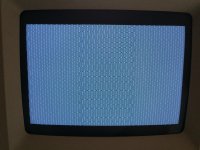
I took the CPU out of my SE/30's LB. Installed Powercache. Crossed my fingers. And there was light, but no floppy icon...

Here is the actual picture it gave me:

IMG_2838-min.JPG

I tested that same board again but this time without any CPU at all, it gave me the same raster.

So... I have been able to determine 2 things.

1/ The board I was using is dead or at least I now have to fix it.

2/ I'm afraid the Powercache is equally as dead or hopefully there's a fix to make it work again.

I have tried removing the ROM and all of the 8 RAM SIMMs, cleaned them as well as the sockets with no luck.

I read that bad RAM can cause such problems with the Powercache, but even though the RAM I have on this LB is only 2mb, it worked with the standard CPU. Should I risk breaking the sockets on my working SE/30 board to try the 8mb Simms?

What do you guys suggest I try next?

 
It worked before I took the original CPU out. 

If I put it back, I dare not try taking that CPU out of its socket again, as I bent one of its legs when I got it out the first time and I don't want to break it...

Do you think I should try it once more with its original CPU? 

 
Do you think I should try it once more with its original CPU?
Don't know really, but you are supposing the LB is the problem here, and you said before you get it repaired.

The only way to know it for sure is to put it back together, but it's just my two cents.

I know it's a bit nerve wrecking, so it's up to you. 

 
Back
Top