• Hello MLAers! We've re-enabled auto-approval for accounts. If you are still waiting on account approval, please check this thread for more information.

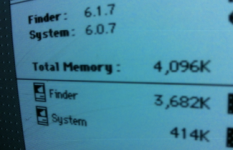
(2) Mac SE's stuck at 2,048K ram, /w 4meg installed

uniserver

68LC040
I have 4 one meg simms installed in both this FDHD and SE Dual 800k drive.

I tried 3 different sets of ram,

the jumper is set to (2-4)

I even tried the 1 meg position as well.

Does the Mac SE have a 2 meg limit syndrome of some sorts?

 
Just after checking my 4Mb SE: no jumper is set. Also Pina says (for reference):

MEM____Row2______Row1________Jumper

512K.....all 256K......empty..........2/4 on

1M.......all 256k......all 256k.........1 on

2M........all 1M.........empty.........2/4 on

2.5M.....all 1M........all 256k.........out

4M........all 1M........all 1M...........out

Pina also says:

"Note while the "2/4M" label may suggest the shorting blocks should be installed over the two left pins for 4M, that's just not the case. When the two left pins are shorted, all you end up with is 2M, regardless of how much extra RAM is installed!"

Talking about misleading!

So that would match what I have. Let us know if that works :)

 
wow thanks for the awesome info… man i have no idea why i didn't try no jumper at all. :-(

i will give it a shot… i am sure that is what is going on now.

 
ok thanks for the info!

yup!,

so no jumper.

i just took the jumper and moved it to one leg.

Screen Shot 2013-11-19 at 8.03.48 PM.png

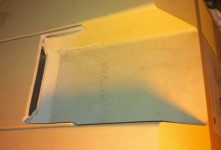
anyone know why someone would do this to a SE?

Screen Shot 2013-11-19 at 8.04.40 PM.png

:-p

 
I'm guessing they didn't have the correct tool to remove the top screws and didn't feel like they needed to move the computer around. So, out came the Dremel.

Anyway, good deal at getting it addressing the RAM correctly.

-J

 
No handle does discourage students/patrons from picking it up and trying to walk out with it. Unfortunately I would guess it would also encourage them to put gum wrappers/paper/trash in the new slots on top.

 
Back
Top