• Hello MLAers! We've re-enabled auto-approval for accounts. If you are still waiting on account approval, please check this thread for more information.

Chop Orinoco Silver PCMCIA card into Airport slot

Can confirm I have done this and it works. I'd look for cards which are a bit smaller already like the Buffalo AirStation WLI-PCM-L11GP (rather than the standard G model) but they do all still have antenna "lumps" which you have to deal with. I think Sony even made one which is basically an identical form factor so doesn't need to be hacked up at all.

If you want to do this on an iMac specifically then getting the card carrier is going to be your biggest challenge, as from memory they weren't included with the machine.

ETA: The nice thing about this is that in quite a few machines you can get a bigger card into the slot and boot the machine to test if it will work before taking the card to bits. Exceptions I can think of are the TiBook, iMac G3 and maybe the Pismo.
 
Thanks for tips - this iMac has the sled/card carrier which was nice to see. I'll try to do some non-destructive disassembly of a card next.

It appears the Orinoco Silver, Gold cards work at the same functionality when detected as Airport cards. Further reading suggested the card firmware is updated when Airport drivers are installed on these, but can't be sure on that.
 
I've been handed three Orinoco cards in the past year without looking too hard. I'm sure there is a good stash of useless Airport cards somewhere locally too.
 
interesting, I thought that you couldn't use a regular PCMCIA card in an AP socket due to pin incompatibility..
 
I think these are the only cards that fit the slot, and Airport cards do not physically fit a generic PCMCIA connector. Hmmm to CF or SD adapter but you’d have to mod the Airport slot and probably not worth the gain.
 
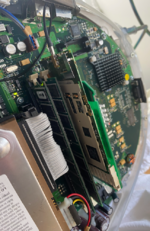
Also confirming this works using an Orinoco Silver card in the iMac G3 Airport slot carrier. A spare Orinoco card I had already had a broken plastic external enclosure (black part) so was a suitable donor for this. Unclip the plastic cover on the card, then the metal shroud comes off easily note some metal tabs but nothing is soldered. I didn't feel need to cover the card up with electrical tape as it seems to be well insulated with its own plastic shroud.

You need to remove the RF shielding on the iMac G3, put in the Airport sled first then slide the card in taking care of the RAM tabs (a part of the Orinoco card antenna hits the RAM slot, compress the foam on the card to make this fit smoothly). The card should slide in without much effort, and the Apple antenna clicks straight in.

Screenshot 2025-02-02 at 11.01.53 am.png
 
The Orinoco cards are more rare than the airport cards in the UK at least.
Interesting. They’re practically laying around on the ground in the US.

Might be worth international shipping, I’ve been surprised how cheap it is sometimes to send stuff across the pond.
 
Not in the Imac G3, but at some point tried a couple of alternative cards, including the Orinoco Silver and the Cisco Aironet. Both worked without any issue in PowerBooks, some directly detected as original Airport cards, some only when a third party program was present.
 
Both worked without any issue in PowerBooks, some directly detected as original Airport cards, some only when a third party program was present.
I’ve also had it go the other way, the Orinoco drivers recognized my AirPort card
 
It's kind of pointless these days to run an older wifi system, especially if other people who are inclined to snoop are around, so I'm not super knowledgeable about the AirPort hacks anymore.
I'm pretty sure the AirPort slot uses a subset of the PCMCIA standard in that it's only providing an ATA channel, not an ISA slot in addition to ATA. Therefore, the only wifi cards that will work are ones that are ATA-based. I'm unsure if most of the non-CardBus ones are ATA based or not (the CardBus types, especially G and later, are PCI-based so they'll never work).
 
The point is to use machines which have internal AirPort cards, running classic MacOS, for which there are no 802.11g card drivers.

Also, who is doing anything worth spying on with a thirty-year-old computer? That is a fake problem 😆
 
I would just use an old router for the few times a year you want to mess with wifi on an old laptop. I had an Orinoco on my Amiga 1200 a long time ago just to see it work.

Airport cards in the US used to be everywhere 10+ years ago, no idea now. I would think the Orinoco's are a little rarer now that PCMCIA is so old and obsolete. Most of what turns up on eBay for PCMCIA is CARDBUS.
 
It's probably not a problem if you're the only house in a 20 mile radius, but in high-density housing, your WEP network's probably going to be cracked within 30 minutes of standing up. Mine usually was, even with MAC filtering (they'd just clone something's address). The whole point of a network is to share resources, and I don't want to share my home resources with random people who break into my ancient wifi network. Unsuspecting people have been prosecuted for computer crimes originating from their networks from hacked wifi and I'm not interested in dealing with that. Also, my internet has a data cap and I don't want to unwittingly give any away.

Setting up either an empty network (so there's nothing for adversaries to take but also nothing for me to do on it) or maintaining all of the security to keep people out of stuff they shouldn't be in on a real network (while also remaining compatible with obsolete equipment and software) isn't worth the effort to me.

If I was at a VCF or something and hosted an old open wifi network with a public share on it (for sharing shareware/abandonware/other fun stuff), that would be different because it would be a temporary, untrusted, curated experience that I'd expect to be exploited to some degree.

My point is: people are the worst and they WILL mess with your stuff if for no other reason than because they can. I try not to give them an easy opening.
 
The point is to use machines which have internal AirPort cards, running classic MacOS, for which there are no 802.11g card drivers.

I think you're confusing WiFi generation and encryption standard here. The problem isn't so much there aren't any 11g drivers as that the OS 9 WiFi stack does not support WPA(2) even over 11b.

Also, who is doing anything worth spying on with a thirty-year-old computer? That is a fake problem 😆

Not true. Let's think about what the risk actually is in this situation. Risk is the result of both the likelihood of occurrence and the impact of any occurrence. So we can take these separately.

Likelihood of occurrence: there are millions of domestic networks out there, many of them rather poorly secured. People do try to break into domestic networks, for various reasons. But because there are millions of them and any malicious activity is probably not aimed at the owner of the network personally (except under rather unfortunate circumstances), for most of us we can get away with just not being the softest target in a given area. Our putative attacker will find easier prey quite easily, generally.

If we've got WEP then getting access to that wireless network is trivial, and you are no longer 'not the softest target' - in fact, the only softer targets are those without any encryption and access control at all. So by sheer statistics, even assuming that the attacker is not going after you personally, the likelihood of occurrence is noticeably higher. If the attacker is going after you personally, welp, good luck.

Impact of occurrence: depends on how your network is set up, but most of the simple ways are a liability. Let's look at two things an attacker could attempt to do.

First, the "spying"/stealing data use case. It is not the case that having a WEP AP just attached to your network is only putting at risk traffic between the old computers on the WEP network. Remember that if you can inject arbitrary L2 frames into a broadcast domain - especially ARP - you can basically pretend to be any computer on that broadcast domain and redirect traffic away from, say, a wired station to a wireless station. This can be mitigated by encrypting everything at application layer - which is what the modern web largely does - and so is not as much of a problem as it used to be. It can also be mitigated on the network layer by having your WEP network as a separate broadcast domain and route between that and the rest of your network, if you must. But how many people do that, other than network nerds?

Second, the "I want bandwidth that can't be traced back to me" use case. This is far more common, and can actually potentially get you into far more trouble than the first. There's all kinds of dirty work that one might prefer to do on someone else's network from a car outside, say - and by the time they get the nasty letter from their ISP or the police, one is long gone. To mitigate this, your WEP network would need not to have a route to the outside world at all. Again, how many people do that other than network nerds?

Most people who want WEP just plug an old AP into their existing network. That exposes them to these risks.

Now, are these risks enormous? Not... hugely. One is far more likely to get got by malware on the Internet than by a drive-past attacker. But they're also basically trivial to remedy. And even if the likelihood of occurrence isn't huge, not exposing yourself to risk you don't have to is a prudent and sensible thing to do, especially when it's dead easy.

So telling other people this is a 'fake problem' is irresponsible. It's not a fake problem at all. If you have decided that in your risk calculus this is OK, then that's fine. But each person has to make their own decision here; to tell them it's a fake problem prevents them from making their own decision about risk in a situation where the nature of that risk can be very non-obvious. And that's not a good thing to do.

 
As a quick update/resurrection - a quick look on eBay now suggests those Orinoco 802.11b cards may no longer be much cheaper than the Apple Airport cards. Possibly due to the growing surge in interest in vintage Windows PCs these days. So if you're adding wifi now you might be able to land original Apple hardware for a similar price. Though I bet those Orinoco cards can still be had much cheaper at thrift stores and estate sales....

I put an Airport card in my Digital Audio back when it was in daily use, but now it's just there to complete the vintage build. I don't think I've taken that machine online since about 2010, or whenever they stopped security support for OS X Tiger. And I am not planning to anymore. Even back then I recall it being common advice to move away from WEP devices when possible. I am certainly concerned about exposing my home network these days using old wifi devices that a child could crack into.

With that being said, I love seeing how far vintage Mac users have gone in getting old 68k and PPC macs using the modern web! But those that go that route usually know their way around network technology (I don't!) and understand the risks.
 
Back
Top