• Hello MLAers! We've re-enabled auto-approval for accounts. If you are still waiting on account approval, please check this thread for more information.

Ideal upgrade path for a dual 867MHz MDD?

Wondering what people would recommend I look for to upgrade my Dual 867MHz G4 MDD.
When I got it, it was pretty much Stock, but I'd like to get it up to at least Dual 1.25GHz to match my original machine back in the day, if I can. I'm a little unclear if the upgrades require physical modification to use with such an early MDD. Some info suggests that they'll work, you just won't quite get the absolute most out of them due to the bus speed?

I've seen Herd's upgrades, but it seems they don't ship outside the US, so I guess I'm out of luck there.
 
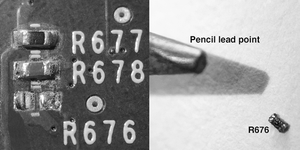
Snip / de-solder / remove… R676 from the backside of the 867’s motherboard to accomplish 167 MHz bus speed.

R676x.png

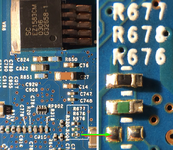
R676 already absent from other MDD mobos (below).

Done.png

Then possible to replace original CPU with a stock 1.25 GHz or even a 1.42 GHz processor transplant.
 
Well, my dual 1.25GHz CPU arrived.
Successfully removed the resistor cleanly... but upon reassembly, I get a single loud beep and periodically blinking power light.
Swapping the original CPU back in, I get nothing but the fans blasting at top speed.

Searching online led to all manner of posts confidently declaring basically every individual part of the machine to have failed... but the most promising lead suggests that it's the RAM.
There was conflicting information on whether the RAM had a totally separate bus clock, and whether your RAM speed mattered, so hopefully someone can confirm - after removing the resistor to boost the clock, will PC2100 RAM fail to work? And will upgrading to PC2700 RAM fix this?

Regarding the removed resistor, is it simply a zero-ohm? To reverse the modification, is it a jumper situation?
 
Yes. Could be the RAM. Think that all of mine are running with PC2700. And they’re all 1.25 GHz & 1.42 GHz dual CPUs. But I’d suggest that you’d re-seat everything and zap the PRAM (if it will allow that).

And I’ve forgotten the actual miniscule value of R676 but it isn’t quite zero (but very near that).

If you must acquire PC2700, will that be a deal breaker for you?

One more thing… after removing that resistor on an 867 DP MDD mobo here and adding a 1.42 GHz DP CPU, I had a problem with the J20 RAM slot (closest to the GPU). And I’ve since become aware that others have also had this same “glitch”. The solution was found, not to use J20. So I got two, 1GB sticks of RAM instead and no more problem. Of course, one stick of 1GB plus two 512 mb sticks will get you the same max 2 GB (without using J20).

So maybe before you source different RAM, remove whatever might be occupying J20 and test.

*You might also test / try just one stick of RAM (in any other slot except J20).
 
I'll give those tips a shot, thank you!
I've got a stick of PC2700 on the way I was able to pick up cheap, at least for testing; will hopefully arrive some time next week.
 
Wondering what people would recommend I look for to upgrade my Dual 867MHz G4 MDD.
When I got it, it was pretty much Stock, but I'd like to get it up to at least Dual 1.25GHz to match my original machine back in the day, if I can. I'm a little unclear if the upgrades require physical modification to use with such an early MDD. Some info suggests that they'll work, you just won't quite get the absolute most out of them due to the bus speed?
Be warned, the power supplies on MDDs have not all aged well. Both of my MDDs have failed power supplies.
As for your question, is it primarily a Mac OS 9 machine, a Mac OS X machine or both?

As for accelerators, 1200MHz are fast for Mac OS 9 and while 1400MHz processors, they aren't that much better for Mac OS 9. Maybe they make a big difference for Mac OS X 10.4 but I think the choice of AGP card is more important there. Dual processors are essentially a waste of electricity in Mac OS 9.
OWC, Sonnet & Giga-something-or-other all do faster processors and are priced accordingly.

For Mac OS 9
• ATi Radeon 9xxx are not bad cards at all and some are better than others. For gaming, you won't really more than 32MB VRAM. You probably already have an ATI Radeon 9000 Pro in your MDD. The most powerful video cards are nVidia Ti 4600 and you will need deep pockets for them.
• A SATA-I card will make a great difference here. @rabbitholecomputing do a great SIL-3112 PCI SATA card that you will need to flash yourself. Here is his shop: https://shop.rabbitholecomputing.com/products/sata-pci-hard-card.
More information of flashing SIL-3112 cards here: https://68kmla.org/bb/index.php?thr...3112-flashing-easier-way-using-flashrom.7013/

If you will be using Mac OS X, there is a lot more hardware that you can get:
• faster AGP cards for gaming: e.g. ATi Radeon 9600. You'll have to look them up for I am only starting on Mac OS X. Some PC cards can be flashed and ROMs can be found at: http://themacelite.wikidot.com/wikidownloads2. See also: https://68kmla.org/bb/index.php?threads/id-like-your-help-ordering-a-128k-eeprom.51062/
• SATA cards from SeriTek & Sonnet, like the Tempo-X, which will give you 8x SATA-II ports (4x eSATA & 4x internal SATA);
• RAID cards: I'm still trying these out, so YMMV: HighPoint, Areca, LSI Logic

Your MDD doesn't support PCI-X but many PCI-X cards also support 64-bit, 33MHz PCI slots. You will need to check though before buying any.

As for shipping out of the US, look up www.shipito.com. I use to get stuff from the US to Switzerland or Ireland.

 
It's pulling duty as a triple-boot, Tiger, Sorbet, and OS9. And looking to expand further with an unlocked MorphOS, but I've not used it enough yet to feel comfortable and take the plunge.
I want to retain full OS9 compatibility, so I stuck to the "officially" supported GPU and already upgraded it to the Radeon 9000.

Lots of helpful info to keep in mind, thanks! A SATA card would probably be better than a bunch of SATA-to-IDE adaptors; I'll definitely have to remember that one.
 
It's pulling duty as a triple-boot, Tiger, Sorbet, and OS9. And looking to expand further with an unlocked MorphOS, but I've not used it enough yet to feel comfortable and take the plunge.
I want to retain full OS9 compatibility, so I stuck to the "officially" supported GPU and already upgraded it to the Radeon 9000.

Lots of helpful info to keep in mind, thanks! A SATA card would probably be better than a bunch of SATA-to-IDE adaptors; I'll definitely have to remember that one.
Have you tried installing System 7.1 on it yet? You'll lose networking, graphics acceleration and sound, but be able to say you've done it :)
 
I have not!
I've considered having both System 7 and OS8, but will need an additional drive to do so.
I do currently have Basilisk II set up for a few games that won't run properly on OS9, but I fear that the compatibility of that software with this hardware means it isn't going to be able to replace that.
 
I tried booting System 7.1.2 om my Pismo today.

To my amazement, it actually did boot, but the Finder won't load, so it's not very useful.

But it basically works, so the Finder is probably fixable!

c
 
I tried booting System 7.1.2 om my Pismo today.

To my amazement, it actually did boot, but the Finder won't load, so it's not very useful.

But it basically works, so the Finder is probably fixable!

c
Supposedly the Finder from 7.1 works, as does the Finder from 7.5. Just something wonky with the 7.1.2 Finder.
 
Huh, OK. I'll try that.

I tried the Finder from 7.6.1, and it didn't work either, probably because it's too new.

c
 
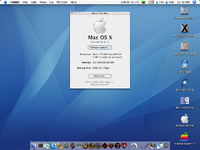
Picture 1.png

Good news is that I replaced the RAM with a 512MB PC2700 stick, and it boots okay!
Bad news is that it seems incredibly unstable. Limited testing, but Sorbet Leopard gave me the ol' "Mac Bomb" Grey Box of Death multiple times without warning, and Tiger locked up and froze on me at least once. It also seemingly locked up on the boot select menu.
Took some games for a quick spin in Tiger, and things seem to run quite well - definitely better than before. Though the one I put the most time into crashed. Not sure if unlucky fluke or related to the apparent instability.

I'll have to get a full 2GB RAM upgrade when I've got the money, and see if that helps, but if anyone can confirm my theory that it's just a lack of RAM causing it, that'd be very good to know. Does Sorbet typically Bomb with only 512MB RAM? Is there anything I should do after upgrading (or downgrading - in this case, I've gone from 1GB to 512MB) RAM to fix instability? Some sort of cache that needs clearing?
 
The machine should be perfectly stable, and I think OS X 10.4 only requires 128MB of RAM. It could be that the logic board does not like the bus overclock. You could try the PC2700 RAM stick in different slots. Also, the original 867MHz CPU should still work (and still run at 133MHz bus). Do you have a heatsink that is suitable for a Dual CPU, and does it make good contact with both dies? You could turn off one CPU with a boot arg and see if that makes any difference. It is an easy thing to try and should at least run cooler.

If you can't get it stable at 167MHz bus, I would re-install the original 867 CPU. If this proves to be stable, I would then change the settings on your Dual 1.25 board to run at 133MHz bus. It would probably do 1.33GHz (10x 133MHz) fine. But this process involves moving small SMD resistors.
 
Temperatures didn't seem to be an issue, based on the monitoring.
My heatsink is the one that came with the Dual 867MHz - had to cut about 2 square centimetres out of it to fit the extra components on the 1.25GHz board, but it's still got the industrial blaster fan on it. Using good thermal compound, too.

I'll have to give swapping the RAM slot around a go, and see if it improves. And disabling a CPU.
I fear reverting the bus speed back will be next to impossible, though - removing a resistor that small is one thing, but putting one that small back in is... probably not within my capabilities.

Will the old 867 CPU work as normal with the bus modification, as long as I use the new RAM?
 
Picture 1.png
Picture 2.png
It's alive!!
Swapping the RAM from J23, the slot second closest to the GPU, to the next slot down, zapping PRAM and hitting the PMU reset, everything now seems totally stable! Bounced between Sorbet and Tiger and tried a handful of things; nothing crashed or locked up at all.
Thermals appear good too - tried some more demanding games and it hovered around normal temperatures, never above 50.
It appears we have a success!
 
Back
Top