so you'll have to learn a few "secret codes". IE, learn how to go to the CLI.
I suppose you didn't really read my posts, as I wrote that I "had to" work with Unix und "liked to" play with AmigaDOS.
But that's gone and the times changed. No time & need to learn old stuff anymore.
I like to play with System 6 to Mac OS 9 computers. And that's the reason I like this 68kMLA forum.

The good news:
THE SOLUTION
Your links were
really great and so I installed Snow Leopard Server on a Virtual Machine.
Here the results:
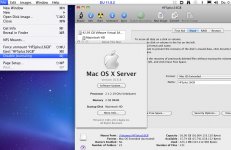
Snow Leopard 10.6 - Disk Utility v11.5.2 (intel, not PPC):
can format HFS+ non-journaled disks and
can disable Journaling on an already formatted disk when holding down the Option (Alt) key within the menu.
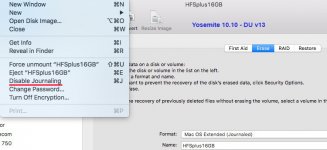
Yosemite 10.10 - Disk Utility v13 (I use a hacked DU v13 in El Capitan...):
cannot format HFS+ non-journaled disks but
can disable Journaling on an already formatted disk when holding down the Option (Alt) key within the menu.
"Disable Journaling" can be used on a disk with files on it without deleting them.
Great to format hard disks etc. for use on Mac OS 8.1 to 9.2.2.
I use it now on an external 2TB hard disk to get read
AND write access on a Linux OS for files exchange (USB 3.0).
Don‘t use larger HFS+ non-journaled disks with Linux!
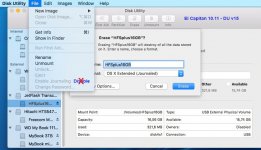
El Capitan 10.11 - Disk Utility v15:
cannot format HFS+ non-journaled disks and
cannot disable Journaling.
Thanks!