• Hello MLAers! We've re-enabled auto-approval for accounts. If you are still waiting on account approval, please check this thread for more information.

Quadra 950, advice on SCSI cable and HD needed

Alex

6502
Dear friends

I have a Quadra 950. It arrived a few days ago without any internal SCSI cables or hard drive.

Could one of you kind souls tell me specifically what cable I should by and what I should be looking for in terms of an HD?

I have a few 68K machines but I am rather timid and ignorant of this machine. I know there is much for me to research but I want to be sure I purchase the right cables and drive.

I really appreciate any help.

—Alex

 
Thanks a million. 

I see that the cable you referred to is described as a SCSI 18 Inch Internal Ribbon Cable with Two 50 Pin Female Connectors. Doesn't the 950 support at least 2 hard drives?

I don't know the name of the cable I am thinking but some internal cables have connectors along the same cable, one on either end and perhaps a few more in between. Could SCSI devices be connected like this internally, for example 3 devices along on cable?

I have to read the dev notes on this machine, I have a huge gap of knowledge in internal SCSI and as I understand it the 950 folded or virtualised the two SCSI buses into one, at least under an earlier OS.

This is not an easy machine to contend with but I just got it so I would love see it running.

Thanks!

—Alex

 
There are long 50 pin SCSI cables with 5 ports if you look hard enough. You can install 3 hard drives and keep the floppy drive if you have 3 drive cages (you can stack 2 of them in the back)

 
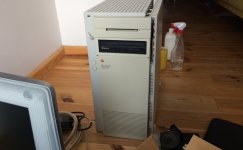
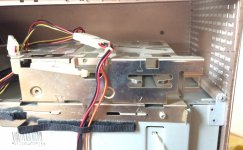
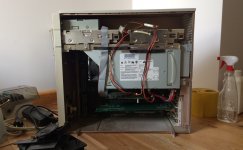
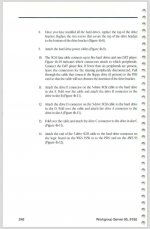
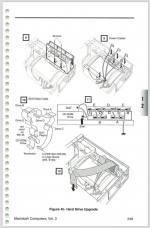
Here are some photos of the machine, a NuBus and PDS card that I discovered in the machine and the extra cage that was also present. According to "Macintosh Computers Service Guide Volume III", this upgrade appears to be for the WGS 95 or to upgrade the 950 to a WGS 95. The 950 I purchased has the cage but no drives, no power or SCSI cables and no SCSI ID cables.

I would appreciate very much if someone has information on where I can find the following parts.

5-Drive SCSI Data Cable

SCSI ID Cables
SCSI Power Cables
 
Is it worth my going this route? What are your own recommendation.

My machine has a 44 a Megabyte Syquest which has no use, to me anyway. I would much prefer a DDS-DC or a CD ROM. Any thoughts?
 
 
Machine overall.
Featuring a 44MB Syquest.jpg
 
2nd Drive Cage
2nd Drive Cage (closeup).jpg
2nd Drive Cage at rear.jpg
 
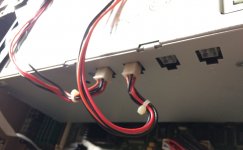
PSU
PSU 4 PIN molex?.jpg
 
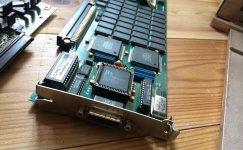
GPU Card (I have no idea what this card is   Maybe it's a ForMac Pronitron and I have no drivers for this)
GPU Card.jpg
GPU Card full length.jpg
 
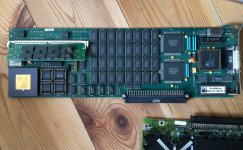
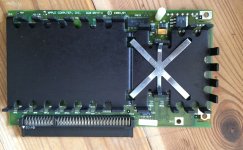
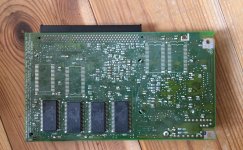
PDS Card
PDS Card - Power Macintosh Upgrade Card (front).jpg
PDS Card - Power Macintosh Upgrade Card (back).jpg
 
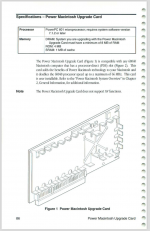
PDS Card appears to be the one mentioned below (source Archive.org: Macintosh_Computers_Service_Guide_Volume_III_July_1994)
Power Macintosh Upgrade Card.png
 
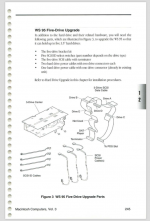
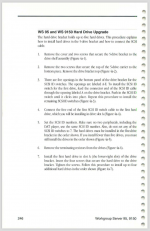
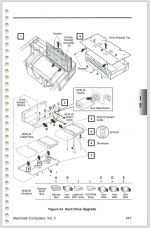
WS 95 Five-Drive Upgrade Kit (source Archive.org: Macintosh_Computers_Service_Guide_Volume_III_July_1994)
Macintosh Computers Vol 3 - 1.png Why does the SCSI cable have an end that connects to PDS?
Macintosh Computers Vol 3 - 2.png
Macintosh Computers Vol 3 - 3.png It appears I am missing the drive bracket top that holds 3 more drives.
Macintosh Computers Vol 3 - 4.png
Macintosh Computers Vol 3 - 5.png
 
 
Folks, I am sorry for all the images and auxiliary info but I though it might help. I am really stuck on where to find the parts:
5-Drive SCSI Data Cable
SCSI ID Cables
SCSI Power Cables
 
Any further help would be amazing!
—Alex
 
Last edited by a moderator:
FORMAC made high end VidCards and Monitors for CAD etc. You might not need drivers, they're usually in the Declaration ROM on the card. Give it a try with a good Multisync display that'll handle 21" resolutions.

 
No idea where to get Q950 power cables, you might have to buy the plugs and make your own. I think they are all connected to the same point in the power supply so you could probably just get a normal PC molex 4 pin power splitter and call it a day.

SCSI cables are on ebay, take a look.

Since you have the 5.25" Removable drive bezel you just need to replace that with a 50 pin SCSI drives.

I would put in a WTB on LEWswap google groups for the Q950 stuff.

PS. Nice video card, if you want to trade for it let me know.

 
WOW! I've never seen that service guide before, it's amazing! Thanks so much for that link, now I've gotta dig up the rest of the volumes.

edit: that didn't take long, looks like they've archived all of them and a lot more.

 
Last edited by a moderator:
WOW! I've never seen that service guide before, it's amazing! Thanks so much for that link, now I've gotta dig up the rest of the volumes.

edit: that didn't take long, looks like they've archived all of them and a lot more.
They are absolutely amazing, indeed! There are 4 volumes in total and they are meant to be considered as one set of knowledge. In other words, volume 2 does not make volume 1 obsolete.

I should create a new post on these volumes because they are truly packed with excellent information.

Glad you like them!

 
No idea where to get Q950 power cables, you might have to buy the plugs and make your own. I think they are all connected to the same point in the power supply so you could probably just get a normal PC molex 4 pin power splitter and call it a day.
The physical connectors look like they're the exact same ones used for CPU power on ATX power supplies so hacking up your own cables shouldn't be hard, if you want to retain something closer to the "original look". Pinout looks to be http://i.imgur.com/r3xQ7IL.pngbut I'd confirm with a multimeter if anyone wanted to try.

 
Back
Top