• Hello Guest! We're hosting a challenge to welcome vintage Intel macs to the MLA during the month of July! See this thread for more information.
  • We've made some quality of life improvements to the Trading Post. More info here.

Lisa 2/10 kill switch question

mst3k

6502
There are two plastic pegs that attach the 'kill' switch on my Lisa 2/10 to the small plastic mount that screws into the frame on the front of the machine.
The front cover then fits into a slot in that mount that closes the switch and allows the machine to boot, preventing the machine from booting with the front cover removed.
I am going to try gluing the switch back in place inside the plastic mount, but my question is about the switch itself.
Other than the obvious safety reasons Apple implemented to keep stray hands from getting inside the machine when it is 'on', is there any other reason why i can't simply eliminate the switch and attach the two wires together or tape the switch closed? Has anybody here simply bypassed the switch?
I'm thinking more about a temporary fix to keep using the machine in the event I need to locate another switch as I am dubious that gluing will work.
Thanks
 
It took me a while to know what you were referring to, as I would ordinarily call this a "panel interlock switch" or similar. But "kill switch" is accurate.

Anyway, if you wish to defeat the interlock by any of the means you've suggested, they will all work exactly as you intend. Safety is the only reason I'm aware of for Apple fitting the switches (there are two of them, though it sounds like you're describing the one behind the front cover), and defeating the interlock is a typical thing to do for a variety of repair and adjustment operations. If you do run your Lisa with the covers off, be certain you know and mitigate the associated risks to yourself and to the computer.
 
(there are two of them, though it sounds like you're describing the one behind the front cover)

Thanks stepleton. Yes. the front cover switch. The actual switch is loose inside the mount.
I for the life of me could not figure out any other reason than safety (which is not a bad reason), but thought it worth asking.
The previous owner of this Lisa said it powered on, but I can't get it to show any signs of life. I'm started with the kill switches on the front and PSU, which I have both bypassed, but still no signs of life. I guess my next stop is reseating all the boards. Is there a simple way to tell if the PSU is actually functioning and producing the correct voltages. The compact Macs are ez to check on the external fdd port, but NO idea how to check on the Lisa and currently no other machine to try it in. This is a 2/10 with the 1.8 amp, 150w PSU. Then I suppose it's on to the power switch itself.
Any suggestions would be appreciated!
 
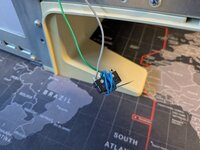
Here's my kill switch fix:

PXL_20260709_005959571.jpg

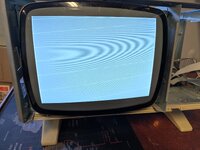
Here's what I am getting now:

PXL_20260709_005949118.jpg

Image is steady with no flicker.
This machine has Mac XL roms.
No beeps or tones.
The boards look great (doesn't mean they are great). If this were a compact Mac I'd think voltage problems.
 
Found this thread. Looks familiar.

 
A few new findings...
Tried booting with solo memory cards. No difference.
Tried booting with switched memory card slots. No difference.
Tried booting without I/O card. No change.
Tried booting without CPU card. No image or screen activity at all.
Tried using the reset button during each of the above boots to no effect. Pushing reset does not cause any screen flicker or reset.
Hmm.
 
Forgive this post for being quite similar to the one on the other active Lisa troubleshooting thread, but: you now find yourself at the beginning of a classic troubleshooting journey, for which the typical strategies for machines of the Lisa's era apply. Unlike the other poster, you do not have easy access to your Lisa's circuitry, which will make troubleshooting a challenge. While it will be possible to measure some things from the access you do have (essentially to the I/O board), it will be hard to investigate the CPU board from where you are. You may be able to make some early progress by removing the I/O board and probing the CPU board from the "bottom" (i.e. the solder side); you'll just have to keep good track of which pins are which!

But before we get to that, what troubleshooting equipment do you possess? Multimeter, oscilloscope, logic analyser, anything else of that nature?

For me, the trinity of first troubleshooting checks are as follows:

1. Are all of your voltages good?
2. Is your CPU receiving a clock signal?
3. Is your CPU coming out of reset?

These things are things I think you ought to be able to measure without too much trouble. Power-wise, I believe most of the voltage rails are available on the I/O board (consult schematics to identify good places to probe). The +33V rail will not be present there, but the healthy-looking display suggests it is fine.

For CPU clock and reset, you may remove the I/O board and probe the corresponding legs on the 68000 from the CPU board solder side.

Finally, as advised on the other post, you may find that people on lisalist2.com may offer more focused troubleshooting guidance.
 
PS: Reseating socketed chips can't hurt, generally, provided you do it with the usual care. Worth a shot!
Thanks for the advice and encouragement stepleton.

I reread your thread ( shown above) with BEU and was curious about how the machine magically fixed itself while testing the SRAM chips.
When I pulled all of the socketed chips from the CPU board, including the CPU and SRAMs, I carefully buffed all of the pins with a brass brush and cleaned them with IPA.
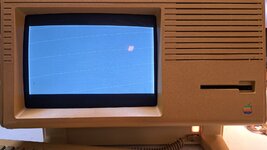
I replaced them, then the CPU board, but NOT the I/O board, power on, et Voila! the ghostly flickering Error #41 appeared.
I popped the I/O board back in and tweaked the video display settings a bit and.....
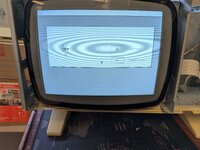
the old girl booted to the glorious, wonderful error 82!
It is a magical feeling when one of these things comes to life. It is worth all of the fidgeting, studying and staring at the ceiling while I'm lying in bed trying to fall asleep.
And now, to paraphrase BEU in your earlier thread, 'on to the widget drive!'

PXL_20260710_211607301.jpg

I'm hoping my luck holds and it's just a stuck brake (crossing fingers).
Thanks again for the support! It is always greatly appreciated.
 
Back
Top