• Hello Guest! We're hosting a challenge to welcome vintage Intel macs to the MLA during the month of July! See this thread for more information.

Phil's iBook 700MHz Adventures

Phipli

68040
I don't own any intel Mac laptops sorry :). But I picked up a cheap "sold as seen" iBook G3 700MHz 12" on eBay.

This thread will capture my experiences getting it running and installing unsupported Systems.

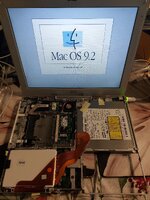
It hasn't been all plain sailing. I'll fill in the details, but let's just say this is the third time I've had this famously tricky machine apart :

20260705_153731.jpg
 
So the Machine arrived. Overall condition is good, but worryingly, I think it is someone's parts donor. The keyboard is was heavily worn, more so than the screen is faded or the case worn.

The fan is noisy. For now, given it rarely spins, I'll just put up with it. The Optical (it has a DVD read / CD writer (was that a combo drive? I forget)) drive eject is tired, but it seems to read well. It is a tray drive on these.

RAM was 128MB, and the hard disk was "dead", but turned out to have been removed.

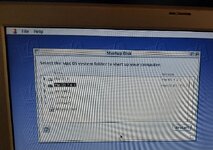
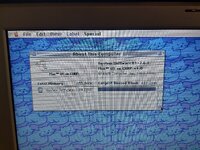
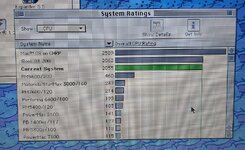
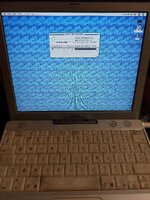
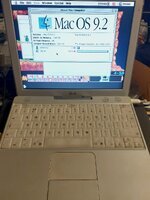
I plugged in a USB pendrive I'd been messing with and discovered it was actually bootable, so messed booting it in 9.2.2 and Mac OS 7.6.1 from CD and USB.

1000036676.jpg
 
For now, I've borrowed a keyboard and an extra 512MB of RAM from a 500MHz iBook. It looks much nicer now and is a fun little machine to play Lemmings on.

1000036678.jpg
 
Next step was to stop booting from a USB stick and sort out some storage.

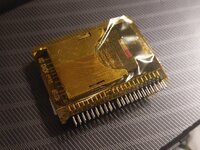
I've always had excellent luck with the 44pin SD to IDE adapters in Pismos and so I thought I'd do the same with this (don't). I ordered a new one and a new 64GB SD card, but being impatient I stole the adapter from my Pismo for now. I booted up, formatted the SD card, installed Mac OS 9.2.2 and some various other software, restarted.

1000036700.jpg
SD Card adapter - they work well in Pismos, less so in iBooks.

Everything was great... But the CD drive was only showing up intermittently and then when I powered down, nothing on the IDE bus would show up. Hours later it started working again when I tried (I installed System 7.6.1 - details to follow) and then again, when I shutdown, the IDE devices vanished again. It was late, so I left it for the night.

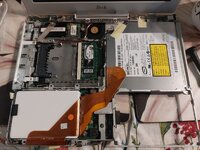
Today, I disassembled the iBook for the third time and installed a SATA M.2 SSD in an IDE adapter.

I also oiled the fan as it was making horrible grinding sounds, which might have been an error as I think I retrospectively read it uses magnetic bearings. No loss - it was destroyed anyway and is no worse than it was, but I've ordered a £4 replacement. Hopefully it isn't also worn out.

This new SSD seems to be working perfectly and I have a few partitions with 9.2.2 and 7.6.1 installed so far. I may also add 10.3 and 7.1) mostly for experimentation.

1000036716.jpg
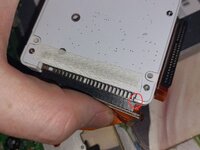
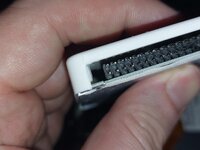
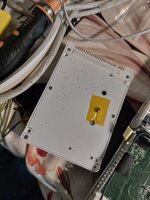
I had to make a small modification to the SSD housing because it didn't have enough clearance for the IDE connector's overhang. I stopped off a small area of plastic with my side cutters.

1000036719.jpg
I covered the screw in kapton tape just to be safe as it is just above the logic board.

1000036720.jpg
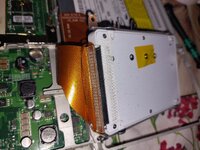
Now it all happily fits. Sadly, with the price of SSDs, I only have a 32GB disk for it, which is smaller than I'd like.

1000036722.jpg1000036723.jpg
 
Last edited:
IDE to mSATA would be a far better solution for a system this new. OS X is going to be hard on a little SD card.
I'm still updating the thread and have updated the previous post (there is a bug in the way the forum works on my phone, if I try to edit text after uploading a first image, it just deleted the image), but also, 64GB SD cards are cheaper than 120GB SSDs. SD cards aren't small in a logical sense.
 
Installing System 7.6.1...

Format and partition your disk. I tend to make a couple of small partitions for older OSes, and habitually don't make them larger than 2GB even though that isn't a limit here. Make sure you select HFS (Standard), not HFS+ (Extended).

While booted from another OS, insert a 7.6.1 installer CD (I need to make a bootable version but haven't got around to it). Ignore the main installer, it won't run on your iBook. Open the "Software Installers" folder, and then the "Mac OS 7.6" folder.
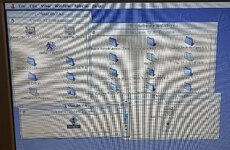
1000036731.jpg

Hold option down while you double click and keep it down while you accept the licence agreement, and any other messages until you get to the main installer. If you don't hold option it will tell you the installer isn't compatible with this machine, if you do, you get the following screen :
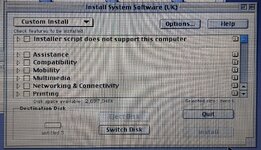
1000036732.jpg

Select the minimum install (not the full) and then add in anything you feel you need, but keep it fairly light to minimise issues. Once done, select a destination and click install.
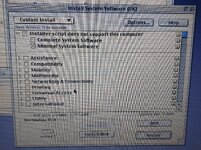
1000036733.jpg

Quit out and run the 7.6.1 Update Installer.
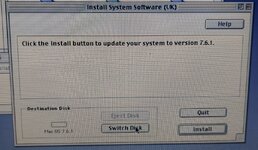
1000036736.jpg

Don't restart, but instead put the CHRP Enabler, CHRP ROM and Mac Mini ROM (Mac OS 9 Lives 9.2.2 ROM) in the System Folder. Then move "Monitors & Sound" and "Date & Time" out of the System - they cause issues on my setup for some reason.
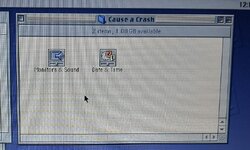
1000036737.jpg

Now you can restart into 7.6.1.

1000036738.jpg
Remember if you have issues, you can hold Option during boot to show the boot selector.

You should now have a working, if fragile and buggy, Mac OS 7.6.1 install on your iBook.
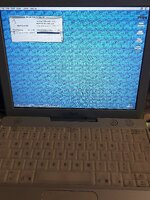
20260705_164732.jpg20260705_164740.jpg20260705_165453.jpg
 
Last edited:
I'm still updating the thread and have updated the previous post (there is a bug in the way the forum works on my phone, if I try to edit text after uploading a first image, it just deleted the image), but also, 64GB SD cards are cheaper than 120GB SSDs. SD cards aren't small in a logical sense.
Ah, I see your edit now. The current SSD prices truly are a shame for upgrading these old computers. I used to be able to get a 120GB mSATA drive for only around $20-25!
The issue with SD cards, besides for the lower speeds, are that they aren't really designed to handle being used as a page file and that sort of thing, which can cause them to wear out faster. Capacity wise they're perfectly fine of course.
 
Ah, I see your edit now. The current SSD prices truly are a shame for upgrading these old computers. I used to be able to get a 120GB mSATA drive for only around $20-25!
The issue with SD cards, besides for the lower speeds, are that they aren't really designed to handle being used as a page file and that sort of thing, which can cause them to wear out faster. Capacity wise they're perfectly fine of course.
I'm aware. But also, these machines aren't mission critical and I've run a Raspberry Pi server for 5 years straight off an SD card, and used a Pismo with a good quality SD card for several years weekly.

It isn't as bad as some people think. Your milage may vary, but I've found them more reliable than period spinning disks.
 
Attached are the three files to add to your 7.6.1 System Folder. This is just to get people started, I'm not saying these are the right files, or the best files or there isn't a better solution... this is just the ones that I got to work today.

They'll probably also "work" on a lot of other G3 / G4 macs.

Do not run this software on a machine containing files that are important as it may crash and crashes might corrupt your disks.

Note I have a lot of issues with video related things. I have been working on trying to improve the graphics driver situation, but at the moment my best solution is still not good enough to share. I have partial bit depth and resolution changing... but a byproduct is that my cursor keeps getting trapped on a non-existant 2x1 pixel screen. I also need to look into getting 2D acceleration working.

And sound. If someone can get sound working, I'd be over the moon!
 

Attachments

Back
Top