Hello. The thing that happens to everybody but me actually happened to me and not everyone else for once, haha
On Facebook Marketplace, I saw a 512k w/keyboard, mouse, Apple tote bag, and a midnight blue Abcom dust cover for the Mac and the keyboard, listed for $350. Pictures of the front of the unit powered off; listing said it was functional. All I wanted was the dust cover, as I have the white version and am obsessed with it. The midnight blue, which I had no clue even existed, looked awesome.
But I have a 512k already that I was happy with. I stuck a ROMinator in it and it's great. Don't really need another.
Anyway, it's now like a month later and the listing is still up. I figured, screw it, and offered the seller $200, which he accepted immediately. Drove 45 minutes today for pickup. Kid selling it said he got it for free from an estate cleanout. They told him to chuck it or just take it for himself. He decided to save it, God love him. $200 straight profit for him; I get a dust cover and a 512k I can trade someone for something else, maybe.
Anyway, I got home and got it out of the bag to take a look at it:
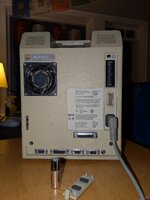
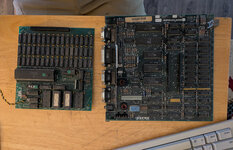
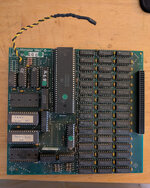
That ain't normal, haha. So I cracked it open and found a the following card hooked up to this hand-mounted SCSI board:
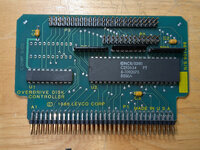
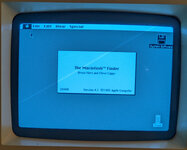
I don't remember there being an expansion slot on my other 512k, probably because there isn't. So I buttoned the machine back up quick to see if it would boot. It did, and as you'll see below, this thing has 2MB of RAM somehow:
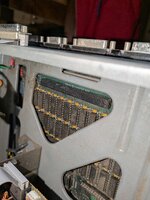
Now I'm excited to see what exactly what expansion board is installed. I'm guessing a Levco MonsterMac or something similar, but I cannot remove the board from the unit. There is absolutely zero clearance between the SCSI slot there and the metal shelf above it. Does anyone have an suggestions on how I can get this thing out for cleaning and identification? It is enticingly stuck in there:
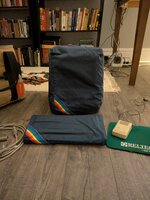
Also, this would have been worth it regardless, because this dust cover is sick:
On Facebook Marketplace, I saw a 512k w/keyboard, mouse, Apple tote bag, and a midnight blue Abcom dust cover for the Mac and the keyboard, listed for $350. Pictures of the front of the unit powered off; listing said it was functional. All I wanted was the dust cover, as I have the white version and am obsessed with it. The midnight blue, which I had no clue even existed, looked awesome.
But I have a 512k already that I was happy with. I stuck a ROMinator in it and it's great. Don't really need another.
Anyway, it's now like a month later and the listing is still up. I figured, screw it, and offered the seller $200, which he accepted immediately. Drove 45 minutes today for pickup. Kid selling it said he got it for free from an estate cleanout. They told him to chuck it or just take it for himself. He decided to save it, God love him. $200 straight profit for him; I get a dust cover and a 512k I can trade someone for something else, maybe.
Anyway, I got home and got it out of the bag to take a look at it:
That ain't normal, haha. So I cracked it open and found a the following card hooked up to this hand-mounted SCSI board:
I don't remember there being an expansion slot on my other 512k, probably because there isn't. So I buttoned the machine back up quick to see if it would boot. It did, and as you'll see below, this thing has 2MB of RAM somehow:
Now I'm excited to see what exactly what expansion board is installed. I'm guessing a Levco MonsterMac or something similar, but I cannot remove the board from the unit. There is absolutely zero clearance between the SCSI slot there and the metal shelf above it. Does anyone have an suggestions on how I can get this thing out for cleaning and identification? It is enticingly stuck in there:
Also, this would have been worth it regardless, because this dust cover is sick:



 the CPU upgrades certainly often did.