
You are using an out of date browser. It may not display this or other websites correctly.
You should upgrade or use an alternative browser.
You should upgrade or use an alternative browser.
Building the fastest Power Mac 9600
- Thread starter Bolle
- Start date





What is the performance of the stock machine like when running Tiger? And would your build (made on a dual G5) run both processors of a dual 604e card, do you think? Or is that a limitation in xpostfacto?Just wondering did you make any progress with this?
I recently got a 9600 myself and Have been having much fun playing/experimenting with it
which you can read about here

And that's even with the original SRAMs installed? You mentioned back in June that you "soldered the original 700MHz 7451 back on and cache is working just fine with that one." Is it still enabling with the 7451, but fails with the 7455?Indeed. The extensions test the cache size and speed and afterwards set the correct registers.
They fail at picking up the cache for testing though and I did not find a way yet to force the cache registers the way I want them.
ReggieSE in OSX won't let me do it.


Not sure if you're still working on this project...
I thought I fried a G4 card today- my ventilation was a bit constrained, it froze and wouldn't restart past the Sonnet extension. I popped my spare in and it booted to the desktop, so I decided to re-paste both cards, and discovered evidence against the rumors of Sonnet building 1000/2Ms only after running out of 800MHz parts- both of mine have 800MHz chips overclocked to 1GHz. Thankfully the first G4 worked again after repasting.
These pictures aren't great, but could be useful as both cards do run 2MB of cache at 250MHz, though it is only listed in Sonnet Metronome and System Profiler, not Gauge Pro (which is very confused and also sees a disabled motherboard cache, despite this being a 9600 Enhanced board.) It looks like your 2MB cache chips are the same part number, so nothing jumps out at me, but I'd be happy to help provide more information if it would help.
I've seen native G4s like the MDD fail a startup test in 9.2.2, which indicates just before the desktop that the L3 cache has been disabled due to a hardware failure. Does yours produce a message like this?
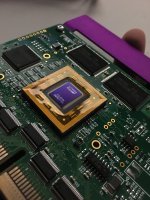
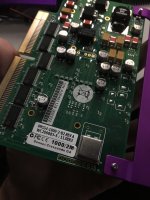
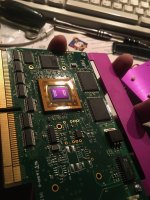
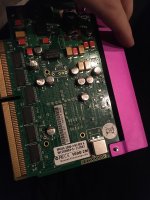
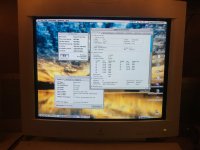
I thought I fried a G4 card today- my ventilation was a bit constrained, it froze and wouldn't restart past the Sonnet extension. I popped my spare in and it booted to the desktop, so I decided to re-paste both cards, and discovered evidence against the rumors of Sonnet building 1000/2Ms only after running out of 800MHz parts- both of mine have 800MHz chips overclocked to 1GHz. Thankfully the first G4 worked again after repasting.
These pictures aren't great, but could be useful as both cards do run 2MB of cache at 250MHz, though it is only listed in Sonnet Metronome and System Profiler, not Gauge Pro (which is very confused and also sees a disabled motherboard cache, despite this being a 9600 Enhanced board.) It looks like your 2MB cache chips are the same part number, so nothing jumps out at me, but I'd be happy to help provide more information if it would help.
I've seen native G4s like the MDD fail a startup test in 9.2.2, which indicates just before the desktop that the L3 cache has been disabled due to a hardware failure. Does yours produce a message like this?

with some semi cheap 7457's showing up on ebay it would be really interesting to see if they work on one of these sonnet cards
perhaps time to revisit this project? @Bolle
https://www.ebay.com/itm/184311937918
I also came across this most interesting normal apple G4 CPU card fitted with a 7448 on an interposer board to go from CBGA483 to CBGA360
https://forums.macrumors.com/threads/g4-7448-and-7457-swap.2233532/page-2?post=28563255#post-28563255
it would hilarious if you could use such a interposer-board here as well a 7448 9600 would be epic
perhaps time to revisit this project? @Bolle
https://www.ebay.com/itm/184311937918
I also came across this most interesting normal apple G4 CPU card fitted with a 7448 on an interposer board to go from CBGA483 to CBGA360
https://forums.macrumors.com/threads/g4-7448-and-7457-swap.2233532/page-2?post=28563255#post-28563255
it would hilarious if you could use such a interposer-board here as well a 7448 9600 would be epic
Last edited by a moderator:
I did actually start drawing up such a interposer card a couple of years back (or it might have been to replace 7400 series chips with one of the newer ones, I can't remember what mac I was targeting with it) but got board manually drawing the BGA footprint's as I couldn't find them online, I was also a little unsure how well a normal fibreglass PCB would survive being hot air soldered
Maybe it's time for a revisit
Maybe it's time for a revisit

Just posting a couple of files. One is the Motorola/Freescale ZIF datasheet which was linked to earlier. The link is not working. The other is an IBM doc on connecting/configuring L2 cache chips -- but it's only for the 750/G3, not for the G4.
View attachment MPCPCMEC.pdf
View attachment 750_dg.pdf
What is the maximum size for the G4 L3 cache? I ask, because Digikey has some Cypress chips on clearance (no warranty/no returns) which are 250MHz, 512K X 36, $9.10 each. So a pair of them would yield a 4MB L3.
View attachment MPCPCMEC.pdf
View attachment 750_dg.pdf
What is the maximum size for the G4 L3 cache? I ask, because Digikey has some Cypress chips on clearance (no warranty/no returns) which are 250MHz, 512K X 36, $9.10 each. So a pair of them would yield a 4MB L3.
Last edited by a moderator:
yeah would be interesting to see what can be doneI did actually start drawing up such a interposer card a couple of years back (or it might have been to replace 7400 series chips with one of the newer ones, I can't remember what mac I was targeting with it) but got board manually drawing the BGA footprint's as I couldn't find them online, I was also a little unsure how well a normal fibreglass PCB would survive being hot air soldered
Maybe it's time for a revisit
ah cool find I had seen the first PDF but not the IBM oneJust posting a couple of files. One is the Motorola/Freescale ZIF datasheet which was linked to earlier. The link is not working. The other is an IBM doc on connecting/configuring L2 cache chips -- but it's only for the 750/G3, not for the G4.
View attachment 34947
View attachment 34948
What is the maximum size for the G4 L3 cache? I ask, because Digikey has some Cypress chips on clearance (no warranty/no returns) which are 250MHz, 512K X 36, $9.10 each. So a pair of them would yield a 4MB L3.
maximum size for L3 cache is generally 2MB the 7457 can "do" 4MB but only up to 2MB of it can be used as L3 cache
I wonder if the L3 cache setup you mentioned can just be used in 2MB mode with the last 2MB ignored?
(like 512MB SDRAM sticks in a G3 Beige or BW G3)
I do still wonder how L2 cache is set/detected by Uninorth based macintoshes, I know there is an SPD chip on the CPU card that contains the info
but I dont know what format it is in or how to manipulate it
it must clearly be possible as this guy on ebay upgrade the backside L2 cache on a G4 to 2MB!
https://www.ebay.com/itm/293535144530
BTW has anyone contacted sonnet? I hear they are generally quite willing to provide detailed technical info on their old PPC CPU upgrade cards
wonder just how much info we could get from them, schematics, board layout info and any technical notes would be neat! LOL
wonder just how much info we could get from them, schematics, board layout info and any technical notes would be neat! LOL
maximum size for L3 cache is generally 2MB the 7457 can "do" 4MB but only up to 2MB of it can be used as L3 cache
Is there any potential use for the other 2MB?
I wonder if the L3 cache setup you mentioned can just be used in 2MB mode with the last 2MB ignored?
I think there are some 256K X 36 @ 250 chips in the $4 - $6 range, so it would probably make more sense to use those. I'm not certain, as I browsed scores of SRAM chips and the brain is full. It all started with a simple search for some Galvantech chips on a Sonnet G3 card, which popped up a link to Digikey where they were clearing them out for $1.7X (don't remember 'x'). 128K X 36 @ 250. And I just kept looking. It looks like Cypress passed a lot of their old product on to Renessas (sp?) or discontinued a bunch of the old line of SRAM chips recently and there's a bit of a fire sale going on.
That's a good idea -- for someone else to do.BTW has anyone contacted sonnet? I hear they are generally quite willing to provide detailed technical info on their old PPC CPU upgrade cards
wonder just how much info we could get from them, schematics, board layout info and any technical notes would be neat! LOL
Didn't you mention that someone else had had success? Perhaps that person could be contacted. Presumably, he has established a friendly beach head at Sonnet?
BTW have you tried contacting sonnet for some details on the CPU card? A friend of mine doing stuff like we do contacted sonnet for info on the TAM G3 upgrade cards and actually got back a good wealth of detail
Ah, here we go. Perhaps this friend could be asked?
BTW, did you friend get info on how the cache size/speed is encode on the Flash on the board?
I ask because i have some G3/512K Cache upgrades and I am sorely tempted to replace the SRAM chips to take them to 1MB, but there's no point if it won't be recognized.
Last edited by a moderator:
Didn't you mention that someone else had had success? Perhaps that person could be contacted. Presumably, he has established a friendly beach head at Sonnet?
realised I did not follow up on this, but sadly a little bit after this someone else did contact sonnet, and from what I heard, they where not very helpful at all! I dont know if the staff had changed or he just got the wrong person to speak!
I just know that a few years ago, admitadly probably closer to 10 years ago now! that a friend of mine had a Sonnet G3 L2 cache upgrade for a TAM/6500 etc that had been phyiscally damaged and was missing some passives, so with nothing to lose, he contacted sonnet to see if they might know what those passives where etc, and the person he got put through, was very helpful there, they still had all the original documentation/BOM's etc and where able to tell him what the values of the missing passives where, so he was able to then repair his upgrade card,
I was hopeful that perhaps they would still have this info, but now I am not sure, but cant hurt to poke again! sometimes with things like this, its very much a case of having to get through to the right person
I just performed an L3 cache and CPU swap on my 800Mhz Sonnet card. My 800Mhz came with a 7451 installed on it, so there were at least some of them made that way by Sonnet.
I started by swapping on 2MB of 250Mhz cache memory chips from a Quicksilver upgrade. The 2MB of cache showed up immediately with no other changes required. The Sonnet extension is what initializes the caches on these cards (this will be important later). Therefore, there aren't any resistor straps necessary to get it to recognize 2MB because the extension just does some address line probing and simply figures it out.
Next came installing a 1.25Ghz rated 7455B that I harvested off of an MDD CPU card. It booted at 800MHz without issue and also recognized the full 2MB of L3 Cache. Now that I had a working card, I decided to give it a spin in my Power Computing Power Center Pro 210, which actually runs at a 60MHz bus. By installing a crystal socket on the Sonnet card, I can now change the bus speed with a replacement oscillator. I had the PCP running stable with the bus at 68MHz with its stock 604e. However, with the 7455 installed, it refused to load video above a 60MHz bus.
Now for overclocking. Starting at the 28x multiplier and working my way down, I found that the highest multiplier that the machine would boot at was 24x. However, L3 cache would not be recognized at the resulting 1.44GHz (which, fair, that would run the cache at 360MHz). The fastest I could get the Mac booting with L3 cache enabled was at 21x for 1260MHz. The machine was definitely unstable at this 1.26GHz, likely because the cache was running at 315MHz. Thankfully, the XLR8 MachSpeed Control software allows on-the-fly editing of the L3_CLK bits in the L3CR register. As long as the cache is initialized (which the Sonnet extension can pull off at 1.26GHz) you can change the divisor. Dividing by 5 gets us 252MHz for the cache, which is just a hair over its rated speed. Once selecting this, I was able to get a (mostly) stable machine. Some software still acts funny and I'm not sure why, but it hangs in there for the most part. The XLR8 software also seems to set the cache speed to the last set divisor once its extension loads. This has me wondering if I can boot at 1.44GHz with cache enabled and run the cache at 288MHz or 240MHz. The CPU is already getting very hot with the tiny stock heatsink though, so I think I'm sticking with 1.26GHz. If the XLR8 trick worked, it would also stop working if your preferences files got trashed for any reason.
Finally, I wanted to see if I could boot System 7 on this bad boy. It did work with the stock 7451, even with the 2MB of L3 cache fully recognized. However, with the 7455 I could only get it to boot with extensions disabled (so no cache). After copying the XLR8 extensions and preferences from my Mac OS 9.1 partition, I could finally get it to load with extensions, but the key Sonnet extension will not load under any circumstances. This unfortunately means that both the L2 and L3 cache are disabled under 7.6.1 (the benchmark results show this in a rather unfortunate manner). It seems, at this time, the fastest CPU that System 7 will successfully boot with all caches enabled is a 7451.
I actually found a 7457 and it is on its way, but won't be here for 2-3 weeks. I plan on seeing if that works on this card once it arives. I also want to see how it acts in my Power Macintosh 7600 at some point. Maybe I'll have better luck with System 7 there?
Just a side note, I'll have this mean machine at VCFMW this weekend if anyone wants to come check it out.
I started by swapping on 2MB of 250Mhz cache memory chips from a Quicksilver upgrade. The 2MB of cache showed up immediately with no other changes required. The Sonnet extension is what initializes the caches on these cards (this will be important later). Therefore, there aren't any resistor straps necessary to get it to recognize 2MB because the extension just does some address line probing and simply figures it out.
Next came installing a 1.25Ghz rated 7455B that I harvested off of an MDD CPU card. It booted at 800MHz without issue and also recognized the full 2MB of L3 Cache. Now that I had a working card, I decided to give it a spin in my Power Computing Power Center Pro 210, which actually runs at a 60MHz bus. By installing a crystal socket on the Sonnet card, I can now change the bus speed with a replacement oscillator. I had the PCP running stable with the bus at 68MHz with its stock 604e. However, with the 7455 installed, it refused to load video above a 60MHz bus.
Now for overclocking. Starting at the 28x multiplier and working my way down, I found that the highest multiplier that the machine would boot at was 24x. However, L3 cache would not be recognized at the resulting 1.44GHz (which, fair, that would run the cache at 360MHz). The fastest I could get the Mac booting with L3 cache enabled was at 21x for 1260MHz. The machine was definitely unstable at this 1.26GHz, likely because the cache was running at 315MHz. Thankfully, the XLR8 MachSpeed Control software allows on-the-fly editing of the L3_CLK bits in the L3CR register. As long as the cache is initialized (which the Sonnet extension can pull off at 1.26GHz) you can change the divisor. Dividing by 5 gets us 252MHz for the cache, which is just a hair over its rated speed. Once selecting this, I was able to get a (mostly) stable machine. Some software still acts funny and I'm not sure why, but it hangs in there for the most part. The XLR8 software also seems to set the cache speed to the last set divisor once its extension loads. This has me wondering if I can boot at 1.44GHz with cache enabled and run the cache at 288MHz or 240MHz. The CPU is already getting very hot with the tiny stock heatsink though, so I think I'm sticking with 1.26GHz. If the XLR8 trick worked, it would also stop working if your preferences files got trashed for any reason.
Finally, I wanted to see if I could boot System 7 on this bad boy. It did work with the stock 7451, even with the 2MB of L3 cache fully recognized. However, with the 7455 I could only get it to boot with extensions disabled (so no cache). After copying the XLR8 extensions and preferences from my Mac OS 9.1 partition, I could finally get it to load with extensions, but the key Sonnet extension will not load under any circumstances. This unfortunately means that both the L2 and L3 cache are disabled under 7.6.1 (the benchmark results show this in a rather unfortunate manner). It seems, at this time, the fastest CPU that System 7 will successfully boot with all caches enabled is a 7451.
I actually found a 7457 and it is on its way, but won't be here for 2-3 weeks. I plan on seeing if that works on this card once it arives. I also want to see how it acts in my Power Macintosh 7600 at some point. Maybe I'll have better luck with System 7 there?
Just a side note, I'll have this mean machine at VCFMW this weekend if anyone wants to come check it out.
Last edited:
Can you share the bus speed modification? I've got a 700 Mhz version of this card and it'd be really handy to be able to set bus speeds like I can on my ZIF cards. Thanks!I just performed an L3 cache and CPU swap on my 800Mhz Sonnet card. My 800Mhz came with a 7451 installed on it, so there were at least some of them made that way by Sonnet.
I started by swapping on 2MB of 250Mhz cache memory chips from a Quicksilver upgrade. The 2MB of cache showed up immediately with no other changes required. The Sonnet extension is what initializes the caches on these cards (this will be important later). Therefore, there aren't any resistor straps necessary to get it to recognize 2MB because the extension just does some address line probing and simply figures it out.
Next came installing a 1.25Ghz rated 7455B that I harvested off of an MDD CPU card. It booted at 800MHz without issue and also recognized the full 2MB of L3 Cache. Now that I had a working card, I decided to give it a spin in my Power Computing Power Center Pro 210, which actually runs at a 60MHz bus. By installing a crystal socket on the Sonnet card, I can now change the bus speed with a replacement oscillator. I had the PCP running stable with the bus at 68MHz with its stock 604e. However, with the 7455 installed, it refused to load video above a 60MHz bus.
Now for overclocking. Starting at the 28x multiplier and working my way down, I found that the highest multiplier that the machine would boot at was 24x. However, L3 cache would not be recognized at the resulting 1.44GHz (which, fair, that would run the cache at 360MHz). The fastest I could get the Mac booting with L3 cache enabled was at 21x for 1260MHz. The machine was definitely unstable at this 1.26GHz, likely because the cache was running at 315MHz. Thankfully, the XLR8 MachSpeed Control software allows on-the-fly editing of the L3_CLK bits in the L3CR register. As long as the cache is initialized (which the Sonnet extension can pull off at 1.26GHz) you can change the divisor. Dividing by 5 gets us 252MHz for the cache, which is just a hair over its rated speed. Once selecting this, I was able to get a (mostly) stable machine. Some software still acts funny and I'm not sure why, but it hangs in there for the most part. The XLR8 software also seems to set the cache speed to the last set divisor once its extension loads. This has me wondering if I can boot at 1.44GHz with cache enabled and run the cache at 288MHz or 240MHz. The CPU is already getting very hot with the tiny stock heatsink though, so I think I'm sticking with 1.26GHz. If the XLR8 trick worked, it would also stop working if your preferences files got trashed for any reason.
Finally, I wanted to see if I could boot System 7 on this bad boy. It did work with the stock 7451, even with the 2MB of L3 cache fully recognized. However, with the 7455 I could only get it to boot with extensions disabled (so no cache). After copying the XLR8 extensions and preferences from my Mac OS 9.1 partition, I could finally get it to load with extensions, but the key Sonnet extension will not load under any circumstances. This unfortunately means that both the L2 and L3 cache are disabled under 7.6.1 (the benchmark results show this in a rather unfortunate manner). It seems, at this time, the fastest CPU that System 7 will successfully boot with all caches enabled is a 7451.
I actually found a 7457 and it is on its way, but won't be here for 2-3 weeks. I plan on seeing if that works on this card once it arives. I also want to see how it acts in my Power Macintosh 7600 at some point. Maybe I'll have better luck with System 7 there?
Just a side note, I'll have this mean machine at VCFMW this weekend if anyone wants to come check it out.
It was done by simply de-soldering the original oscillator, adding a socket, then putting a faster oscillator on the card. The sockets and oscillator chips are readily available on DigiKey and Mouser. Just be warned, you won't get beyond 55MHz on any system besides the Power Computing Power Center Pro series. Any other Apple or clone machines can't hit the higher bus speeds. Finding through hole 5V oscillators in the 50-55MHz range is harder, but eBay or digging through scrap boards could help.Can you share the bus speed modification? I've got a 700 Mhz version of this card and it'd be really handy to be able to set bus speeds like I can on my ZIF cards. Thanks!

I'm pleased to be able to say from experience that this isn't strictly the case: https://68kmla.org/bb/threads/power-mac-7500-9600-bus-speed-overclocking.45179/#post-576375Just be warned, you won't get beyond 55MHz on any system besides the Power Computing Power Center Pro series. Any other Apple or clone machines can't hit the higher bus speeds.
I also have a tool for this: https://68kmla.org/bb/threads/tiny-...or-anything-with-a-half-can-oscillator.51191/Finding through hole 5V oscillators in the 50-55MHz range is harder, but eBay or digging through scrap boards could help.
Similar threads

- Replies
- 10
- Views
- 2K
- Replies
- 5
- Views
- 2K


- Replies
- 10
- Views
- 5K
