

• Hello MLAers! We've re-enabled auto-approval for accounts. If you are still waiting on account approval, please check this thread for more information.

Tips for desoldering corroded chips

Well!

I’m a bit of a dope. l read the guide, which is absolutely brilliant. One thing caught my eye, regarding “an unsupported memory module/bank configuration”.

I figured, surely I was doing it correctly. Well, I was not. I had only inserted two sticks, and it needs four minimum.

Lesson learned, got back in town and popped two more sticks in. It chimed!

I have yet to test everything else on the system, but I am thrilled I have gotten this far in repairing a battery bombed SE/30. New things learned, and I have confidence to lift, clean, and replace chips and run a bodge wire. I think I did a fair job on that:
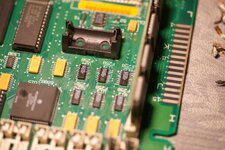
DSC03161.jpeg

Thanks again for posting the link to that guide David Cook. While I didn’t really use it completely, I’m sure I will as I will be fixing up more of these as they come my way.
 
Nice and clean too. On longer jumper wires, I put a dab of conformal coating to secure them in place. On this one, it's short enough that you are fine as it is. Good job. Finding broken traces can be a challenge and takes patience.
 
I am happy but I’ll admit, this was far from a complicated one. The bad trace was actually a bad solder pad so it was visually apparent it was bad. Confirmed of course beeping it out but not like I had to do the full legwork to beep everything out.

Also this was not a severe battery bombed unit anyway. It looks as if it was stored on its side or upside down, all the rust was on the frame. So the board was largely spared.

Also, I got it to boot off a BlueSCSI and Snooper checks out completely for this guy. I think that’s about as good as it needs to be to call this repair done.
 
imo don't bother with snooper, use proper mactest pro.
Snooper is good for some 68k machines, but MacTest PRO is from Apple and is more thorough. Snooper is easier to run, supports just about all 68k machines, and is decent for burn-in of newly restored boards. MacTest PRO can be complex to set up and you need the specific version for your hardware. That said, I always run a few cycles of MacTest PRO after I am finished with a board to make certain it works all the way.
 
I wasn’t able to locate an English copy of Mactest SE/30, so I got Mactest MP. That does run but it presumably isn’t designed with the SE/30 resolution in mind, I can only barely select the options for the display tests at the very bottom edge of the display.

Whatever tests I can get it to run check out though!
 
One word of caution about MacTest Pro, though this is purely anecdotal: It does not seem to test the RTC, including the 1hz timer. Apple Personal Diagnostics, despite its vague and unhelpful output messages, does test the RTC. If the clock is running slow, if you notice inconsistencies in cursor redraw timing, or just to be on the safe side, you could check if APD's Logic Board tests also pass.

(This quirk is not usually relevant, but I figure since you had to do some cleaning and rework near the RTC, it was at least worth mentioning.)
 
I was looking to mostly scrutinize the clock, as you had pointed out I did replace just about everything in that area short of the clock chip. I’ll see about that software. How do you feel about Snooper’s clock testing? That did pass, and the computer is otherwise functioning completely normally.
 
I'm almost positive I tried Snooper when working on the same machine that had the RTC issues, and it did not fail any tests. However, I'm not sure exactly which Snooper version I was using. APD's "Logic Board Components" test should finish quickly, unless the RTC test times out and spits out a vague "one or more tests failed" message after several minutes.

Solely speculation on my part, but I wonder if most test programs only store/load a time from the clock, as opposed to letting it tick and measuring the deltas to ensure seconds are passing at the intended rate.
 
Back
Top