• Hello MLAers! We've re-enabled auto-approval for accounts. If you are still waiting on account approval, please check this thread for more information.

The one keyboard to rule them all

I am getting ready for an old school network party for my employees at the end of the year. I am finding myself in a pinch point I have not experienced before - I do not have enough keyboards and mice. I do have two Wombats, and I love them. This got me thinking though, it would be cool to have an Apple IIGS styled keyboard that hooks in via ADB or USB and has pass-through for ADB and USB. There has to be a way to build the wombat in so to speak. In the end it would have the cool step style keys and could plug into a modern computer or an old school Mac. Using any combination of mouse with it would be wicked sweet if it can be pulled off.
Before I go down a rabbit hole on custom keyboard PCBs and whatnot, am I reinventing the wheel? I could see myself using one of these as a daily driver on all my computers and have done quite a bit of reading on how to make an arduino generate the signals.
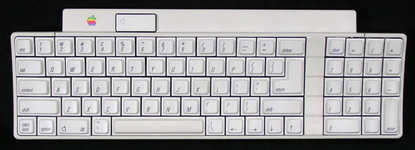
 
I have done some more tinkering and learning about custom keyboards. To start I wanted to come up with a requirement list.

  • USB Mouse Input
  • ADB Output for Mac SE to B&W PowerMac G3
  • USB Output
  • RJ9 Output for Mac 128k to Mac Plus
  • Start button for ADB and USB needs to be on the keyboard
  • Similar form factor and feel to the IIgs Keyboard
So far I have found several resources to help out largely based off the custom keyboard community and started doing some design in KiCad.

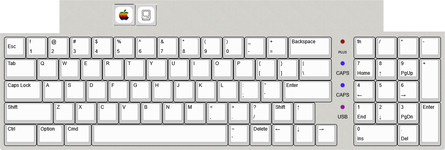
Looking at the original, there are a couple of edits I wanted to make. I am not big on the capslock key layout and the arrow keys, so I moved them around and came up with another, similar layout.

IIgs.png

With the edited layout, I have a directional pad and a more modern layout. I intend to have the Macintosh key change the mode for output to go between the different styles. I am planning on using a Pi Pico to control this, so I can use the bus voltage to tell it which mode to default to, but I also want a way to move things around.

keyboard-layout.png

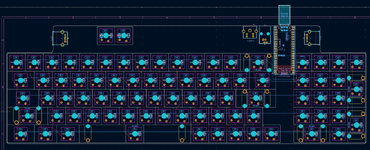
I drew up a schematic and realized I may be out of GPIO pins, however, the rows and columns setup is incredibly inefficient for the 80 keys that the controller will need to send signal for. I think I will re-work to do a 9x9 setup instead of a 5x18 which will reduce the needed pins from 23 to 18.allmacV2 — PCB Editor.png

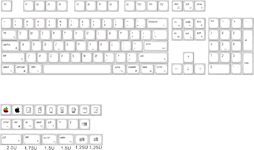
I also found some wonderfully retro key caps to go with.

71Q+2qP0fxL._AC_SL1500_.png


At this point I have realized I need to figure out some more circuitry to add a USB hub into the board. In USB mode, a straight hub with both USB ports will be fine. In ADB mode, the controller will need to read the USB ports for mice and emulate the ADB signal. I am stuck here and don't know how to do that yet. I also realized that there is an offsite on the power button compared to the keys. I am thinking I will have those two keyboard switches mounted directly to the PCB instead of the keyboard plate which will have them sit lower. I need to get this put into fusion and draw up some cut files. Next steps are to figure out the circuitry to not need the Wombat. That said, if any of you hardware guys want to partner with this, I just want to make it possible more than anything. Any help is appreciated!
 
I got mine on Amazon and probably over-payed

I like the third picture that clearly illustrates "these do not work on older Keychron keyboards" a lesson I have also learned the hard way.
 
the CH334U is pretty easy.
This does look very straight forward!
When it is in ADB mode, I will need to have the USB port on the pico read the USB devices, where as when it is in USB mode I will need to have it be a HID device. Depending on how cheap these are, I may just make two separate USB circuits and depending on which one is powered will do the switch for me.
 
It would be nice to have a more up to date keyboard than my Key Tronic MacProPlus with Griffin iMate. This model has Mac Plus, ADB, and with the help of a Griffin iMate, USB. I suppose a BMOW Wombat could be used to allow the connection to a USB mouse.

I had to replace my Key Tronic keyboard recently. Its replacement has some keys that require a bit of effort while typing. Again, a modern alternative would be more than welcome in the Pupp household.
 
Using the CH334U that @cheesestraws mentioned I think will work with some modification to my plans.
The Pico will be bus powered and all buses use 5 volt. What I will do is use diodes so each bus can power the Pico, but it won't back-feed into the other outputs. I will use two GPIO pins to tell the Pico where it is being powered from which will tell it to which mode to go into.
  • Mode 1 - the Pico emulates a USB keyboard and the CH334U allows the two USB ports to be active. The host computer picks up each device and addreses them and does USB magic like normal
  • Mode 2 - the Pico senses that it is powered off the ADB bus and a separate C334U chip connects the two USB ports to the USB port on the Pico where it reads for pointer devices and translates that signal out two different GPIO pins to emulate the ADB signals
  • Mode 3 - the Pico senses that is powered off the RJ9 port and uses two more GPIO pins to emulate the Mac Plus keyboard. The secondart CH33U will be powered, but the Pico will not have the USB port reading, so no damage is done, but nothing tries to translate.
Re-arranging the diode array for the keys, I can use 9x9 to give me the 80 keys I need, so that will use 18 GPIO pins. 2 will be needed for power sensing, 2 will be needed for data and clock on ADB, and two will be needed on data and clock on RJ9. That will use 24 of the 26 pins. For now I will hook up the Mac key to pin 25 to allow for more functionality later if I need to make an interrupt for mode functionality or something.

This will take a lot of programming, but if it is feasible, I can start with basics and make it work in USB more immediately. At that point I will probably just plug it into my wombat so I can at least use it and continue to work on the firmware as I have time. Depending on what my protoype build is and how much interest others have in it will influence how much of my attention it gets. I am going to play more with Kicad this weekend and see if I can make the schematic make sense, and then I can start working on the 3d part of it and figure out what kind of manufacturing to use on the case.
 
In case it helps, this is a schematic for a 7-port hub I knocked up some time ago using a pair of CH334s. I use this hub every day so I know the design is basically sound. This uses polyfuses on the power lines; you can get chips to do the current limiting that talk to the CH334 but they were out of stock when I was designing this and it wasn't really for other people, so I just went with polyfuses. I'd suggest using the proper current limiting chips if you are making a product, though.
 

Attachments

This is very helpful!
I am inexperienced when it comes to pcb design and have been mostly a high-powered diy guy. I was planning on just sending the 5 volt straight in, but mentioning the polyfuses makes me think that may be a bad idea. How do I figure out how bad of an idea that is before ordering boards?
 
the polyfuses are on the output ports of the USB hub, they're there to protect it from someone trying to draw loads of current the hub can't provide and/or to stop a short circuit catching fire. If building something for your personal use you can probably get away without, I wouldn't recommend leaving them out (or some other current management technique) if you are going to have other users.
 
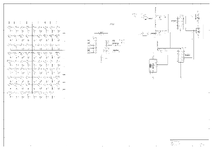
I need to add the polyfuses yet, but here is what I have so far. I think I have it right, but the power circuit on the right should let the pi pico know which program to run. So long as this schematic works, I should be able to do whatever I need in software.

schematic.png
To free up the the GPIO pins, I had to re-arrange the keyboard matrix and label all switches individually. From what I have read, there is no clock signal on the ADB devices, so I am not sure exactly how that works. I will need to do more reading to figure that out, but as long as my understanding is good enough, again, I could fix that in software too.
 
Back
Top