• Hello MLAers! We've re-enabled auto-approval for accounts. If you are still waiting on account approval, please check this thread for more information.

eMac Combo 1GHz (chipped to 1.27GHz) won't boot from Mac OS 9.2.2 ISO

Snial

68000
Hi folks,

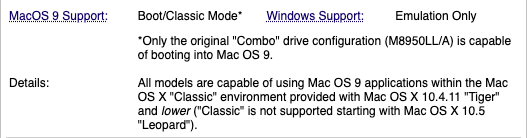
I finally have a potential buyer for my eMac (originally from @CircuitBored ), who wants to use Pro Tools 5.1.1 with it, which needs the Mac to boot properly into Mac OS 9.2.2. This eMac should be able to do that. It's really an ATI 1GHz Combo (still a Combo) and this EveryMac page:


Says:

1756629061268.png

But it doesn't recognise the ISO as bootable. I could run the installer from within Classic, but that installation of Mac OS 9.2.2 is still Classic-only.

Any ideas?

-cheers from Julz
 
I'd have a look around for the machine-specific eMac OS 9.2.1/2 installer media, along with reset PRAM/NVRAM and maybe an Open Firmware patch to trick the CPU speed as a last resort.
 
I'd have a look around for the machine-specific eMac OS 9.2.1/2 installer media, along with reset PRAM/NVRAM and maybe an Open Firmware patch to trick the CPU speed as a last resort.
OK, so it turns out that my eMac is a M8950/LLA which according to all available sources can boot directly into Mac OS 9.2.2, if I have the installation CD for that kind of model ( eMac ATI, ideally eMac ATI 1GHz). I don't yet know how to use OF to trick the CPU speed if that would be an issue.

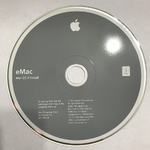
In the end I found a supposedly proper installation CD here:


The disk image says ©2003, which would be correct for this eMac.

1756674437085.png
And the .iso is the right size. Again, I can't boot it from the CD itself. I was able to install the OS via Classic mode. It appears to have 10.1.1 as the Mac OS ROM version. In the end I tried to boot from it via open firmware.

I found the location for the Mac OS ROM and typed:

0 > boot /pci@f2000000/mac-io@17/ata-4@1f000/disk:,\System%20Folder\MAC%20OS%20ROM

and got:

.. load-size=2aad86 adler32=d23c8b3e
parsing <CHRP-BOOT>

BootInfo is not compatible


Size is 2796806b for the ROM.

Any ideas?

PS, thanks @Byrd for your reply!
 
Last edited:
Hi Snial,

Up next I'd try the patched version of Mac OS 9.2.2 that enables booting on unsupported Macs.

Try booting the CD image from a FW drive as an alternative.

JB
 
Hi Snial,

Up next I'd try the patched version of Mac OS 9.2.2 that enables booting on unsupported Macs.

I think that's what I'll try next. I think I need a Mac OS 9 Lives account to do that.

On this page:


"Yes, makes sense, as Gary stated your hardware is almost 100% good for a native boot, al you needed was the "imic" ROM injection and voila :) "

This implies that all I need is to use a different Mac OS ROM. But what's "imic" ROM injection?

Try booting the CD image from a FW drive as an alternative.
I don't think I have a working external FW drive. Correction: I have a few FW drives, but not sure about power supplies (though I think you just need a 9V or 12V one).
 
Hi Snial,

Up next I'd try the patched version of Mac OS 9.2.2 that enables booting on unsupported Macs.

Try booting the CD image from a FW drive as an alternative.

JB
OK. I found a MAC OS ROM:


I can now manually try to boot from OF with:

0 > boot /pci@f2000000/mac-io@17/ata-4@1f000/disk:,\System%20Folder\MAC%20OS%20ROM

1756751985644.png
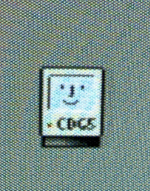
I don't know what the CDG5 code is, unless it's a French reference to Charles De Gaulle, but it looks interesting and it's a happy Mac. However, it's stuck there.

This ROM is an executable. Perhaps it needs a pointer to a System Folder even though the ROM file is *in* the System Folder? I had originally installed the 'proper' Mac OS 9.2.2 for the ATI eMac and subsequently I ended up running Classic in order to use Stuffit Expander to open the new Mac OS ROM file which then offered to update some System files. Maybe that screwed it up?

Anyway, more investigation awaits unless someone has more info?

OK, so the reason why I haven't just installed the Mac OS 9 Lives unsupported CD ROM is because I'm aware that it doesn't fully support all the hardware and maybe that includes some aspect of the hardware that ProTools 5.1.1 would use. So, if I can use something as close to the ATI eMac, Mac OS 9 installation as possible, then that would be best IMHO.
 
Hi Snial,

Up next I'd try the patched version of Mac OS 9.2.2 that enables booting on unsupported Macs.
I wondered if it didn't get further than the Happy Mac, because there wasn't a PPC disk driver. But in reality, there appears to be 4 68000 drivers, but no PPC disk drivers on the partition map (it's an Apple Partition Map drive, which I think it needs to be for Mac OS 9).

Read Image=HdParts.bin, Partition=0
gApm[0]={
Sig="ER", Parts=80293248, Start=0x00000000
Name="", Type="¯ˇ"
DataStart=0x00000000, DataSize=0x00000000, Status=0x00000000
BootStart=0x00000000, BootSize=0x00000000, BootAddr=0x00000000
BootEntry=0x00000000, BootChecksum=0x00000000, Processor=""
}

Read Image=HdParts.bin, Partition=1
gApm[1]={
Sig="PM", Parts=10, Start=0x00000001
Name="", Type="Apple_partition_map"
DataStart=0x00000000, DataSize=0x0000003f, Status=0x00000003
BootStart=0x00000000, BootSize=0x00000000, BootAddr=0x00000000
BootEntry=0x00000000, BootChecksum=0x00000000, Processor=""
}

Read Image=HdParts.bin, Partition=2
gApm[2]={
Sig="PM", Parts=10, Start=0x00000040
Name="", Type="Apple_Driver43"
DataStart=0x00000000, DataSize=0x00000038, Status=0x00000103
BootStart=0x00000000, BootSize=0x00002c16, BootAddr=0x00000000
BootEntry=0x00000000, BootChecksum=0x0000f1f0, Processor="68000"
}

Read Image=HdParts.bin, Partition=3
gApm[3]={
Sig="PM", Parts=10, Start=0x00000078
Name="", Type="Apple_Driver43"
DataStart=0x00000000, DataSize=0x00000038, Status=0x00000303
BootStart=0x00000000, BootSize=0x000046de, BootAddr=0x00000000
BootEntry=0x00000000, BootChecksum=0x0000040f, Processor="68000"
}

Read Image=HdParts.bin, Partition=4
gApm[4]={
Sig="PM", Parts=10, Start=0x000000b0
Name="", Type="Apple_Driver_ATA"
DataStart=0x00000000, DataSize=0x00000038, Status=0x00000103
BootStart=0x00000000, BootSize=0x000028fa, BootAddr=0x00000000
BootEntry=0x00000000, BootChecksum=0x00007eb4, Processor="68000"
}

Read Image=HdParts.bin, Partition=5
gApm[5]={
Sig="PM", Parts=10, Start=0x000000e8
Name="", Type="Apple_Driver_ATA"
DataStart=0x00000000, DataSize=0x00000038, Status=0x00000303
BootStart=0x00000000, BootSize=0x00004366, BootAddr=0x00000000
BootEntry=0x00000000, BootChecksum=0x00003417, Processor="68000"
}

Read Image=HdParts.bin, Partition=6
gApm[6]={
Sig="PM", Parts=10, Start=0x00000120
Name="", Type="Apple_FWDriver"
DataStart=0x00000000, DataSize=0x00000200, Status=0x00000003
BootStart=0x00000000, BootSize=0x00000000, BootAddr=0x00000000
BootEntry=0x00000000, BootChecksum=0x00000000, Processor=""
}

Read Image=HdParts.bin, Partition=7
gApm[7]={
Sig="PM", Parts=10, Start=0x00000320
Name="", Type="Apple_Driver_IOKit"
DataStart=0x00000000, DataSize=0x00000200, Status=0x00000003
BootStart=0x00000000, BootSize=0x00000000, BootAddr=0x00000000
BootEntry=0x00000000, BootChecksum=0x00000000, Processor=""
}

Read Image=HdParts.bin, Partition=8
gApm[8]={
Sig="PM", Parts=10, Start=0x00000520
Name="", Type="Apple_Patches"
DataStart=0x00000000, DataSize=0x00000200, Status=0x00000003
BootStart=0x00000000, BootSize=0x00000000, BootAddr=0x00000000
BootEntry=0x00000001, BootChecksum=0x00000000, Processor=""
}

Read Image=HdParts.bin, Partition=9
gApm[9]={
Sig="PM", Parts=10, Start=0x00000720
Name="…&XUntitled", Type="Apple_HFS"
DataStart=0x00000000, DataSize=0x04c92658, Status=0x40000033
BootStart=0x00000000, BootSize=0x00000000, BootAddr=0x00000000
BootEntry=0x00000000, BootChecksum=0x00000000, Processor=""
}

Read Image=HdParts.bin, Partition=10
gApm[10]={
Sig="PM", Parts=10, Start=0x04c92d78
Name="", Type="Apple_Free"
DataStart=0x00000000, DataSize=0x00000000, Status=0x00000000
BootStart=0x00000000, BootSize=0x00000000, BootAddr=0x00000000
BootEntry=0x00000000, BootChecksum=0x00000000, Processor=""
}


So, curious. Hey, @joevt : you know a lot about the modified MAC OS ROM 10.2.1; I'm reading about it on macos9lives.com:


I've seen some stuff to do with running OF code from a Mac HD something about reading it into a script and convert it into Forth byte code. But your code snippet:

Code:
decimal
1 load-base load-size 14 - adler32
load-base load-size + 12 - 12 ['] eval catch if
    2drop ." , bad checksum value" -1
then
<> if
    ." , checksum error"
    abort
then
hex

doesn't make sense to me, because if it replaces the MAC OS ROM, where does the real MAC OS ROM go? OK, your next message seems to start explaining that: "The Mac OS ROM file begins with some stuff that looks like XML or HTML and the Open Firmware code is contained within that.."
 
Last edited:
OK, so a bit further on I'm reading about OS9 ROM Fixer and ataboot.py, but also OS9 ROM Fixer doesn't work on Tiger. Do I even need this?

OK, so reading another topic, I think it doesn't allow you to format for OS 9 drivers, because the Mac already thinks that OS 9 isn't properly supported.


Wonderful. So, going to:


Means you have to install the Mac OS 9 drivers at the beginning; which implies that I have to reformat and install Mac OS 9 and Mac OS X all over again. Gosh.
 
Last edited:
0 > boot /pci@f2000000/mac-io@17/ata-4@1f000/disk:,\System%20Folder\MAC%20OS%20ROM
Check devalias to see if there's an alias that you can replace /pci@f2000000/mac-io@17/ata-4@1f000 with.

You usually don't need both the name (before @) and the unit address (after @) unless there's multiple nodes with the same name.
So these should also work:
/pci/mac-io/ata-4
/pci/@17/ata-4

\System%20Folder\MAC%20OS%20ROM should be replaceable by \\:tbxi
\\ means blessed system folder
:tbxi means file with type tbxi

I don't know what the CDG5 code is, unless it's a French reference to Charles De Gaulle, but it looks interesting and it's a happy Mac.
The name is described in @elliotnunn 's web page at https://elliot.nunn.au

I don't think anyone has made a G5 boot Mac OS 9 yet, so this software is more like a "CDG4".

This ROM is an executable.
Not sure what you mean by "executable". All the Mac OS ROM files are tbxi files and therefore not executables. A Mac OS 9 executable has file type APPL. A Mac OS X executable is usually a macho file.

Perhaps it needs a pointer to a System Folder even though the ROM file is *in* the System Folder? I had originally installed the 'proper' Mac OS 9.2.2 for the ATI eMac and subsequently I ended up running Classic in order to use Stuffit Expander to open the new Mac OS ROM file which then offered to update some System files. Maybe that screwed it up?
Maybe. I've never used the software so I don't know how it works.

I wondered if it didn't get further than the Happy Mac, because there wasn't a PPC disk driver. But in reality, there appears to be 4 68000 drivers, but no PPC disk drivers on the partition map (it's an Apple Partition Map drive, which I think it needs to be for Mac OS 9).
It looks like your drivers are ok. Compare with the info below:

I would use Mac OS X Disk Utility.app to create a partition map with Mac OS 9 drivers. I can do this on my Intel Mac with a Parallels Desktop for Mac virtual machine running Mac OS X 10.5.8. It works with disk images and external Fire Wire drivers and maybe some other types of drives.

The command like can also create a disk image with the Mac OS 9 drivers:
hdiutil create -size 500m -layout "UNIVERSAL HD" -fs HFS -volname "MacOS9.2.2" ~/Disks/MacOS922.dmg

The disk looks like this:
Code:
diskutil list disk2
/dev/disk2
   #:                       TYPE NAME                    SIZE       IDENTIFIER
   0:     Apple_partition_scheme                        *500.0 Mi   disk2
   1:        Apple_partition_map                         31.5 Ki    disk2s1
   2:             Apple_Driver43                         28.0 Ki    disk2s2
   3:             Apple_Driver43                         28.0 Ki    disk2s3
   4:           Apple_Driver_ATA                         28.0 Ki    disk2s4
   5:           Apple_Driver_ATA                         28.0 Ki    disk2s5
   6:             Apple_FWDriver                         256.0 Ki   disk2s6
   7:         Apple_Driver_IOKit                         256.0 Ki   disk2s7
   8:              Apple_Patches                         256.0 Ki   disk2s8
   9:                  Apple_HFS MacOS9.2.2              499.1 Mi   disk2s9

My dumpvols.sh script can list the partitions of a disk or all disks so you can see how the partitions and volumes change when you do an install or whatever.
https://gist.github.com/joevt/a99e3af71343d8242e0078ab4af39b6c

It shows that the SCSI and ATI drivers are 68K. Here's an example disk (the first 8 partitions are the Mac OS 9 drivers which are always the same):
Code:
APM 1 @ 1: Partition Map contents (10 partitions)
 1:         63 @ 1          Type:"Apple_partition_map" Name:"Apple" Status:00000003=Valid,Allocated
 2:         56 @ 64         Type:"Apple_Driver43" Name:"Macintosh" Status:00000103=Valid,Allocated,ChainCompatible BootSize:11286 BootCksum:0x0000F1F0 Processor:"68000" Pad1:70744452 = 'ptDR' = kPatchDriverSignature
 3:         56 @ 120        Type:"Apple_Driver43" Name:"Macintosh" Status:00000303=Valid,Allocated,ChainCompatible,RealDeviceDriver BootSize:18142 BootCksum:0x0000040F Processor:"68000" Pad1:00010600 = kSCSIDriverSignature
 4:         56 @ 176        Type:"Apple_Driver_ATA" Name:"Macintosh" Status:00000103=Valid,Allocated,ChainCompatible BootSize:10490 BootCksum:0x00007EB4 Processor:"68000" Pad1:70744452 = 'ptDR' = kPatchDriverSignature
 5:         56 @ 232        Type:"Apple_Driver_ATA" Name:"Macintosh" Status:00000303=Valid,Allocated,ChainCompatible,RealDeviceDriver BootSize:17254 BootCksum:0x00003417 Processor:"68000" Pad1:77696b69 = 'wiki' = kATADriverSignature
 6:        512 @ 288        Type:"Apple_FWDriver" Name:"Macintosh" Status:00000003=Valid,Allocated
 7:        512 @ 800        Type:"Apple_Driver_IOKit" Name:"Macintosh" Status:00000003=Valid,Allocated
 8:        512 @ 1312       Type:"Apple_Patches" Name:"Patch Partition" Status:00000003=Valid,Allocated
 9:     203024 @ 1824       Type:"Apple_HFS" Name:"Untitled" Status:C0000033=Valid,Allocated,Readable,Writeable,MountedAtStartup,Startup
10:         16 @ 204848     Type:"Apple_Free"

So, curious. Hey, @joevt : you know a lot about the modified MAC OS ROM 10.2.1; I'm reading about it on macos9lives.com:

I don't know about the modifications that make Mac OS 9 work on unsupported Macs. I only talk about Open Firmware, the checksum of the Mac OS ROM file, and the organization of the Mac OS ROM file.

I've seen some stuff to do with running OF code from a Mac HD something about reading it into a script and convert it into Forth byte code. But your code snippet:

Code:
decimal
1 load-base load-size 14 - adler32
load-base load-size + 12 - 12 ['] eval catch if
    2drop ." , bad checksum value" -1
then
<> if
    ." , checksum error"
    abort
then
hex

doesn't make sense to me, because if it replaces the MAC OS ROM, where does the real MAC OS ROM go? OK, your next message seems to start explaining that: "The Mac OS ROM file begins with some stuff that looks like XML or HTML and the Open Firmware code is contained within that.."
My code snippet that you quoted is code that is inside the <BOOT-SCRIPT> part of the Mac OS ROM file. It is the code that calculates the checksum and compares the checksum and reports an error if the checksum doesn't match.

OK, so a bit further on I'm reading about OS9 ROM Fixer and ataboot.py, but also OS9 ROM Fixer doesn't work on Tiger. Do I even need this?
If you're not making changes to the ROMs then you don't need to fix the checksum. If the ROM is correct then you don't need to check if the ROM is correct. We can't actually check if a ROM is correct without trying it, but we can check for known requirements such as the correct file type, a correct checksum, and the existence of a resource fork.

OK, so reading another topic, I think it doesn't allow you to format for OS 9 drivers, because the Mac already thinks that OS 9 isn't properly supported.


Wonderful. So, going to:


Means you have to install the Mac OS 9 drivers at the beginning; which implies that I have to reformat and install Mac OS 9 and Mac OS X all over again. Gosh.
You can save each partition to a disk image, then reformat the drive with the OS 9 drivers, add partitions, then use Disk Utility Restore to restore the partitions from the disk images to the partitions on the drive.

 
Check devalias to see if there's an alias that you can replace /pci@f2000000/mac-io@17/ata-4@1f000 with.
Thanks, I'm aware that I could create an alias, it's just that I seem to muck up the syntax and end up just copying the whole path.
<snip>

\System%20Folder\MAC%20OS%20ROM should be replaceable by \\:tbxi
\\ means blessed system folder
:tbxi means file with type tbxi
<snip>
Lots of useful info, which I'll try and reply to later when I have time. I realise from the above that the Mac OS 9 System Folder wasn't blessed, because I couldn't select it as a Startup Folder from Mac OS X. Perhaps that was an issue? And it's right that MAC OS ROM should be in the Mac OS 9 System Folder?
 
I realise from the above that the Mac OS 9 System Folder wasn't blessed, because I couldn't select it as a Startup Folder from Mac OS X.
In Mac OS 9, you can bless the System Folder by moving the System or Finder out and into the System Folder.
A blessed System Folder will have a Happy Mac icon.
My dumpvols.sh script will show which folders are blessed on each volume. It uses the bless command. It also parses the FinderInfo in the MDB of each volume.

Perhaps that was an issue? And it's right that MAC OS ROM should be in the Mac OS 9 System Folder?
Yes, Mac OS ROM file should be in the System Folder.
 
In Mac OS 9, you can bless the System Folder by moving the System or Finder out and into the System Folder. <snip> Yes, Mac OS ROM file should be in the System Folder.
And in the end it was pretty much that simple. I downloaded the Unsupported Mac OS 9.2.2 CD from Macintosh Garden.


I restarted with the CD in and pressed Option. The CD appeared to be bootable, so I clicked it and hit Enter. The CD then did actually boot, but it was a bit weird, because it only seemed to use the centre of the screen with a resolution of about 640x480 or 800x600 (I didn't check, anyway it was small). I then simply created a Macintosh HD:SystemFolderTemp folder; dragged Macintosh HD:System Folder:System to it and then dragged it back to Macintosh HD:System Folder.

It then looked blessed. I then went to the Control Panel:Startup and selected Macintosh HD:System Folder. I also copied the "Unsupported CD":System Folder:MAC OS ROM to Macintosh HD:System Folder. Then I rebooted.

eMacBootsInMacOs922.JPG
Ta-dah! It booted into the full screen. I set the screen to the maximum resolution! I've checked audio will beep! I'm very pleased with this, thanks for the help @joevt & @Byrd !

-cheers from Julz
 
This thread reminds me that I have an original eMac or two that I need to check out (along with a whole plethora of other long-neglected machines). I've had them for years and have yet to actually test them (I burned myself out trying to repair one from a friend, an original 700 MHz model, that another friend of his bought for him new in 2001. What an outright pain these are when they don't work!)

Those, of course, will boot OS 9 natively without help from the "OS 9-for-unsupported-Macs" CD.

c
 
This thread reminds me that I have an original eMac or two that I need to check out (along with a whole plethora of other long-neglected machines). I've had them for years and have yet to actually test them (I burned myself out trying to repair one from a friend, an original 700 MHz model, that another friend of his bought for him new in 2001. What an outright pain these are when they don't work!)

Those, of course, will boot OS 9 natively without help from the "OS 9-for-unsupported-Macs" CD.
Indeed. Knowing some eMacs were designed to boot natively is a real help or knowing others certainly won't at least makes things clear. It's the Twilight Zone of the 1GHz ATI eMacs that causes most of the hassle as one has to spend far more effort working out which side they fall on.

Up until this week, I assumed @CircuitBored 's eMac was non-native Mac OS 9 and also assumed that pretty much everything that needed Mac OS 9 would work under Classic. So I hadn't gone down that rabbit hole.

I saw the rationale of forcing users onto Mac OS X, but frankly Mac OS X was so compelling in its own right that Apple never needed that kind of cut-off. My iceBook 600 was my first Mac to come with Mac OS X (10.1.5, Puma I believe). I started using it with Mac OS 9.2, but as soon as I had some spare time I installed Mac OS X 10. The gorgeous UI and relative reliability meant that I switched over to that OS very quickly; used Classic from within it, because most apps were still Mac OS 9, and then only rarely switched back to booting from Mac OS 9.

I then bought Mac OS X 10.2 and 10.3 when they came out, because I was looking forward to them becoming the fully fleshed out OS. I kept my iceBook 600 on Panther, because I then bought a 1.5GHz PowerBook G4 12" which came with 10.4, just before the Intel switch (which I found depressing at the time). It's still theoretically workable, except I haven't figured out how to properly secure the thread-stripped, left-hand turret that holds in the heatsink.

Apr 10, 2023

index.php

(I used a marker pen to prove the turret wasn't spinning when I tried to tighten it).

I don't feel confident about drilling it out from the bottom (replace with a M1.5 screw thread?). Does that work or am I liable to damage internal tracks?

Also, you can see from an earlier photo above the comment I've linked to, I've splurged far too much thermal paste. It's probably another job for IPA.
 
Indeed. Knowing some eMacs were designed to boot natively is a real help or knowing others certainly won't at least makes things clear. It's the Twilight Zone of the 1GHz ATI eMacs that causes most of the hassle as one has to spend far more effort working out which side they fall on.
Agreed. I think a general rule of thumb for determining which ones have native OS 9 support is that OS 9-native models had a regular AirPort card slot, whereas the OS X-only ones had an AirPort Extreme slot instead.

c
 
Agreed. I think a general rule of thumb for determining which ones have native OS 9 support is that OS 9-native models had a regular AirPort card slot, whereas the OS X-only ones had an AirPort Extreme slot instead.
Good point. Haven't checked that, but this one supports 801.11g. Does that make it Airport Extreme?
 
Good point. Haven't checked that, but this one supports 801.11g. Does that make it Airport Extreme?
Yup, sure does.

Regular AirPort can only do 801.11b.

Obviously, AirPort Extreme won't work under OS 9, because the drivers aren't compatible with it, but there's plenty of ways to work around that (Ethernet should still work, and I believe there are 801.11g-compatible USB adapters for which OS 9 drivers exist (not sure, though)).

c
 
Back
Top