
-
 Hello Guest! We're hosting a challenge to welcome vintage Intel macs to the MLA during the month of July! See this thread for more information.
 -
We've made some quality of life improvements to the Trading Post. More info here.
You are using an out of date browser. It may not display this or other websites correctly.
You should upgrade or use an alternative browser.
You should upgrade or use an alternative browser.
Silicon Image SIL3112 Flashing: Easier Way Using flashrom
- Thread starter Compgeke
- Start date



Indeed. Got one today, flashed it and just lifted VCC. Works seamlessly under OS X 10.4.11 and OS 9.2.2. however when i benchmarked an attached Samsung EVO 840 and a cheap Alibaba Sata SSD, the transfer speeds are limited to something like 70mb/sec. Changed from a yellow to a black Sata cable, but it stays the same. Am I missing something?the adaptecs are pretty straightforward to mod and also look rather nice.

What are the specs of your G4 @Coloruser ? There was a benchmark thread a while back, @GorfTheChosen saw about the same performance on a dual 450: https://68kmla.org/bb/index.php?thr...-disk-speeds-ppc-68k.49268/page-3#post-554678
In the first post of that thread, @DarthNvader quoted 92MB/s on a MDD.
In the first post of that thread, @DarthNvader quoted 92MB/s on a MDD.
It‘s a Sawtooth 450 Mhz. I can also testdrive the card in a G3 Minitower 266 and a 1.25 Ghz dual MDD. Is the PCI Bus driven by the Uni-North IC even without any other PCI card so limited on early G4s?What are the specs of your G4 @Coloruser ? There was a benchmark thread a while back, @GorfTheChosen saw about the same performance on a dual 450: https://68kmla.org/bb/index.php?thr...-disk-speeds-ppc-68k.49268/page-3#post-554678
In the first post of that thread, @DarthNvader quoted 92MB/s on a MDD.
edit: did a retest in the G4 MDD - it is almost reaching 100mb/sec. Thus no real benefit for such machines as the UDM100 port is almost equally fast. Makes more sense for the slower G3 266 Minitower with its PIO mode 4 16mb/sec IDE bus or the TNT, Nitro or Tsunami based 1st generation PCI Macs with the 10mb/sec fast SCSI bus.
Last edited:
Was able to get the Adaptech ASH-1205SA to work just like the ASH 1210SA by Snipping Pin 8 (VCC) of the 24WC02 and was then able to flash it with the patched compressed rom. Boots from sata SSD on my beige G3 and 7600. I noticed that some sata SSD hard drives are very flaky especially larger ones and the High Speed SSD drives. I purchased some 16gb and 32gb Apacer tiny SSDs and they seem to work just fine. I experimented with the IDE to sata adapters and seem to have similar results. You can see in my picture which pin i clipped to make the Adaptech work. Just remember the boot partition size should be 7gb or less or you will eventually have issues. View attachment IMG20250525220412.jpg
View attachment IMG20250525220459.jpg
View attachment IMG20250525220459.jpg
I´ve now installed the card in beige G3 Tower / 300. But here, I am running into a problem.
Any idea about this behaviour?
- Mac OS 9.2.2 boots from the internal spinning HD and I can access the SSD. FWB HDT shows almost 50mb/sec maximum transfer. A huge improvement over the onboard 16mb/sec IDE channel.
- Mac OS X 10.2.8 refuses to boot at all with a device attached to the Adapter card and creates a kernel panic. No matter whether this is a SSD or a 2.5" SATA notebook drive.
Any idea about this behaviour?
Attachments
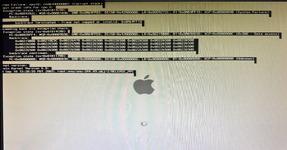

Try forcing a safe boot (by holding the shift key on boot) to rebuild the kext cache. This will ensure the correct driver is pulled from the card’s ROM and cached.Any idea about this behaviour?

You're correct. Panther (10.3) or Tiger (10.4) are required. And with XPF you can install either on any Beige G3. I have both DT and MT. The DT has a reflashed SIL3112 and SATA SSD.These cards/drivers don't work with 10.2 as far as I'm aware.
Tried my luck with 10.3 today. Installed a fresh 9.2.2 on the original 7gig HD, used XPostFacto 4 to start the installation from the Panther CD 1. All works well until the installer reboots (prior to continuing with CD 2). Then, the OS 9 and X systems are corrupted. A happy face appears and the HD starts reading for a few seconds, then stops. Forcing a booth with the OS 9 install CD and running XPostFacto shows an error log:
XPostFacto Version 4.0
Compatible: AAPL,Power Mac 63
Finding Firevire devices
SCST Bus OpenFirmwareName: scsi
Bus Number: 1
Finding SCSI devices
Creating new ATA Bus OpenFirmareName: ide
ShortOpenFirmwareName: ide
Creating new ATA Bus
OpenFirmwareName: ide 1
ShortOpenFirmwareName: ide 1
Creating ATADevice
OpenFirmwareName: ide /@0
ShortOpenFirmwareName : ide /e0
Cheating ATADevice
OpenFimwareName: ide1 / 00
ShortOpenFirmwarNlame : idet /00
MountedVolume: MountedVolume error : - 8138 of a program error
MountedVolume: MountedVolume error: - 8738 of a program error
Any ideas?
XPostFacto Version 4.0
Compatible: AAPL,Power Mac 63
Finding Firevire devices
SCST Bus OpenFirmwareName: scsi
Bus Number: 1
Finding SCSI devices
Creating new ATA Bus OpenFirmareName: ide
ShortOpenFirmwareName: ide
Creating new ATA Bus
OpenFirmwareName: ide 1
ShortOpenFirmwareName: ide 1
Creating ATADevice
OpenFirmwareName: ide /@0
ShortOpenFirmwareName : ide /e0
Cheating ATADevice
OpenFimwareName: ide1 / 00
ShortOpenFirmwarNlame : idet /00
MountedVolume: MountedVolume error : - 8138 of a program error
MountedVolume: MountedVolume error: - 8738 of a program error
Any ideas?
What was your partition layout when you started the OSX install? This failure would be consistent with attempting to installl OSX via XPF on a partition on the IDE drive that's beyond the first 8GB. There's an annoying hardware limitation here.
I've successfully installed OSX to IDE within 8GB mark and also to a SATA SSD on a SIL3112 card.
I've successfully installed OSX to IDE within 8GB mark and also to a SATA SSD on a SIL3112 card.

Did you find a clean solution to this? I have the same issue on my 9600 running 8.6 after upgrading to SATA and I worry about something eventually getting corrupted if I keep ignoring it forever.So I’m having an odd issue with my flashed Adaptec 1210SA in my Beige G3 with Rev. C ROM running Mac OS 9.2.2. After a cold start, I will always get the alert that the machine was improperly shut down and it runs through a disk check. It seems that when I initiate the Shut Down command, the hard drive is not correctly dismounted. The same does not occur if I choose Restart.
I have tried a couple of different hard drives (one Seagate, one WD) and the same behaviour occurs.
Has anyone seen this issue before?
Do we have an sil3124 pci-x mac image? Have an Addonics 4 port card I would like to boot from.
Similar threads


- Replies
- 1
- Views
- 593
- Replies
- 40
- Views
- 6K


- Replies
- 37
- Views
- 8K