

• Hello MLAers! We've re-enabled auto-approval for accounts. If you are still waiting on account approval, please check this thread for more information.

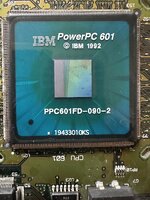
Does this look like a dead 601?

lobust

6502
One of two 7100s I just acquired, both in bad shape, one 66Mhz, one 80. I haven't recapped either of them yet, trying to decide which, if either of them, to start with.

Behaviour with this one (80MHz board):
  1. Plug in power
  2. Turns on by itself, PSU fan starts, power led is lit, no chime or otherwise signs of life, but:
  3. After 1-2 seconds powers off again, so it's not on for long enough to anything to happen anyway.
  4. And won't power back on until it's been unplugged for 10 or so seconds.
I am not sure that the cpu isn't perhaps damaged, and if it is I'm not going to waste any more time diagnosing it.

The black spot in the lower left is slightly raised/bubbled - possible short?

The line/seam/wave pattern on the die I think is probably normal enough, that's not a crack right? Or is it?

What say you?
IMG_2029.JPG
 
I don't see it in your picture, but I had a 6100 that wouldn't start up and it turned out a couple of the little legs been bent into each other and were shorting out. After very careful work with an x-acto knife, I was able to separate them and that fixed it for me.
 
I don't see it in your picture, but I had a 6100 that wouldn't start up and it turned out a couple of the little legs been bent into each other and were shorting out. After very careful work with an x-acto knife, I was able to separate them and that fixed it for me.

I don't see any touching legs, but there are potentially many faults with this logic board, there were clearly mice in there but after I washed it it looked salvagable.

I have two boards like I said, this one is actually the cleanest, the other one has a lot of corrosion especially in the simm sockets, but it actually did show signs of life (chime then death chime), while this one seems dead.

I only have enough caps on hand to do one of them, just wanted to solicit some opinions on whether this board might behave differently after recapping, or whether it's a lost cause. I'm not sure that dead caps can cause the behaviour it's showing, it's like it's tripping the protection in the PSU.

I'm confused, as that black spot sure looks like something has been hot underneath it, but a google image search revealed some other 601's with a spot in the exact same place, and others with no spot. So either it's meant to be there, or it's a reasonably common failure point...
 
I'd recap both board before you do any further troubleshooting, paying particular attention to the startup circuit on the dead board.

I'd start with the one that actually chimes/death chimes though.
 
I'd recap both board before you do any further troubleshooting, paying particular attention to the startup circuit on the dead board.

I'd start with the one that actually chimes/death chimes though.

I normally would of course, just that there's nearly 30 caps on this board!
 
Did you try swapping power supplies between them, or finding a known good one to try? Also, disconnect everything (expansion cards, RAM SIMMs, cache DIMM, disk drives) and try again. If it stays dead even with a known good power supply and a totally bare board, there's an obvious fault somewhere but it's probably not the CPU. These machines will usually power up with a defective CPU (assuming it's not shorted out or something), they just won't do anything else.
I tried experimenting with removing a physically damaged CPU and installing a PDS CPU upgrade, but because of the way these boards are designed (the host CPU has to be present to boot), it didn't work, sadly.
 
Did you try swapping power supplies between them, or finding a known good one to try? Also, disconnect everything (expansion cards, RAM SIMMs, cache DIMM, disk drives) and try again. If it stays dead even with a known good power supply and a totally bare board, there's an obvious fault somewhere but it's probably not the CPU. These machines will usually power up with a defective CPU (assuming it's not shorted out or something), they just won't do anything else.
I tried experimenting with removing a physically damaged CPU and installing a PDS CPU upgrade, but because of the way these boards are designed (the host CPU has to be present to boot), it didn't work, sadly.

Yes to all the above, I guess I'll just bite the bullet and get to work on it!
 
Back
Top

