
-
 Hello Guest! We're hosting a challenge to welcome vintage Intel macs to the MLA during the month of July! See this thread for more information.
 -
We've made some quality of life improvements to the Trading Post. More info here.
You are using an out of date browser. It may not display this or other websites correctly.
You should upgrade or use an alternative browser.
You should upgrade or use an alternative browser.
SuperMac Graphix 1.5
- Thread starter pcamen
- Start date

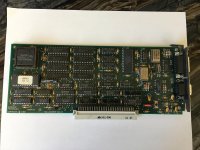
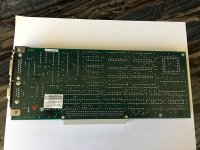
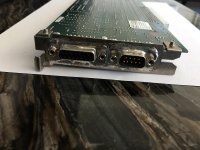

I found this bit in an old InforWorld article from 1987. Since the board is dated 1987, this seems to fit.
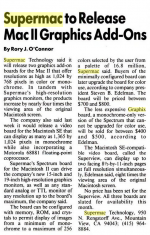
Sounds like this is a monochrome monitor with a max 1024x768 resolution.
I am curious though as to the two types of connectors. I wonder if this allows it to drive a normal Mac monitor as well as a FPD type monitor.
Sounds like this is a monochrome monitor with a max 1024x768 resolution.
I am curious though as to the two types of connectors. I wonder if this allows it to drive a normal Mac monitor as well as a FPD type monitor.
Last edited by a moderator:

Regarding the card pictures from the OP, the board shown is SuperMac's original monochrome card for NuBus-based machines, the Graphix/Grafix or SuperView II ( ask Marketing  ). It was a contemporary of the Spectrum/8 Series II (aka Spectrum C) color board. It was a companion to the SuperView SE. Both SuperViews had max resolutions of 1024x768 at 60Hz and were TTL/digital boards.
The SuperView II/Graphix was later superseded by SuperMac's Monochrome Card (codename: Elroy -- of the Jetsons) in the same time period as SuperMac produced the Spectrum/8 Series III (codename: George -- also Jetsons). The Monochrome Card had redesigned hardware/firmware and supported a max resolution of 1152x870/21" (not including virtual desktops). It also supported 1024x768 at 19"/60 and 75Hz and other smaller screens, such as 15" 640x870 portrait configs (also supported on the Graphix). I think the Monochrome Card also supported the Apple portrait monitor. And SuperMac's support for monochrome portrait configs (640x870) with virtual desktops was generally positioned against the Radius Full-Page Display and also the later Radius Pivot monitor. Andy Hertzfeld always made cool stuff for Apple, Radius and beyond (General Magic, etc.)! Among early Mac engineers, he is someone who always had an incredible sense for UX/Human Factors at the cutting edge of emerging technology.
The Monochrome Card may have been composite sync out and I think it shipped with a single BNC connector cable. I seem to recall SuperMac testing it on color monitors with the connector on the green input, since the Sony/Hitachi displays expected sync on green. And there was some discussion about video noise and shadowing on these boards that required ferrite toroids on one or both ends of the cable. So, I think the cables eventually shipped with included/embedded chokes, but there may be some earlier cables without them.
Interestingly, another "Jetsons" dev era SuperMac board was the (color) Spectrum/8 Series II for the SE/30 (codename: Astro). However, it had a few gremlins -- like sometimes losing its PRAM video configuration if you sneezed on it the wrong way. But, maybe that is retrospectively appropriate, since the cartoon Astro was always apologizing for something in his space-doggy-R-speak. (...although probably not too amusing for the customers at the time if it happened). Not sure that the config issue was ever resolved (and may not have been SuperMac's issue) - the world may never know!
I have some additional info around somewhere. If I find it, I will post it.
). It was a contemporary of the Spectrum/8 Series II (aka Spectrum C) color board. It was a companion to the SuperView SE. Both SuperViews had max resolutions of 1024x768 at 60Hz and were TTL/digital boards.The SuperView II/Graphix was later superseded by SuperMac's Monochrome Card (codename: Elroy -- of the Jetsons) in the same time period as SuperMac produced the Spectrum/8 Series III (codename: George -- also Jetsons). The Monochrome Card had redesigned hardware/firmware and supported a max resolution of 1152x870/21" (not including virtual desktops). It also supported 1024x768 at 19"/60 and 75Hz and other smaller screens, such as 15" 640x870 portrait configs (also supported on the Graphix). I think the Monochrome Card also supported the Apple portrait monitor. And SuperMac's support for monochrome portrait configs (640x870) with virtual desktops was generally positioned against the Radius Full-Page Display and also the later Radius Pivot monitor. Andy Hertzfeld always made cool stuff for Apple, Radius and beyond (General Magic, etc.)! Among early Mac engineers, he is someone who always had an incredible sense for UX/Human Factors at the cutting edge of emerging technology.
The Monochrome Card may have been composite sync out and I think it shipped with a single BNC connector cable. I seem to recall SuperMac testing it on color monitors with the connector on the green input, since the Sony/Hitachi displays expected sync on green. And there was some discussion about video noise and shadowing on these boards that required ferrite toroids on one or both ends of the cable. So, I think the cables eventually shipped with included/embedded chokes, but there may be some earlier cables without them.
Interestingly, another "Jetsons" dev era SuperMac board was the (color) Spectrum/8 Series II for the SE/30 (codename: Astro). However, it had a few gremlins -- like sometimes losing its PRAM video configuration if you sneezed on it the wrong way. But, maybe that is retrospectively appropriate, since the cartoon Astro was always apologizing for something in his space-doggy-R-speak.
(...although probably not too amusing for the customers at the time if it happened). Not sure that the config issue was ever resolved (and may not have been SuperMac's issue) - the world may never know! I have some additional info around somewhere. If I find it, I will post it.
Having written that post, I seem to recall that the SuperView SE also supported 1280x960. But there was some RMA issue -- maybe it was that, originally, it supported 1360x1024. But, later revs only supported 1280x960 and SuperMac stopped carrying the larger monitor(?). So, if someone had a problem or failure, I think SuperMac had to swap both the monitor and the card. I think that's prooo--ooo-bably right...maybe a bit hazy -- but anyway, 1280x960, for sure.

I was finally able to get an image from the SuperMac Graphix card.
Apple Macintosh II Video Card on primary monitor
SuperMac Graphix card on secondary monitor
Had to use a Macintosh II, as the monitor jack is too high to connect a cable on a IIci (see image below). I verified the Graphix card uses a standard Macintosh DB-15 video pinout. Sync on green (no separate hsync). The other connector on the card is probably for external sync / genlock -- not for a video output.
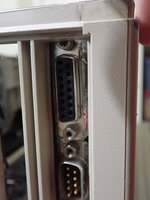
It crashed Monitors in System 7.1 even in 24-bit memory mode. So, I switched down to System 5.1.
In System 5.1, I had to go into the Monitors control panel, click on the SuperMac screen representation in Monitors, exit, and restart to be able to move the cursor/windows into the SuperMac screen. That's unusual.
Apple Macintosh II Video Card on primary monitor
SuperMac Graphix card on secondary monitor
Had to use a Macintosh II, as the monitor jack is too high to connect a cable on a IIci (see image below). I verified the Graphix card uses a standard Macintosh DB-15 video pinout. Sync on green (no separate hsync). The other connector on the card is probably for external sync / genlock -- not for a video output.
It crashed Monitors in System 7.1 even in 24-bit memory mode. So, I switched down to System 5.1.
In System 5.1, I had to go into the Monitors control panel, click on the SuperMac screen representation in Monitors, exit, and restart to be able to move the cursor/windows into the SuperMac screen. That's unusual.
1024x768 @ 66 Hz.
I used a ViewSonic DB15->VGA adapter set to 1024x768 in case it needed monitor sense (I don't think it does)
Dell 1708FPt monitor (none of my other monitors would display an image)
Image looks this bad. (not caused by photography). Likely due to the voltage and timings being slightly non-standard.
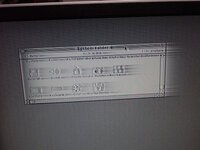
I used a ViewSonic DB15->VGA adapter set to 1024x768 in case it needed monitor sense (I don't think it does)
Dell 1708FPt monitor (none of my other monitors would display an image)
Image looks this bad. (not caused by photography). Likely due to the voltage and timings being slightly non-standard.
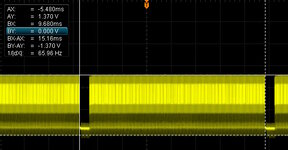
15.16ms vertical frame rate (65.96 Hz)
Voltage of 1.37V is not TTL but not VGA either
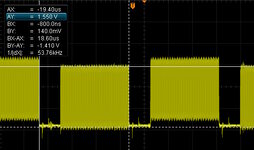
Horizontal line 18.6 us.
From the article below, a 1365x1024 mode is claimed. Maybe with a special cable or driver software? The oldest SuperMac SuperVideo software that I have did not recognize the card.
So, @pcamen after 6 years you have your answers. The card can sorta work, but barely.
Voltage of 1.37V is not TTL but not VGA either
Horizontal line 18.6 us.
From the article below, a 1365x1024 mode is claimed. Maybe with a special cable or driver software? The oldest SuperMac SuperVideo software that I have did not recognize the card.
So, @pcamen after 6 years you have your answers. The card can sorta work, but barely.
Image looks this bad. (not caused by photography). Likely due to the voltage and timings being slightly non-standard.
or because everything's moving very fast to the left
(sorry)

(Since this thread was resurrected anyway, why not going on.)
Doesn't the distorted picture look like an impedance mismatch problem? Like the signal traveling back and forth the wire, becoming increasingly damped and finally fading out?
Cards may have been more picky about cables and display input circuitry at that early days of desktop publishing (DTP) in mid 1987. A time when the very first version of QuarkXPress had just been released.
SuperMac became a popular brand for large CRT displays but I cannot say if they were already available when this card came out. Apple's two page display was put to market two years later in 1989 (says usually reliable Everymac.com).
Doesn't the distorted picture look like an impedance mismatch problem? Like the signal traveling back and forth the wire, becoming increasingly damped and finally fading out?
Cards may have been more picky about cables and display input circuitry at that early days of desktop publishing (DTP) in mid 1987. A time when the very first version of QuarkXPress had just been released.
SuperMac became a popular brand for large CRT displays but I cannot say if they were already available when this card came out. Apple's two page display was put to market two years later in 1989 (says usually reliable Everymac.com).
Doesn't the distorted picture look like an impedance mismatch problem?
Well spotted! Yes, my setup involved a lot of jumper wires and breakout boards. Between that, and whatever the display board was originally matched for, it wouldn't surprise me if this is way off 75 ohm (which I believe is the Mac standard).

I thought of that too when I saw it. That desktop sure is in a hurry to get to wherever it's going!or because everything's moving very fast to the left
(sorry)
Apparently our senses of humor have a few, um... similarities? (scary thought....
 )
)c
Apparently our senses of humor have a few, um... similarities? (scary thought....
I do appreciate your sense of the ridiculous.
(But let's let this thread get back on topic now)
Thank youI do appreciate your sense of the ridiculous.

Of course!(But let's let this thread get back on topic now)
c


