• Hello MLAers! We've re-enabled auto-approval for accounts. If you are still waiting on account approval, please check this thread for more information.

PowerBook 3400c GLoD repair success

I’m servicing a couple of 3400c machines at the moment and one of them came to me with a failed logic board, afflicted with the well known ‘Green Light of Death’ syndrome. There seems to be a general consensus that GLoD symptoms are unfixable, so I wanted to show that a full repair is possible.

I inspected the board and found two areas of concern. The first was corrosion under and around this op-amp at U3, caused by a leaking PRAM battery.
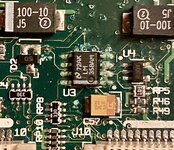
IMG_3958.jpeg

The other was this blown zener diode by the power connector:
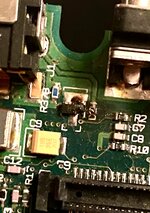
IMG_3957.jpeg

I lifted and cleaned the area under U3. I also found a broken trace circled in red:
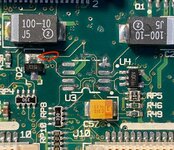
IMG_3961.jpeg

The finished repair:

IMG_4306.jpeg

I then had to wait for a zener diode (P/N: 863-MMBZ5233BLT1G) to arrive from Mouser. Eventually it did, and I got it swapped in - but there was no boot.

I inspected the board again and turned my attention to another very localised area of corrosion, right next the RAM card connector. It’s a strange spot to find any corrosion but since it aligns with the edge of the keyboard perhaps something dripped through.

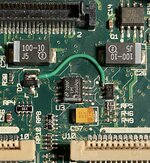
Sure enough, two vias were corroded and did not make continuity to the back side of the board. I ran wires as follows:
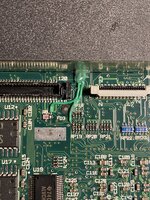
IMG_4307.jpeg

I passed them through the opening for the PC Card cage and then along the back side of the board with dabs of hot glue to hold everything in place.
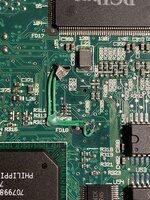
IMG_4308.jpeg

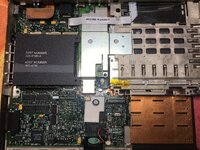
Board overview after repairs complete:
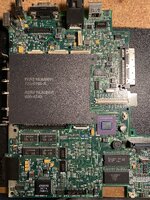
IMG_4309.jpeg

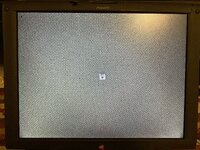
Result:

IMG_4310.jpeg
 
Last edited:
Whoah great job, another one lives! I've a 3500/Kanga that was on its last legs and kicked the bucket recently, I'm guessing it looks a lot like this on the inside.
 
Whoah great job, another one lives! I've a 3500/Kanga that was on its last legs and kicked the bucket recently, I'm guessing it looks a lot like this on the inside.

Thanks :) Feel free to start a thread and upload photos of the board, I’ll be interested to see how it looks. Luckily this one only had two areas of minimal corrosion, which made it a viable repair.
great job..I guess it was quiet a job to track the traces

I’m glad there were only three!
 
Hello. Could you please provide more information about powering the laptop? I'm working on a PowerBook G3 M3553, which has a leaked PRAM battery and main battery. I cleaned it carefully, but I want to understand if the laptop can start if I connect 10.8V to the main battery pins from my bench power supply. I don't have the original charger, but I can try to power it via the charger port using 24V without a battery. What is the minimum setup required to turn it on without having to assemble and disassemble for every check?
 
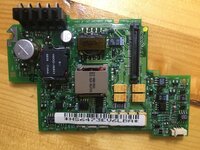
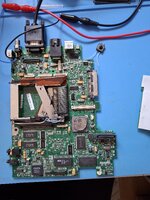
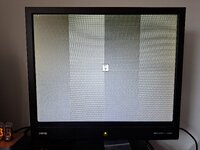
I did it myself. It can be started without both batteries. The 24V power is soldered directly to the board because I didn't have the charger. The power board should be installed to the Mesonine connector (not shown in the photo). I also connected the button instead of the keyboard for convenience. Pin 2 on J10 and pin 32 on J11 are the power keys. I used a coin and silicone thermopad as a heatsink. With this minimal setup, I got a picture on my VGA monitor. I hope it helps.
 

Attachments

  • 20250719_173451.jpg
    20250719_173451.jpg
    1.8 MB · Views: 18
  • 20250719_173606.jpg
    20250719_173606.jpg
    5.2 MB · Views: 19
I’m servicing a couple of 3400c machines at the moment and one of them came to me with a failed logic board, afflicted with the well known ‘Green Light of Death’ syndrome. There seems to be a general consensus that GLoD symptoms are unfixable, so I wanted to show that a full repair is possible.

I inspected the board and found two areas of concern. The first was corrosion under and around this op-amp at U3, caused by a leaking PRAM battery.

View attachment 86955

The other was this blown zener diode by the power connector:

View attachment 86946

I lifted and cleaned the area under U3. I also found a broken trace circled in red:

View attachment 86956

The finished repair:

View attachment 86957

I then had to wait for a zener diode (P/N: 863-MMBZ5233BLT1G) to arrive from Mouser. Eventually it did, and I got it swapped in - but there was no boot.

I inspected the board again and turned my attention to another very localised area of corrosion, right next the RAM card connector. It’s a strange spot to find any corrosion but since it aligns with the edge of the keyboard perhaps something dripped through.

Sure enough, two vias were corroded and did not make continuity to the back side of the board. I ran wires as follows:

View attachment 86951

I passed them through the opening for the PC Card cage and then along the back side of the board with dabs of hot glue to hold everything in place.

View attachment 86952

Board overview after repairs complete:

View attachment 86953

Result:

View attachment 86954
Wow! Amazing work - I've got a 3400c with some very small centralised corrosion that is acting strange and sort of GLoD symptoms? Anyway you've inspired me to give it a crack!
 
I am repairing a 3400 for someone and it too was giving me the GLoD, but some vinegar and scrubbing in the battery-damaged area was able to restore it to booting. However, the picture is still missing, both internally and with an external monitor, so I'm guessing there's some damage by the display connector. I'm guessing the VGA Out comes from there as well, hence no picture there either. It is getting... something... the external monitor goes black (as opposed to saying "No Signal"), but it doesn't seem to be getting actual image information.
 
Back
Top