• Hello MLAers! We've re-enabled auto-approval for accounts. If you are still waiting on account approval, please check this thread for more information.

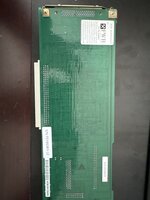
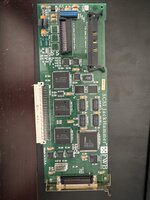
FWB SCSI Jackhammer.

crazyben

6502
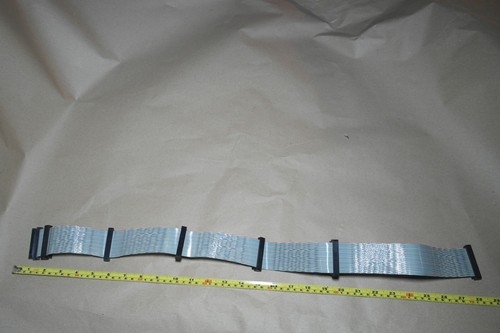
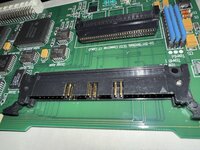
I am pleasantly surprised to find this card in a non working Centris 650. HDD was removed and all the cables with it. I have q840av I believe this card is prefect for it. Does these require any special internal cable or I can use the normal 50 pins on the top connector. What cable goes in the bottom connector?
 

Attachments

  • image.jpg
    image.jpg
    1.5 MB · Views: 38
  • image.jpg
    image.jpg
    1.2 MB · Views: 38
You can use a 50 pin one with the other connector. You can also use external drives with the correct cables and terminators.

These days I would recommend whatever you can find locally just to see if the card works.
 
Do you have link to the driver. I read in manual that i need to do install but Mac garden only has control panel not a installer for it.
 
I did that and mac wont boot with 50 pin internal drive. So i wanted start with installing as the manual suggest.

The Jackhammer is fussy about disk drivers. I found that it did not play well with volumes that were formatted with anything other than FWB Hard Disk Toolkit. It's been a few years so I don't recall the details, but I did my experiments with a SCSI2SD v6 and a few real hard drives in a Quadra 800 and a Quadra 700. I can't remember if I ever tried my ZuluSCSI with the jackhammer...

Also, mine didn't work initially which I figured out to be corrupted firmware, and it worked after I force overwrote the firmware. In case yours is the same, the details on that are here: https://68kmla.org/bb/index.php?threads/simple-revive-of-a-dead-nubus-jackhammer.42341/

The ATTO Silicon Express cards are less finicky than the Jackhammer IME, so I tend to use those in preference while my Jackhammer lives on the shelf most of the time...

I can't remember if it's the case with the Jackhammer, but I think it possibly is, that it won't find a boot drive by itself. This is definitely the case with the silicon express cards. You initially have to boot from some other disk and select the boot disk in the Startup Disk control panel. After that it will boot from it provided you have a good pram battery, because it is stored in the slot pram.
 
My jackhammers boot just fine for attached drives (even on my IIfx). The ATTO IV cards tend to be just for storage drives and are not bootable unless you have the final firmware.

I still have to see if the SE II's I have are bootable or not.
 
My jackhammers boot just fine for attached drives (even on my IIfx). The ATTO IV cards tend to be just for storage drives and are not bootable unless you have the final firmware.

I still have to see if the SE II's I have are bootable or not.

All the SE cards are bootable from my tests. I have a II and a IV, and ran the IV on its original firmware for a good while with no issues.

However, if the only bootable drive in the system is connected to one of the cards it will not simply find it and boot from it. The boot volume has to be selected in the startup disk control panel. The blessed volume is saved in the slot pram, and it will happily boot from that drive thereafter, until the pram is reset or the battery dies.

As I understood it, this is a limitation of the ROM and how it looks for boot volumes, so if it doesn't apply to the Jackhammer I'm not sure how FWB worked around it.

As I mentioned, the Jackhammer seems to only work well with drives formatted with HDT while the SE cards are fine with whatever - maybe there is something done at the driver level to assist with booting un-blessed volumes?
 
You can bodge around it as a card designer, but you're not meant to, because it'll mean that under some circumstances your card will ignore what the user expects/has configured.
 
If you're curious about the details of how Bootable nubus cards work on the ROM side, I've discussed it in my NuCF thread a bit: https://68kmla.org/bb/index.php?threads/fast-compactflash-for-macintosh-pds-nubus.49328/

Essentially, as cheesestraws pointed out, your DeclROM PrimaryInit method can take a guess if it thinks it's supposed to be the bootable device and set the PRAM to ensure Mac OS invokes the Bootrec at early boot. But this could cause unintentional behavior if you aren't canny about it.

The sensible behavior I settled on was to set it once on PRAM reset or card install. Any changes beyond that are up to the user.

The driver discussion is interesting, however: I'm not exactly sure how a card that participates in SCSI manager would need its driver(s) structured. It's possible that the on-disk driver needs to know exactly how to talk to the in-rom driver for proper operation.
 
The sensible behavior I settled on was to set it once on PRAM reset or card install. Any changes beyond that are up to the user.

Even that is a bit iffy if the user installs it in an already working system, though; as I think we discussed, in your case I think it's a reasonable decision but I'm not sure it would have been the right thing to do in a mass market card for a different audience at a different time. C&D is, I think, correct in discouraging this as a general design approach.

The driver discussion is interesting, however: I'm not exactly sure how a card that participates in SCSI manager would need its driver(s) structured. It's possible that the on-disk driver needs to know exactly how to talk to the in-rom driver for proper operation.

I suspect more here (although I'm happy to be corrected) it's just that FWB really had no incentive to do anything else, given that Hard Disk Toolkit was bundled with the card in the box - and if you're already distributing the disk driver/formatter, I can see an argument that for the sake of avoiding unexpected interactions with other people's software, just don't allow use of any driver you're not expecting...

(I suspect this because other cards, or things that masquerade as SCSI cards and interact with the SCSI manager, don't seem to have this limitation)
 
Back
Top