• Hello MLAers! We've re-enabled auto-approval for accounts. If you are still waiting on account approval, please check this thread for more information.

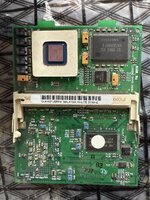
iMac G3 Rev A-D FSB bus overclock

The compounding issue is that the L2 supply voltage also goes to 13 pins of the 750/7400/7410, which will be much more difficult to disconnect and reconnect to a different, interposed voltage rail.
Mainly because there won't be a separate, isolated voltage rail to the L2 voltage pins of the cache ICs and CPU, as they're presumably just connected straight to the 3.3V rail of entire CPU card.

So while not impossible with both a CPU and cache IC interposer that supplies both with a 2.5V or thereabouts voltage rail, it's a very complex way of doing things.
And if you're going to interpose CPUs, you might as well try to develop an interposer for a G4 that has integrated cache.
The the motherboard supply 3.3v to the L2 Bus interface via the ZIF socket?

So that the voltage would have to be stepped down on the daughter card?

Are not the ZIF cards that use SEC L2 RAM 2.5v?
 
The the motherboard supply 3.3v to the L2 Bus interface via the ZIF socket?

So that the voltage would have to be stepped down on the daughter card?

Are not the ZIF cards that use SEC L2 RAM 2.5v?

Ah, I had the iMac G3 card in mind considering the thread.
As for the ZIF, looking at the Yosemite schematics, there is a dedicated 3.3V rail that I would assume card with 3.3V cache ICs would use to power them (and the cache logic on the CPU).

Perhaps newer ZIFs regulate it on-card, or perhaps they're using vCore for the cache as well?
 
Ah, I had the iMac G3 card in mind considering the thread.
As for the ZIF, looking at the Yosemite schematics, there is a dedicated 3.3V rail that I would assume card with 3.3V cache ICs would use to power them (and the cache logic on the CPU).

Perhaps newer ZIFs regulate it on-card, or perhaps they're using vCore for the cache as well?
Sorry, I was carrying on in 2 threads about this and lost sight of the fact we were talking early iMac.

I have both ZIF Macs and early iMacs, all using the MPC106.

My interests is pushing PCI, but G4 CPU's are needed for that.

Great points tho, I learn a lot, thanks.
 
Fortunately, this web page is archived:


“To change the bus to 83Mhz, simply move resistor R24 to location R23, and then resistor R12 to location R13.”


This is quite interesting. I guess it’s another way to set the bus/PCI clocks, obviously redundant as the MPC106 has its own internal multiplier.

Thank you so much for recovering the link!! Now I know how to do it.

I'm going to write it down and save it so I don't lose it again. We've preserved other information!!
Overclock Bus 83MHz.jpeg

When I have changed the HDD for SSD I will try it.
 
Fortunately, this web page is archived:


“To change the bus to 83Mhz, simply move resistor R24 to location R23, and then resistor R12 to location R13.”


This is quite interesting. I guess it’s another way to set the bus/PCI clocks, obviously redundant as the MPC106 has its own internal multiplier.
This must explain why R140-R138 are in test mode on the main logic board, the daughter card is setup to set the bus?
 
The odd thing is that they are all unpopulated, which according to the schematics means it is set to test mode. I think there’s a reasonable chance populating all three sets of pads would still set the 83MHz bus option.

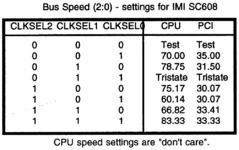
I don't think what I'm going to say really explains anything, but the way I interpret the schematics, having a resistor populated would make it a 0. Because they each have 4.7k pullups pulling the line up to a logical 1, and populating a 47 ohm resistor to ground will drop it down to a logical 0. I think this jives with how the arrows are pointing to the bottom entry in the table.
 
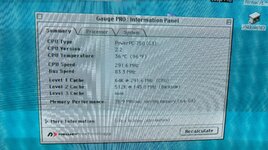
Hi, after finding a compatible SSD, I tried overclocking the bus.

IT WORKS!

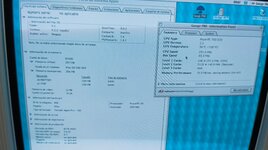
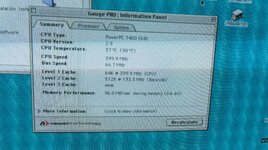
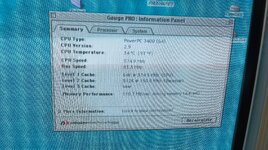
Although the system profile still indicates 233MHz, Gauge Pro tells us that we have a 290MHz CPU and an 83MHz bus. It works with two PC100 RAM modules.

IMG_20250214_090655.jpgIMG_20250214_090714.jpg
 
This must explain why R140-R138 are in test mode on the main logic board, the daughter card is setup to set the bus?

R138-R140 on the iMac logic board are equivalent to pins 7-9 on the Beige jumper block, which select a preset on the SC608 clock generator.

I don't think what I'm going to say really explains anything, but the way I interpret the schematics, having a resistor populated would make it a 0. Because they each have 4.7k pullups pulling the line up to a logical 1, and populating a 47 ohm resistor to ground will drop it down to a logical 0. I think this jives with how the arrows are pointing to the bottom entry in the table.

Yes, good point. In which case the clock generator is set to its 83.33 CPU/33.33 PCI preset. On the Columbus schematics, there is a note under the table of presets which says 'CPU speed settings are "don't care"'.

Screenshot 2025-04-01 at 21.52.31.png

I take it to mean that the iMac is not using the clock generator to set up the bus speed and it's instead being done through the Grackle. If this is the case – it pretty much has to be since the iMac runs a 66MHz bus – then probably the clock generator's fixed presets are not a show stopper as regards 100MHz operation. Just firmware.

This is different to the Beige where the clock generator does seem to be driving the bus clock.

I would like to know how R12/13 and R23/24 are wired on the CPU card and if they indeed connect to GracklePLL2/3.
 
Last edited:
I’ve done a bit more research on this topic. So the trayloader iMac uses an MPC932 ‘Low Voltage PLL clock driver’ on the CPU card for the SDRAM and CPU bus clocks.

According to the datasheet the MPC932 supports up to 120MHz clock output and a 3x multiplier.

This is how I did it on my card that received a 100MHz XPC106.
Sadly, I haven't found a way to get it to 100MHz, it might simply be impossible without further hardware modifications.

@Daniël, please could you share details about which resistors you set, and what you specifically tried? Because my understanding is that you need to both set up the clock generator and the Grackle PLLs 0-3 so that they agree in terms of the 3:1 bus mode.

This is what I have been wanting to do on my Beige G3 but the SC608 clock generator simply isn’t capable of running the bus at 3:1.

Electronically at least (ROM code is another matter), it seems very, very likely that the trayloader iMac is capable of running a 100MHz+ bus just by setting some resistors.
 
Last edited:
@Daniël, please could you share details about which resistors you set, and what you specifically tried? Because my understanding is that you need to both set up the clock generator and the Grackle PLLs 0-3 so that they agree in terms of the 3:1 bus mode.

I didn't take notes and it's been quite a while, but I tried quite a few different combinations and never got past 87MHz.
That said, I still don't fully understand the two resistor settings nearby the clock generator, and its effect on the bus PLL resistors.
 
I didn't take notes and it's been quite a while, but I tried quite a few different combinations and never got past 87MHz.
That said, I still don't fully understand the two resistor settings nearby the clock generator, and its effect on the bus PLL resistors.
Need to get an iMac now

:ROFLMAO:
 
The MPC932 isn't pin compatible with the SC608 so I not sure is't any use to the Beige?
That’s correct.

For now I want to see if I can get the iMac to 100MHz.

The MPC932 could be used in tandem with the SC608 on the Beige, taking the latter’s 33MHz output as reference and then doing the 3x PLL multiplication. This is how the iMac does it, so I figure I could replicate that.
 
That’s correct.

For now I want to see if I can get the iMac to 100MHz.

The MPC932 could be used in tandem with the SC608 on the Beige, taking the latter’s 33MHz output as reference and then doing the 3x PLL multiplication. This is how the iMac does it, so I figure I could replicate that.
You'll need another XPC100 for the iMac.

I'm kind of waiting on you results before I do the swap on my Beige, I was really hoping I could just replace the XPC66 with the 100MHz part and clock chip the PCI to 66MHz but your RAM clocks not syncing with only 38MHz PCI let's me know that can't really be done.

Plus the only person I could find that tried the XPC100 @133MHz said it was unstable and the system would lockup pretty soon after boot on a G3 B&W.
 
I'm kind of waiting on you results before I do the swap on my Beige, I was really hoping I could just replace the XPC66 with the 100MHz part and clock chip the PCI to 66MHz but your RAM clocks not syncing with only 38MHz PCI let's me know that can't really be done.

I think when the CPU bus sags so does PCI at the same ratio, because the outputs are phase locked.

Plus the only person I could find that tried the XPC100 @133MHz said it was unstable and the system would lockup pretty soon after boot on a G3 B&W.

I doubt if many 100MHz rated XPC106s could do 133MHz stably just because they don’t seem to have a lot of headroom for overclocking. Most 66es are not even stable at 83MHz. But maybe there are a few unicorns out there, just like with CPU clocking it’s luck of the draw.
 
IMG_20250515_173223.jpg

Hi!! You might be surprised that I changed the 66MHz XPC106 to a 100MHz one if I told you it worked. Well, it did, but the OS would occasionally pause, especially when copying files. So I suspected it wasn't very stable.

I had a faulty B&W G3 motherboard at home, and I decided to replace it. So, if I can join in testing to get to 100MHz, although if the iMac tray schematics are like those of the iMac G4, some don't have the components to adjust the bus to the 100MHz indicated in the schematic, but it is set to 100MHz.

https://rosysumenteinquieta.blogspot.com/2024/01/imac-g4-bus-overclock.html

A few days ago I did a CPU SWAP for a G4 7400@466MHz, leaving it at 400MHz with the bus at 66MHz, completely stable, with some improvement in cooling, and the cache, according to GAUGE PRO, was working at 133MHz, a 3:1 ratio.

IMG_20250510_164649.jpg

But after adjusting the bus to 83MHz, and changing the PLLs to leave it at 375MHz, look at the cache, it is running at 150MHz, with a ratio of 2.5:1.

IMG_20250515_185513.jpg

What's happening with the cache ratio? Shouldn't it be fixed to the CPU speed?
 
View attachment 86752

Hi!! You might be surprised that I changed the 66MHz XPC106 to a 100MHz one if I told you it worked. Well, it did, but the OS would occasionally pause, especially when copying files. So I suspected it wasn't very stable.

I had a faulty B&W G3 motherboard at home, and I decided to replace it. So, if I can join in testing to get to 100MHz, although if the iMac tray schematics are like those of the iMac G4, some don't have the components to adjust the bus to the 100MHz indicated in the schematic, but it is set to 100MHz.

https://rosysumenteinquieta.blogspot.com/2024/01/imac-g4-bus-overclock.html

A few days ago I did a CPU SWAP for a G4 7400@466MHz, leaving it at 400MHz with the bus at 66MHz, completely stable, with some improvement in cooling, and the cache, according to GAUGE PRO, was working at 133MHz, a 3:1 ratio.

View attachment 86753

But after adjusting the bus to 83MHz, and changing the PLLs to leave it at 375MHz, look at the cache, it is running at 150MHz, with a ratio of 2.5:1.

View attachment 86754

What's happening with the cache ratio? Shouldn't it be fixed to the CPU speed?
Well done on your Grackle swap.

It’s a G4, so you must be using some software to configure the caches. It’s probably defaulting to lower ratios for safety, but you should be able to adjust it.
 
Back
Top