
-
 Hello Guest! The forum software will be upgraded weekend of 06/26. See this announcement thread for more information.
You are using an out of date browser. It may not display this or other websites correctly.
You should upgrade or use an alternative browser.
You should upgrade or use an alternative browser.
Performa 550 and Recovery Partition
- Thread starter Dandu
- Start date



View attachment 83105
Looks like the only file that's named differently is Apple HD SC Setup. On this disk, it's called Internal HD Format.
Thanks for taking a photo! Ah yes, I've heard of Internal HD Format. My understanding is that it only works with Macs that have IDE drives: https://machut.net/files/manuals/macintosh_performa/0306379PerformaHDupdt.PDF
I'm thinking maybe that disk actually came with a Performa 630 series machine?
Someone I know just bought a boxed 550. It has working HDD. I am asking him to confirm what disk he has. Let me know if there is anything I can find out.
Oh wow, a boxed 550 has to be very rare at this point! Assuming it still has the original 160 MB internal hard drive, it would be very interesting to see if it also has this partition. The two pieces of info I'm still missing are: did the older caddy-loading models also have this partition, and is Apple Backup what's really responsible for making it.
One good piece of info to know is, if the hard drive is dead, it may very well be possible to revive it.
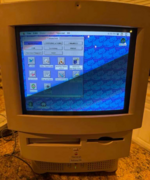


*edit* Yeah, just looked at the back of the disk. This is actually 7.1.2P1. Oops. So, that explains the difference.Thanks for taking a photo! Ah yes, I've heard of Internal HD Format. My understanding is that it only works with Macs that have IDE drives: https://machut.net/files/manuals/macintosh_performa/0306379PerformaHDupdt.PDF
I'm thinking maybe that disk actually came with a Performa 630 series machine?
Oh wow, a boxed 550 has to be very rare at this point! Assuming it still has the original 160 MB internal hard drive, it would be very interesting to see if it also has this partition. The two pieces of info I'm still missing are: did the older caddy-loading models also have this partition, and is Apple Backup what's really responsible for making it.
One good piece of info to know is, if the hard drive is dead, it may very well be possible to revive it.
This is the picture he sent me. He is far and not that tech savvy so I am trying to find a way to get copy of this HDD.
Nice! I wonder if Apple Backup is still present on it. The easiest way to dump the HDD is to use a ZuluSCSI or BlueSCSI V2 with initiator mode, although with someone who's not tech savvy I realize that can be tricky.
Yeah, just looked at the back of the disk. This is actually 7.1.2P1. Oops. So, that explains the difference.
Ahh yeah, definitely for a 630 then. Mystery solved!
I bought a 160 MB Apple Conner hard drive on eBay just for fun, and after unsticking its head, I dumped it and it ended up being from a Performa. I'm not 100% sure that it came from a 550, but I think it's likely. It has an install of System 7.1P5 that appears to have a software bundle exactly like what my childhood 550 came with (which had a 7.1P5 Utilities disk):
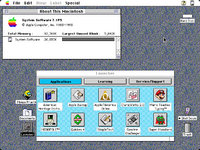
Mario Teaches Typing, Monopoly, Spectre Challenger, and Super Munchers. The person hadn't even changed the desktop background. This hard drive has a recovery partition, but it's empty. The entire hard drive layout is 100% identical to the other drive I dumped. The main and recovery partitions both have a creation date of June 12, 2000, so I think at that point in time it was likely reformatted with the special Performa version of Apple HD SC Setup and then restored, either with an Apple Backup disk set or maybe the elusive volume 1 of the market series restore CD. It's not the 500 Series Restore CD, because that would have had 7.1P6. No new data was really gained from this experiment, but it's nice to have access to a full 7.1P5 install that has very minimal customization.
The version of Apple Backup on this system is 1.1 and doesn't seem any different from other copies of version 1.1 that I've seen. Apple said the recovery was added as part of 7.1P6 though, so maybe that's a point in favor of the recovery partition possibly only being present on later-model Performa 550s.
Turns out this hard drive also definitely came from a Performa 550. Luckily the owner had run MacCheck and saved a report, which said:
80 is gestaltMacLC550. Too bad it had been reformatted in 2000, I could have learned some interesting stuff from this one.
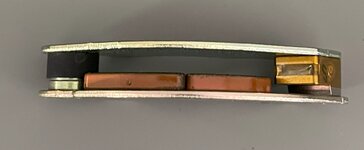
Yep! It was definitely not working, but all it needed was to be opened up and have its head gently pulled away from a (presumably rubber) thing it was stuck to. I've now seen two of these Conner drives with the same problem. This one I got today seems to work fine again with no repair needed, but it'll likely get stuck again unless I figure out a way to replace the sticky stuff or put tape over it. I'm going to make a video about it. I've also heard that the gasket can turn to rubber goo over time, so it might be good to replace that too. Here's a picture of the first one I fixed for someone else, which was really stuck and would always immediately re-stick after I freed it:
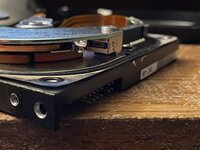
That little indentation in the dark spot is not supposed to be there as far as I can tell. There's a small indentation in this same spot in the (now working) drive I received today, but it's not nearly as deep. On this one I repaired for someone else, I just covered the whole thing with Kapton tape and now the head doesn't get stuck and it works fine. Might be better to actually replace the rubber piece with something new, or only put the tape around the rubber and not the whole metal part.
Macintosh Model:
(ID = 80)
Physical Ram Size:
36 Mb (36864 Kb)
Logical Ram Size:
72 Mb (73728 Kb)
ROM Version:
$67C
ROM SubVersion:
$25F1-14.12
NuBus Slot Information:
No card found in NuBus slot: $E
80 is gestaltMacLC550. Too bad it had been reformatted in 2000, I could have learned some interesting stuff from this one.
@dougg3 I'm guessing the drive came from the commanderscott seller? I did see one that he was selling as parts/repair.
Yep! It was definitely not working, but all it needed was to be opened up and have its head gently pulled away from a (presumably rubber) thing it was stuck to. I've now seen two of these Conner drives with the same problem. This one I got today seems to work fine again with no repair needed, but it'll likely get stuck again unless I figure out a way to replace the sticky stuff or put tape over it. I'm going to make a video about it. I've also heard that the gasket can turn to rubber goo over time, so it might be good to replace that too. Here's a picture of the first one I fixed for someone else, which was really stuck and would always immediately re-stick after I freed it:
That little indentation in the dark spot is not supposed to be there as far as I can tell. There's a small indentation in this same spot in the (now working) drive I received today, but it's not nearly as deep. On this one I repaired for someone else, I just covered the whole thing with Kapton tape and now the head doesn't get stuck and it works fine. Might be better to actually replace the rubber piece with something new, or only put the tape around the rubber and not the whole metal part.
I found some time to write up everything and also shared as close to a factory-fresh drive image that I could create, so anyone else can download and play with this functionality in MAME. The recovery partition even works on the IIci and the Classic II, verified on hardware!

There is software available to recover stuff from previeously formatted drives. Think of something like the "Disk Drill.app" for more recent Macs. If a reformatted drive that came originally from a P550 has not seen much write load after reformatting, could't there be enought leftover from the original recovery partition to restore it to a functional state?
There is software available to recover stuff from previeously formatted drives. Think of something like the "Disk Drill.app" for more recent Macs. If a reformatted drive that came originally from a P550 has not seen much write load after reformatting, could't there be enought leftover from the original recovery partition to restore it to a functional state?
I've definitely searched even on drives that I know have been reformatted, with a hex editor looking at the raw bytes from a dump made with ZuluSCSI. I think depending on how the formatting is done, remnants could definitely potentially be there.
The biggest problem is that I'm pretty sure Apple HD SC Setup does a lot of zeroing out of existing data during the formatting process. It takes forever -- I think it's doing a low level format and removing all the existing data as it goes.

Now featured on OS News:


It's too bad (although from a use-case, probably good) that the 550 came with 7.1P6. I wish we had similar recovery partitions for 7.0.1P through 7.1P5....
The 550 holds that unique space in time where the earlier Apple Backup that backed up to floppy disks required too many disks, but CD-Rs weren't standard yet.
Upon reflection, shouldn't that recovery partition include the version of Apple Backup on it that created it in the first place? If it doesn't, then that kind of suggests Apple pre-populated the image at the factory, and never got around to getting Apple Backup to back up to it or restore from it.
The 550 holds that unique space in time where the earlier Apple Backup that backed up to floppy disks required too many disks, but CD-Rs weren't standard yet.
Upon reflection, shouldn't that recovery partition include the version of Apple Backup on it that created it in the first place? If it doesn't, then that kind of suggests Apple pre-populated the image at the factory, and never got around to getting Apple Backup to back up to it or restore from it.
A reader on my blog figured out one little tidbit: the "jy" in "msjy" stands for John Yen, who is listed as the inventor on Apple's patent for this functionality. I didn't even realize the patent existed until now. It had screenshots of all of the stuff I showed off. The "ms" could be Microseeds, who co-wrote Apple Backup.
Very cool!
The recovery partition only contains the System, Finder, and System Enablers, and a few support files. None of the other apps or anything like that. I am still very interested in finding out if there was a special Apple Backup that didn't make it onto the restore CD...
I sure hope cleaner copies of the other system versions emerge someday! Particularly 7.1P3 as I know you've been looking for.
I didn't talk about this in my post because it was getting way too long, but I do feel pretty confident that older Performa 550s that came with 7.1P5 didn't have a special Apple Backup version. The reason: I stumbled upon a hard drive from a 550 that had a very stock-looking install of 7.1P5 with all of the bundled software, but clearly had been tinkered with just a tiny bit.
Looking at various data on the disk, I can tell that it was reformatted in June 2000 using a 7.1P5 Utilities disk that was likely bundled with the machine (because the disk driver matches Apple HD SC Setup 7.2.2P from that disk). Based on the slowly incrementing modification dates of all of the subfolders in the Applications folder, it was likely restored using Apple Restore and a floppy set right after that. The version of Apple Backup that was restored from the backup was not special and didn't have any recovery partition functionality.
Now featured on OS News:
Very cool!
Upon reflection, shouldn't that recovery partition include the version of Apple Backup on it that created it in the first place? If it doesn't, then that kind of suggests Apple pre-populated the image at the factory, and never got around to getting Apple Backup to back up to it or restore from it.
The recovery partition only contains the System, Finder, and System Enablers, and a few support files. None of the other apps or anything like that. I am still very interested in finding out if there was a special Apple Backup that didn't make it onto the restore CD...
It's too bad (although from a use-case, probably good) that the 550 came with 7.1P6. I wish we had similar recovery partitions for 7.0.1P through 7.1P5....
The 550 holds that unique space in time where the earlier Apple Backup that backed up to floppy disks required too many disks, but CD-Rs weren't standard yet.
I sure hope cleaner copies of the other system versions emerge someday! Particularly 7.1P3 as I know you've been looking for.
I didn't talk about this in my post because it was getting way too long, but I do feel pretty confident that older Performa 550s that came with 7.1P5 didn't have a special Apple Backup version. The reason: I stumbled upon a hard drive from a 550 that had a very stock-looking install of 7.1P5 with all of the bundled software, but clearly had been tinkered with just a tiny bit.
Looking at various data on the disk, I can tell that it was reformatted in June 2000 using a 7.1P5 Utilities disk that was likely bundled with the machine (because the disk driver matches Apple HD SC Setup 7.2.2P from that disk). Based on the slowly incrementing modification dates of all of the subfolders in the Applications folder, it was likely restored using Apple Restore and a floppy set right after that. The version of Apple Backup that was restored from the backup was not special and didn't have any recovery partition functionality.
Similar threads


- Replies
- 6
- Views
- 454


