
You are using an out of date browser. It may not display this or other websites correctly.
You should upgrade or use an alternative browser.
You should upgrade or use an alternative browser.
A thread for RackMacs
- Thread starter cheesestraws
- Start date

You're running mains voltage over a barrel jack?
No, it runs off a 5V external supply.


*12V, it's a PicoATX connected to a mAcTX LC, the PicoATX derives all its voltages off of 12V DCNo, it runs off a 5V external supply.
*12V, it's a PicoATX connected to a mAcTX LC, the PicoATX derives all its voltages off of 12V DC
I think you're thinking of someone else's rackmac build. Mine doesn't use a PicoATX or a mAcTX, it uses a pair of tracopower DC/DC converters, one to generate 12V internally from 5, and one to generate -5V. My reason for doing it this way around is to keep as much of the heat from power conversion outside the case in the power brick, since the previous rackmac case I used didn't have any ventilation. In this one, it might have made more sense to use 12V externally, but I had already built the DC/DC module for the last rackmac and it still worked, so no need to buy anything else

edit: that's why you can't see the DC/DC in any of the photos, it was still in the old rackmac until I decommissioned it today...
I realize what's going on now! I'd like to apologize for assuming that you're an idiot, as only a true a idiot would.
if it helps, my day has been a bit like that too...
ah that makes sense, sorry about thatI think you're thinking of someone else's rackmac build. Mine doesn't use a PicoATX or a mAcTX, it uses a pair of tracopower DC/DC converters, one to generate 12V internally from 5, and one to generate -5V. My reason for doing it this way around is to keep as much of the heat from power conversion outside the case in the power brick, since the previous rackmac case I used didn't have any ventilation. In this one, it might have made more sense to use 12V externally, but I had already built the DC/DC module for the last rackmac and it still worked, so no need to buy anything else
edit: that's why you can't see the DC/DC in any of the photos, it was still in the old rackmac until I decommissioned it today...
ah that makes sense, sorry about that
There definitely is someone using a picoATX in one, it's just not me!
That'd be appreciated
Front panel gerbers and layout files are here https://github.com/cheesestraws/lc-rackmac/tree/main/frontpanel along with an SVG of just the port holes for an LC board, in case you want to create your own variant. The switch that this fits on the front of is an HP V1910-48G, which come up pretty cheap on eBay often - as I said, I got mine for £10. Note that there's not a *huge* amount of space in this case, but there's more than enough. I hope this is useful - I'd love to see what you come up with!
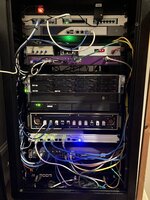
And now it's installed, so one final photo: (yes, I know my cable management is crap)

Is that a bank of mikrotiks? Nice.There definitely is someone using a picoATX in one, it's just not me!
Front panel gerbers and layout files are here https://github.com/cheesestraws/lc-rackmac/tree/main/frontpanel along with an SVG of just the port holes for an LC board, in case you want to create your own variant. The switch that this fits on the front of is an HP V1910-48G, which come up pretty cheap on eBay often - as I said, I got mine for £10. Note that there's not a *huge* amount of space in this case, but there's more than enough. I hope this is useful - I'd love to see what you come up with!
And now it's installed, so one final photo: (yes, I know my cable management is crap)
View attachment 77984
Also you’re begging me to ask what the strange array of ports on the lower cheesy is.
Is that a bank of mikrotiks? Nice.
Yes, for home use I really like Mikrotik kit. The UI is bonkers, but it's excellent value for money, and at home I can live with the bonkers UI for the cheapness...
Also you’re begging me to ask what the strange array of ports on the lower cheesy is.
That's two things in there, both Pi-based - the one on the left (which is currently plugged in) is a GPS clock, the one on the right is an RTL-SDR affair which is waiting for suitable wiring to be installed for the antenna before it can be plugged in and commissioned properly. The knob in the middle is just to adjust fan speeds.
I'm totally crashing this thread but...yeah I'm running hEX as well. Openwrt is actually really nice on them (unlike RouterOS, it supports hardware accelerated IPv6). Don't get BGP and stuff without a lot more effort than RouterOS but it's good enough for home.Yes, for home use I really like Mikrotik kit. The UI is bonkers, but it's excellent value for money, and at home I can live with the bonkers UI for the cheapness...
That's two things in there, both Pi-based - the one on the left (which is currently plugged in) is a GPS clock, the one on the right is an RTL-SDR affair which is waiting for suitable wiring to be installed for the antenna before it can be plugged in and commissioned properly. The knob in the middle is just to adjust fan speeds.
I've got an RTL-SDR running ADS-B reception...and I've had a GPS clock project on my back burner...we have similar tastes haha.
Don't get BGP and stuff without a lot more effort than RouterOS but it's good enough for home.
I actually run BGP quite a bit at home because I make strange decisions, so the fact the hEX can terminate those sessions without mucking about too much is one of the things I really like about them.
Most of us are running AppleTalk networks in 2024 so I can't throw rocks in my glass house about strange decisionsI actually run BGP quite a bit at home because I make strange decisions, so the fact the hEX can terminate those sessions without mucking about too much is one of the things I really like about them.
 .
.

Just popped in to say I absolutely love this. Great work, cheesey!Some more progress photos. I've got to mount the speaker and rescue the PSU from the old rack case, and there's still some software missing on the LCBMC. But on the whole I think this is nearly finished and will be able to replace the old case before it disintegrates. Hooray.
The ZuluSCSI is on little feet at the back, which means that the SD card slot is available over the back of the case. This is something I learned the hard way from the first iteration: make it so you can get the SD card out without having to take the whole lot to bits.
View attachment 77508
View attachment 77509

Just leaving this here:

 www.elgato.com
Imagine classic Mac icons on each button…
Stream Deck Studio
Stream Deck Studio offers hyper-customizable control with IP and SDI compatibility, seamlessly integrating with hundreds of broadcast devices.
www.elgato.com
Imagine classic Mac icons on each button…
One I have been working on for a while:
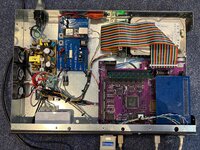
It's built on a repro LCIII and Ethernet card with a version of @cheesestraws LCBM to allow for remote power on / off. Oh and a ful on SCA HDD because why use a small modern solid state solution when you can cram a large hot running server drive in there
Now I just need to see if I can find where I put the rack ears and get localtalk ran up from the rack
It's built on a repro LCIII and Ethernet card with a version of @cheesestraws LCBM to allow for remote power on / off. Oh and a ful on SCA HDD because why use a small modern solid state solution when you can cram a large hot running server drive in there
Now I just need to see if I can find where I put the rack ears and get localtalk ran up from the rack

Indeed it is, originally I was going to just have two Ethernet ports but decided to go fancy and incorporate a little switch
Power supply wires for the LC board are just soldered on the the bottom of the board, I didn't have any connectors tot hand and couldn't be brothered with ordering any
Power supply wires for the LC board are just soldered on the the bottom of the board, I didn't have any connectors tot hand and couldn't be brothered with ordering any

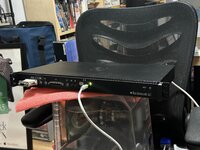
a project that's been in the works for like 3 years, and many revisions later, is almost complete
The Rackintosh LC. An LC shoved inside an old Sonicwall NSA2600 chassis
Currently acting as an Appletalk Internet Router for the Globaltalk project
Thanks to Cheesestraws for the front panel PCB idea/project(slightly modified from his design, removed the RJ45 port for his custom management board, and the additional LED spots, and changed the text)
95% finished. lid needs some modifying to fully fit on there, need to add some more epoxy to the front to hold the bezel on, need some internal cleanup. Also need to wire up a power and HD activity light
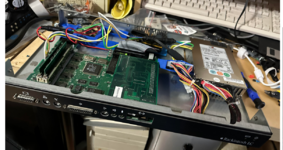
the inside-
Mac LC logicboard
ATX to LC power supply converter(PCB design from someone on here a few years ago)
ethernet card
bluescsi V1 internal for hard drive
for speaker connection, using a barrel jack connector, for power connection, using a 5 pin trailer hitch wiring harness
Once the project is fully done I'll post another picture of it inside the retro rack
The Rackintosh LC. An LC shoved inside an old Sonicwall NSA2600 chassis
Currently acting as an Appletalk Internet Router for the Globaltalk project
Thanks to Cheesestraws for the front panel PCB idea/project(slightly modified from his design, removed the RJ45 port for his custom management board, and the additional LED spots, and changed the text)
95% finished. lid needs some modifying to fully fit on there, need to add some more epoxy to the front to hold the bezel on, need some internal cleanup. Also need to wire up a power and HD activity light
the inside-
Mac LC logicboard
ATX to LC power supply converter(PCB design from someone on here a few years ago)
ethernet card
bluescsi V1 internal for hard drive
for speaker connection, using a barrel jack connector, for power connection, using a 5 pin trailer hitch wiring harness
Once the project is fully done I'll post another picture of it inside the retro rack
Both of those are really nice-looking! I'm glad bits and pieces from my mad project have been able to help other people with theirs.
I wonder how transferable all these great RackMacs are into the 10" form factor? Some homelab folks such as Jeff Geerling have been building community support for this not-quite-a-standard:
https://mini-rack.jeffgeerling.com/
One mainstream provider of the basic 10" rack is DeskPi, who do 4U, 8U and 12U. The last of these has some extra depth, which could be important as they are otherwise pretty short.
One disadvantage is that there's less legacy ewaste to grab and hack, although I have noticed devices such as the Dell X1026 are available cheap (and seem to have the requisite mostly-open front).
https://mini-rack.jeffgeerling.com/
One mainstream provider of the basic 10" rack is DeskPi, who do 4U, 8U and 12U. The last of these has some extra depth, which could be important as they are otherwise pretty short.
One disadvantage is that there's less legacy ewaste to grab and hack, although I have noticed devices such as the Dell X1026 are available cheap (and seem to have the requisite mostly-open front).
Similar threads

- Replies
- 10
- Views
- 3K

- Replies
- 575
- Views
- 189K

- Replies
- 115
- Views
- 31K

