• Hello MLAers! We've re-enabled auto-approval for accounts. If you are still waiting on account approval, please check this thread for more information.

RP2350: Raspberry PI PICO-2 with 520kB of RAM

CMake Error at pico_sdk_import.cmake:68 (message):
Directory '/Users/julianskidmore/Development/pico/pico-examples-eclipse'
does not appear to contain the Raspberry Pi Pico SDK
Call Stack (most recent call first):
CMakeLists.txt:4 (include)
Any Ideas? (please don't just tell me to install vscode).

That error message is saying that PICO_SDK_PATH is not pointing to your checkout of the "pico-sdk" project from GitHub. So wherever you checked that out, that's what they are saying you should define PICO_SDK_PATH to be pointing at it. I see what you mean about how that section of the docs is confusing because it doesn't say that it depends on other stuff from the "Manually Configure your Environment" section on PDF page 34 (labeled page 33), even though it kind of does.
 
That error message is saying that PICO_SDK_PATH is not pointing to your checkout of the "pico-sdk" project from GitHub. So wherever you checked that out, that's what they are saying you should define PICO_SDK_PATH to be pointing at it. I see what you mean about how that section of the docs is confusing because it doesn't say that it depends on other stuff from the "Manually Configure your Environment" section on PDF page 34 (labeled page 33), even though it kind of does.
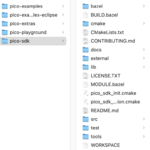
Thanks @dougg3 . So, I now see I've made at least one mistake. I do have a pico-sdk folder but I had been trying to point PICO_SDK_PATH at pico-examples or pico-examples-eclipse. Now I've set $ export PICO_SDK_PATH=~/Development/pico/pico-sdk/

1723925784511.png
However, it makes no difference, with pico-examples-eclipse empty, and after checking PICO_SDK_PATH is in fact that directory.

ls $PICO_SDK_PATH
BUILD.bazel MODULE.bazel cmake pico_sdk_init.cmake tools
CMakeLists.txt README.md docs pico_sdk_version.cmake
CONTRIBUTING.md WORKSPACE external src
LICENSE.TXT bazel lib test


Running $ cmake -G"Eclipse CDT4 - Unix Makefiles" -DCMAKE_BUILD_TYPE=Debug ../pico-examples

Still produces exactly the same error.
 
Running $ cmake -G"Eclipse CDT4 - Unix Makefiles" -DCMAKE_BUILD_TYPE=Debug ../pico-examples

Still produces exactly the same error.

Hmm...did you make sure to export PICO_SDK_PATH after you changed it? Your ls command shows you have it set correctly in your current shell, but maybe the exported version is still the old version. Just an idea anyway. I just redid the setup steps from scratch on Ubuntu and it worked for me (all prerequisite packages already installed):

Code:
cd ~/Development
mkdir pico
cd pico
git clone https://github.com/raspberrypi/pico-sdk.git --branch master
cd pico-sdk
git submodule update --init
cd ..
git clone https://github.com/raspberrypi/pico-examples.git --branch master
mkdir pico-examples-eclipse
cd pico-examples-eclipse
export PICO_SDK_PATH=/home/doug/Development/pico/pico-sdk
cmake -G"Eclipse CDT4 - Unix Makefiles" -DCMAKE_BUILD_TYPE=Debug ../pico-examples

On a side note, I'm jealous that you already got your Pi Pico 2! Mine's still on preorder from SparkFun.
 
On a side note, I'm jealous that you already got your Pi Pico 2! Mine's still on preorder from SparkFun.
@dougg3 , thanks for your continued help.. you can probably relax, your Pico 2 will arrive and you'll have ported BlueSCSI to it before I've gotten Blinky to work on mine ;) !

Anyway, I managed to 'resolve' the issue. I found out my PICO path definitions hadn't been all properly set up in ~/.bash_profile (here underline is the convention). I corrected this and regenerated my terminal window, but even then the CMAKE command seemed to think that everything was in ~/pico-sdk . So, then I thought that maybe I'd messed up the original sdk git clone in the first place, so I deleted it all and restarted from page 33: "Manually Configure your Environment: Get the SDK and examples". I then found that it complained that arm-none-eabi-gcc couldn't be found and suggested that I also set up export PICO_TOOLCHAIN_PATH, which I did, to: /opt/homebrew/bin , because I'm using an M2 Mac. I also keep finding that by default, brew tries to install to Intel, so I added:

eval "$(/opt/homebrew/bin/brew shellenv)"

to my .bash_profile. Now, brew config says: Rosetta 2: false.

Finally, I could run the command and it appeared to generate all the makefiles. At least it filled the pico-examples-eclipse directory with a bunch of examples.

I realised they're all Pico 1 examples (I do have a couple of pico1s, so it's not wasted). Then I created pico2-examples-eclipse at the same level as pico-examples-eclipse (and pico-examples); then tried: cmake -G"Eclipse CDT4 - Unix Makefiles" -DPICO_BOARD=pico2 -DCMAKE_BUILD_TYPE=Debug ../pico-examples with the special -DPICO_BOARD=pico2 magic and it generated a whole bunch of examples, which I presume are for pico2.

It also seemed to think that picotool was missing in both cases and built a version of picotool from source in both folders.

I won't try building or running any of these examples this evening as there's only so much crying I can cope with in a single day 😭 !

-cheers from Julz
[ PS. I haven't really been crying, but I did get fairly frustrated at one point; then I decided to vent my frustration in the first cry for help post this evening! So, thanks again you've saved a Tree's worth of Kleenex ;-) ].

 
@dougg3 , thanks for your continued help.. you can probably relax, your Pico 2 will arrive and you'll have ported BlueSCSI to it before I've gotten Blinky to work on mine ;) !

Haha, believe me, I probably won't be doing much more than Blinky with mine. So many projects, not enough time!

So, thanks again you've saved a Tree's worth of Kleenex ;-)

Happy to help, and glad you got it figured out!
 
@dougg3

I got it to work! I then programmed blink to output a Morse-code pattern, let me know when you figure it out ;) (it's not hard) !


-cheers from Julz
 
I got it to work! I then programmed blink to output a Morse-code pattern, let me know when you figure it out ;) (it's not hard) !

Well done! I honestly can't think fast enough to follow the blinks in real time, but I can see by reading your gDelays array in the code with the dits and dahs what your 5-character message is after consulting a Morse code alphabet chart. It makes sense!
 
Back
Top