• Hello MLAers! We've re-enabled auto-approval for accounts. If you are still waiting on account approval, please check this thread for more information.

LC 475 Project - Upgrades - Mods

Kamshaft

6502
First time poster here.

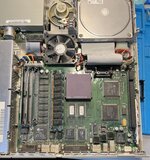
I recently got myself a "new to me" LC 475. It's in pretty good shape over all.
My question is... What are the many upgrades/mods that I can do to the machine?

The first order of business will be...
  1. An overall cleaning
  2. Swap out the old caps with tantalum caps
  3. Replace the old battery
  4. Put an internal BlueSCSI adapter (maybe with wifi)
  5. Maybe... Replace the fan with a quieter one. Noctua maybe?
  6. Maybe upgrade the current 128K x 2 VRAM with 512K x2 sticks?
You guys are the experts, and if missed anything.. please feel free to suggest.
Thanks again!475.jpg
 
in addition to all the fine suggestions above…
Upgrade VRAM to 1mb. The 475 takes lots of RAM, so Id replace the SIMM with a 32 or 64mb. Look for an interesting LC-PDS card, like 90% are NICs, but there are interesting cards like video accelerators.
 
Pretty much the same configuration I have (except that I already have BlueSCSI)

You are a lucky one as the ROM socket is already there. So you can add a custom ROM:

4MB https://ko-fi.com/s/0aa02cfb63
8MB https://ko-fi.com/s/2bee7a6f82

The 4 MB might be "In-system" programmable in future if seller will complete the programming app.
Otherwise you need a programmer as well or order the ROM pre loaded.

128MB RAM seems to be possible as well.

Add a heat sink if you upgrade the processor.

40MHz or beyond might be possible as well.
but need to replace MC88920 by MC88916-80
 
Last edited:
The power supplies in these are notouriously troublesome, you may need to either recap it or rebuild it (putting a Meanwell PSU unit inside the original PSU enclosure to replace the original innards).
 
The Noctua fan is a huge improvement in this machine! And MeowToast battery replacement that uses a vertical coin cell, you need one of those.
 
Just be real careful with those plastic clips when removing the motherboard, the fan, or the floppy drive. Ask me how I know.

If you are going to recap the board, you might as well do the overclock to 33 Mhz, it only takes a few minutes and it's a noticeable improvement in speed.
 
Wow, thanks for the tips! Hope this helps someone else in the future!

Questions...

The ROM: Does it mount itself like a hard disk? (I can google/youtube it too), advantages?
The Notcua fan: What model do you guys recommend? Size, etc..
The PSU (power supply): Model? etc....
The RAM: What's the maximum size? I keep seeing conflicting claims. 32, 64 128. Which is it?
The BlueSCSI (wifi specifically): Is it fast? Worth it?
 
With my own, I did the 33Mhz overclock because it was easy to do, just swap 2 component positions and it's done, put a small heat sink on the processor and it's all good. I also installed a new fan and flipped it upside down, the fan normally pulls air out of the bottom of the chassis, now it draws cool air in and blows it into the case, a noticable temp difference. I also didn't go beyond 32mb of RAM, because what are you going to do on a 68040 that needs more than 32mb? More than 16Mb even? And a BlueSCSI with the Wifi too, because they're great.
 
The ROM: Advantages: You can change the ROM:

- Get rid of the time consuming memory check an each startup
- Change Startup sound and Icons
- Change wait states and refresh cycles for RAM

In addition to that you can get an emergency start Volume, similar to recovery CD that is able to start and fix a hard disk failure if there is one that block starting from disk. As this is in a ROM it can neither be deleted not corrupted.
 
In my experience, the BlueSCSI wifi has been really buggy and had a hard time with transferring large files. It's not a good replacement for a PDS Ethernet card, but better than nothing.

(It is fun to play with)
 
The ROM: Advantages: You can change the ROM:

- Get rid of the time consuming memory check an each startup
- Change Startup sound and Icons
- Change wait states and refresh cycles for RAM

In addition to that you can get an emergency start Volume, similar to recovery CD that is able to start and fix a hard disk failure if there is one that block starting from disk. As this is in a ROM it can neither be deleted not corrupted.
I wonder if there's a ROM I can swap into the LC III that can do something like that
 
In my experience, the BlueSCSI wifi has been really buggy and had a hard time with transferring large files. It's not a good replacement for a PDS Ethernet card, but better than nothing.

(It is fun to play with)
I'm not sure what I'd be looking for... It there a model number or something? Or it's just called "PDS Ethernet Card"?
 
I wonder if there's a ROM I can swap into the LC III that can do something like that

Based on the website https://ko-fi.com/s/0aa02cfb63 the offered ROM fit into
SE/30, IIx, IIcx, IIsi, IIci, and IIfx, Q700/900/950 Q610/650/800 LC475/575/Q605 LC630 & IIvi/IIvx/Pf600 Set Top Television Box 2MB ROM Q840AV

LC III is not in the list but LC 475 (the device kamshaft owns)

There are ready-made ROM images at github.com/CayMac-Team/UniversalROMImages that have
- RAM check disabled
- Emergency start system on ROM-disk

As the RAM controller is set up at start by some code in the ROM the setup can be changed by changing the ROM (but can be changed without custom ROM as well).
 
Wow, thanks for the tips! Hope this helps someone else in the future!

Questions...

The ROM: Does it mount itself like a hard disk? (I can google/youtube it too), advantages?
The Notcua fan: What model do you guys recommend? Size, etc..
The PSU (power supply): Model? etc....
The RAM: What's the maximum size? I keep seeing conflicting claims. 32, 64 128. Which is it?
The BlueSCSI (wifi specifically): Is it fast? Worth it?
I like the BlueSCSI because there is a companion board called "EasyOver" that lets it plug into the 25-pin connector on the back of the Mac. On it I have all the software I don't want on every machine but can easily connect and copy it over when needed. Inside the machine I like the SCSI2SD because it fits more nicely into the HD area. The BlueSCSI is based on an Atmel chip which is faked really often by dodgy resellers - I had one BlueSCSI that was not good and I suspect the Atmel "Blue Pill" part wasn't real. I have another which is fine.

The ROM drive is just like a small hard disk.

The Noctua fan... now that I look I cannot find a Noctua 60mm fan with 15mm depth. I'm going to have to leave that to someone else to clarify.
 
Back
Top