• Hello MLAers! We've re-enabled auto-approval for accounts. If you are still waiting on account approval, please check this thread for more information.

Centris 660av power button extender rod

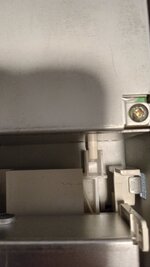
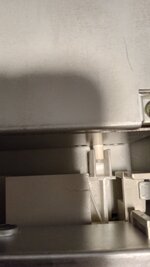
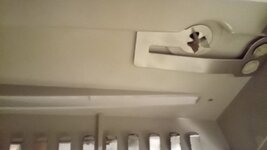
I picked up a 660av that seems to be missing part of the extension rod that runs from the front of the case to the powered supply, or some other piece.

It is to short to toggle the power on and off.

Does anyone have a 660av and can take a picture of where the white extension rod in the case meets with the bottom leaving the power supply.
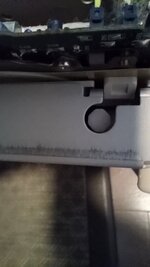
 

Attachments

  • IMG_20231215_154819920_HDR.jpg
    IMG_20231215_154819920_HDR.jpg
    150.8 KB · Views: 9
  • IMG_20231215_154721396_HDR.jpg
    IMG_20231215_154721396_HDR.jpg
    1.5 MB · Views: 7
I picked up a 660av that seems to be missing part of the extension rod that runs from the front of the case to the powered supply, or some other piece.

It is to short to toggle the power on and off.

Does anyone have a 660av and can take a picture of where the white extension rod in the case meets with the bottom leaving the power supply.
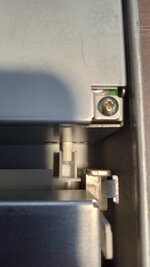
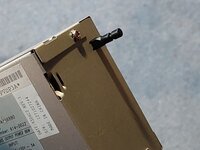
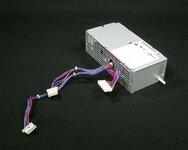
It should be part of the PSU if it is the thing I think you mean?

1000014774.jpg
 
There is a plastic extender in the PSU, and a second that runs through the case, under the floppy to the front. One of them seems to be to short. Based on your picture, it may be the one in the PSU
 
There is a plastic extender in the PSU, and a second that runs through the case, under the floppy to the front. One of them seems to be to short. Based on your picture, it may be the one in the PSU
It looks like it is depressed. It is a latching switch, have you tried poking it with something to click it?
 
When it is turned on the extension at the front of the case is too recessed for the case's button to reach.

I currently can only turn this on and off with the case off
 
When it is turned on the extension at the front of the case is too recessed for the case's button to reach.

I currently can only turn this on and off with the case off
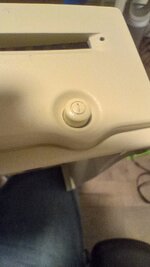
So, it doesn't look like anything is missing (as long as the button on the actual case is there? The lid of the machine should have a button with a power symbol on the end). So I'd check inside the PSU case to make sure it hasn't become dislodged.

In summary
1. Check the actual case button is there, you don't show it. If you have the case off, these buttons are always flush with the metal case. Running without the top case you have to poke the button with a key or something.
2. Make sure the button is mounted correctly inside the PSU.
 
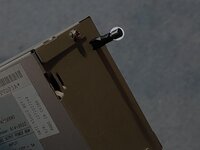
Your PSU is probably missing this bit. It's easy to break off.
 

Attachments

  • 1702678954412.jpeg
    1702678954412.jpeg
    854.4 KB · Views: 3
Your PSU is probably missing this bit. It's easy to break off.
You're right sorry. The white button stem is a different shape. I assumed it was just pushed in because I couldn't see the square profile part, but there is only a square on the black version.

Just glue a bit of plastic on the end. Perhaps get someone with a white button to measure it.

1000014778.jpg
 
Back
Top