• Hello MLAers! We've re-enabled auto-approval for accounts. If you are still waiting on account approval, please check this thread for more information.

SE/30 with simasimac and happy chime

It doesn't need to be a boot disk. Any disk is fine. If it ejects the disk, that still proves it's willing to boot, which is the goal of that test - make sure it's actually a problem with video instead of an early failure in the POST process before video initializes.

Just did that test with a random disk and it does take the disk, try‘s to do something with it, and then ejects it.
 
Just did that test with a random disk and it does take the disk, try‘s to do something with it, and then ejects it.
That's good news. Means it's just a video issue.

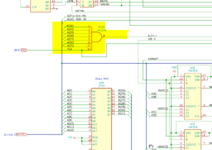
Suggest verifying the connections for UJ6. It is responsible for determining if the video subsystem is being addressed. If you have a logic probe/analyzer, that'd be ideal. Pin 8 will be low when the video subsystem is being addressed, it should show irregular activity during boot process.

Heck, you could make a simple logic probe by connecting any led (even the HDD LED would work) and any resistor in the range 500 ohms to 3k ohms. Connect the resistor to +5v (easily found on the PDS connector) and the cathode (+) of the LED, then connect the anode (-) of the LED to pin 8. It'll light when pin 8 is low (0v/ground).

If it flickers on, a little randomly, but consistently during the boot process, this means all is good with this chip and the video system is being addressed. It should flicker very slightly every couple of seconds or so after 15 seconds or so after boot, due to the blinking disk icon. If all that matches what you were to observe, this would also imply the video ROM is good.

I tested this to verify. Here's an example I just made.


1694042987289.png
 
Last edited:
That's good news. Means it's just a video issue.

Suggest verifying the connections for UJ6. It is responsible for determining if the video subsystem is being addressed. If you have a logic probe/analyzer, that'd be ideal. Pin 8 will be low when the video subsystem is being addressed, it should show irregular activity during boot process.

Heck, you could make a simple logic probe by connecting any led (even the HDD LED would work) and any resistor in the range 500 ohms to 3k ohms. Connect the resistor to +5v (easily found on the PDS connector) and the cathode (+) of the LED, then connect the anode (-) of the LED to pin 8. It'll light when pin 8 is low (0v/ground).

If it flickers on, a little randomly, but consistently during the boot process, this means all is good with this chip and the video system is being addressed. It should flicker very slightly every couple of seconds or so after 15 seconds or so after boot, due to the blinking disk icon. If all that matches what you were to observe, this would also imply the video ROM is good.

I tested this to verify. Here's an example I just made.


View attachment 61720

Would an oscilloscope work? When I probe pin 8 with that it doesn’t do anything. I see the line stay high but doesn’t ever come back down.
 
Would an oscilloscope work? When I probe pin 8 with that it doesn’t do anything. I see the line stay high but doesn’t ever come back down.
That'd certainly work. And that is a problem: if it never goes low -ever- video subsystem does not think it is being addressed. Verify connections to UJ6 as it is likely an address line is broken.
 
Got continuity for every address line to the processor.
Verify that pin 12 is pulled up to +5v?

Otherwise you may want to retest the output of UJ6 again. That output line is the video subsystem "slot" select, if it is never going low ever then that's 100% a major problem. The only other thing that line is connected to is a PAL input. If the address lines are all continious, then it's possible that the gate is bad...
 
Verify that pin 12 is pulled up to +5v?

Otherwise you may want to retest the output of UJ6 again. That output line is the video subsystem "slot" select, if it is never going low ever then that's 100% a major problem. The only other thing that line is connected to is a PAL input. If the address lines are all continious, then it's possible that the gate is bad...
Rechecked and pin 12 has 5 volts. Rechecked the output and it doesn’t pull down.
 
Rechecked and pin 12 has 5 volts. Rechecked the output and it doesn’t pull down.
Just to make sure I haven't misspoke, the output won't stay low for a notable length of time - it's only going to be low for brief bursts as needed to write/read from the video hardware. Generally, we could say milliseconds at most. A scope should be able to capture that though.

May be worth checking that a lead doesn't have a hidden break at the body of the IC, this can happen if the area/chip has suffered corrosion. Otherwise, if you're confident that the address lines are good, the IC has good ground/power, and the output still does not go low - then the assumption would be that the IC is defective and needs to be replaced.
 
Just to make sure I haven't misspoke, the output won't stay low for a notable length of time - it's only going to be low for brief bursts as needed to write/read from the video hardware. Generally, we could say milliseconds at most. A scope should be able to capture that though.

May be worth checking that a lead doesn't have a hidden break at the body of the IC, this can happen if the area/chip has suffered corrosion. Otherwise, if you're confident that the address lines are good, the IC has good ground/power, and the output still does not go low - then the assumption would be that the IC is defective and needs to be replaced.
Thank you so much for the help you’ve provided. Know a good source for one of these ICs?
 
Got continuity for every address line to the processor.
Rechecked and pin 12 has 5 volts. Rechecked the output and it doesn’t pull down.
Are you using scope in a trigger mode or a continuous run mode?

I think what you describe isn't physically possible and that you're just missing activity.

If address line 12 was physically stuck, and you had continuity back to the CPU, the computer wouldn't be able to chime and start booting like we know it is.

I might be being daft, I've only just woken up.

Edit - yup, I'm missing something. It isn't Address 12, it's pin 12. Carry on :)
 
I did it again and made sure I was on triggered mode. There is a little spike that comes down every few second. It’s pulsing something.
I didn't put my logic analyzer on it, but check the video I made for an idea of what it should look like both during boot and steady state after (blinking disk icon, which would be expected with no bootable device).
 
I didn't put my logic analyzer on it, but check the video I made for an idea of what it should look like both during boot and steady state after (blinking disk icon, which would be expected with no bootable device).
Just got a setup exactly like yours. When starting the computer it flashes bright immediately like yours does but after that I can see it flash but it’s extremely faint. So faint that it’s not even lighting up the bulb part and you can just barely see the diode glow.
 
Just got a setup exactly like yours. When starting the computer it flashes bright immediately like yours does but after that I can see it flash but it’s extremely faint. So faint that it’s not even lighting up the bulb part and you can just barely see the diode glow.
That sounds fine to me - any activity is good, that sounds like what I'd expect. That big flash would be the system ROM clearing the screen (or thinking it is clearing the screen, anyways). So that suggests the Video ROM is fine. So it's back to chasing the path writes take into VRAM.

I think perhaps you should check the VIDW line to the VRAM and perform the same test with it (should be similar). You should see activity on this line if data is being written to VRAM.
 
That sounds fine to me - any activity is good, that sounds like what I'd expect. That big flash would be the system ROM clearing the screen (or thinking it is clearing the screen, anyways). So that suggests the Video ROM is fine. So it's back to chasing the path writes take into VRAM.

I think perhaps you should check the VIDW line to the VRAM and perform the same test with it (should be similar). You should see activity on this line if data is being written to VRAM.
I checked VIDW at UE6. It did a flash at startup (dimmer than UJ6 but a flash nonetheless) but afterwards the LED had no activity.
 
I checked VIDW at UE6. It did a flash at startup (dimmer than UJ6 but a flash nonetheless) but afterwards the LED had no activity.
Any activity on that line means you should be seeing something other than what you are seeing. I'd suggest checking at the VRAMs also though. Your most likely problem is a broken trace between VRAM and the control logic.

Next up is to check RAS, CAS, DT-OE.
 
Any activity on that line means you should be seeing something other than what you are seeing. I'd suggest checking at the VRAMs also though. Your most likely problem is a broken trace between VRAM and the control logic.

Next up is to check RAS, CAS, DT-OE.
Okay. Checked at the VRAMs for VIDW and got the same results. The LED just stays on for RAS, CAS, and DT-OE. So they’re just staying high?
 
Okay. Checked at the VRAMs for VIDW and got the same results. The LED just stays on for RAS, CAS, and DT-OE. So they’re just staying high?
I think that is probably normal - maybe try putting your scope on it. I expect it is toggling high and low due to the need to refresh that so it appears to be on.

If you wired the LED as +5v - resistor - led - probe, then the LED lights when RAS/CAS is able to sink current/is logic low/gnd. Not quite sure what it'd do on a broken trace to an input though, but I think probably not light at all.
 
I think that is probably normal - maybe try putting your scope on it. I expect it is toggling high and low due to the need to refresh that so it appears to be on.

If you wired the LED as +5v - resistor - led - probe, then the LED lights when RAS/CAS is able to sink current/is logic low/gnd. Not quite sure what it'd do on a broken trace to an input though, but I think probably not light at all.
Checked with the scope and I do see RAS/CAS go low. Checked VIDW with the scope and it’s always high.
 
Back
Top