• Hello MLAers! We've re-enabled auto-approval for accounts. If you are still waiting on account approval, please check this thread for more information.

PM 5400 / 5500 Damage? Compatibility?

Hi all,

Have been asked to look at a LB from a 5400 / 5500 - PN # 820-0952B.

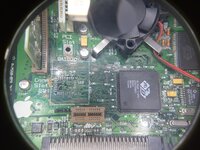
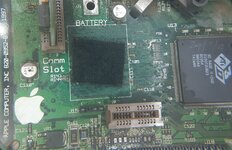
Looks like it was battery bombed at some point. Apart from some revealed traces, and dirt, it looks fine, BUT it looks like there are 2 resistors missing R143/R144 - can't find any images of whether that's the case on other boards (please see below):
1.jpg

At this point, is it worth recapping? Was thinking of doing a good ol' dishwash to it beforehand.

Alternative, are any of the 5360 / 5320 / 6500 / 6400 / 6300 / 7300 logic boards compatible? Are there any I've missed?

-edit- or even a downgrade to a 575 or 580 logic board?

Thanks in advance
 
Last edited:
Wash it and treat the bomb beforehand - you can decide if you want to try a recap depending on how many bad traces/vias it has. R143 and 144 are DNF from factory so no worries there.

Boards with that edge connector are all cross-compatible, however the non-PCI ones will need 3.3V isolated on the harness as it lands on an otherwise GND finger.
 
Thanks!

After a few hours scrubbing with vinegar, this is the result:

2.jpg

An awful lot of solder mask came off along with the battery. It's hard to tell if the traces are bad (my inexperience, likely). They don't look rusty, just exposed. Is it worth continuing, or recapping from here?

Have been reading a few threads about isolating the 3.3v as you mentioned, looks like I would need "3.3v isolation for dummies" guide. Is there a list of PCI & Nubus boards that are compatible with one another anywhere?
 
Hi all,

Have been asked to look at a LB from a 5400 / 5500 - PN # 820-0952B.

Looks like it was battery bombed at some point. Apart from some revealed traces, and dirt, it looks fine, BUT it looks like there are 2 resistors missing R143/R144 - can't find any images of whether that's the case on other boards (please see below):

View attachment 61694

At this point, is it worth recapping? Was thinking of doing a good ol' dishwash to it beforehand.

Alternative, are any of the 5360 / 5320 / 6500 / 6400 / 6300 / 7300 logic boards compatible? Are there any I've missed?

-edit- or even a downgrade to a 575 or 580 logic board?

Thanks in advance
Couple-o-three or so things,

The 5400 and 5500 are fitted with different boards, so it is from one or the other.

The VIAs above VR1 look a bit grotty, I'd pay careful attention to them.

Anywhere the solder resist has come off, I'd suggest either tinning, spray lacquering (stuff that you can solder through, for future work), or both, with care not to spray anything that needs to be conductive.
Alternative, are any of the 5360 / 5320 / 6500 / 6400 / 6300 / 7300 logic boards compatible? Are there any I've missed?
Boards from the TAM*, 5400, 5500, 6360, 6400 and 6500, plus possibly the 6300/180 are interchangeable. Older boards (5300, 6300, 5200, 6200, 640, 630, 5.... Blah blah blah) will need the 3.3v/gnd mod.

* Possibly needing extra ports soldered on?
 
Last edited:
I think I should have a board that would work for you and I'm sure we can make a deal if you can't fix that one, shoot me a PM.
 
Thanks!

After a few hours scrubbing with vinegar, this is the result:

View attachment 61705

An awful lot of solder mask came off along with the battery. It's hard to tell if the traces are bad (my inexperience, likely). They don't look rusty, just exposed. Is it worth continuing, or recapping from here?

Have been reading a few threads about isolating the 3.3v as you mentioned, looks like I would need "3.3v isolation for dummies" guide. Is there a list of PCI & Nubus boards that are compatible with one another anywhere?
Oh, I forgot to actually look at your pictures, that board is the one from a 5500, 6500 or a TAM.
 
Great info, thanks all. Have cleaned it up as above, special attention to comm slot (might be some underneath?). @Phipli thanks, it must be the 5500 then. Will have the computer brought to test. With the spray lacquer, what exactly needs to be avoided (conductive?). It cleaned up pretty well, will begin a recap now, fingers crossed.

-edit- looks like all of the capacitors have also previously leaked, below is encrusted with juice. Ugh
 
With the spray lacquer, what exactly needs to be avoided (conductive?)
Oh, specifically use lacquer for PCBs that is designed to be soldered through. Don't use anything else. And take real care not to get it on any connectors or sockets or plugs or anything. Spray it where you need it and mask everything else carefully. Make sure everything is super clean first.
 
Excellent. Have both Mechanic's UV Mask & PCB Lacquer (solder-through) - better to hold off until testing the board?

@GRudolf94 , thanks for pointing out the filthy comm slot, didn't even see - taking the card out & agitating the slot revealed acid the whole length of it. Had a vinegar bath! Halfway through the recap, no surprises yet.
 
Cool, keep us posted. Yeah, I consider coatings on damaged areas to be a finishing step - if the board needs more work, the less stuff you add on, the better. Fewer variables/unknowns. And even then, to be completely honest I only ever tin my corroded things.
 
Easy, perhaps a tin would be a good idea, however the connections are so tiny that am worried that even a huge helping of flux would stick them together. Regardless, have finished a recap & cleanup as best as possible. There was one lifted pad which was fixed with a tiny dangling connection to the via. Before starting, discharged the CRT and checked AB:

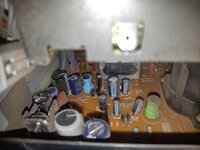
1.jpg

... which looks dusty but nothing standing out as leaking.

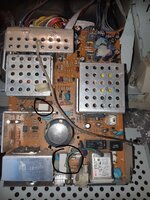
The PSU:

2.jpg

... looks in similar condition, however there are ??2 RIFAs and a fuse - is it worth replacing these before trying to start? They don't look cracked or anything.
 
Not RIFAs unless they're yellow - leave well alone, those are probably polyester instead of metallized paper.

Was wondering about them. I remember on the Mac Classic, there were 2 filter caps (or similar) that looked like this. Replaced them and it cleaned the "fuzz" right up, but nothing else.

So, tried to boot the machine. Crt makes warmup "click" when power switch is flicked. The machine makes a "happy" bong after keyboard power, however nothing appears on the screen.

Didn't replace the rectangular yellow tantalums - only the leaky SMDs. Should this be done? There was particular gunk around the video card, wondering if another wash might be the answer? Not sure where else to go.
 
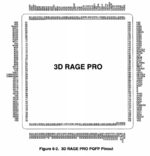
Bad tantalums typically would either silently hold the PSU from starting, or loudly announce themselves. Video is wired in via PCI... probably wouldn't sadchime if not seen. Though the crustiest pins are on the memory interface side, which is what faces the battery area. I think it's worth applying some flux and retouching the Rage II

Pinout shown is Rage Pro, but same as II/II+
 

Attachments

  • Screenshot_20230909-012645.png
    Screenshot_20230909-012645.png
    498.9 KB · Views: 7
Boards from the TAM*, 5400, 5500, 6360, 6400 and 6500, plus possibly the 6300/180 are interchangeable. Older boards (5300, 6300, 5200, 6200, 640, 630, 5.... Blah blah blah) will need the 3.3v/gnd mod.
I have never met a 630 or 580 board where that pin was actually connected to anything, and over the years I have regularly used them with 6500 chassis harnesses and PSUs.
 
Back
Top