• Hello MLAers! We've re-enabled auto-approval for accounts. If you are still waiting on account approval, please check this thread for more information.

Mac Portable SCSI2SD Help

I recently started to work on the portable again and got the SCSI2SD v5.1 board and included the SD card and the 4 pin molex adapter. I bought the 34-50 pin adapter from ebay (https://www.ebay.com/itm/Macintosh-Portable-34-to-50-pin-SCSI-Hard-drive-Adapter-/312973273392). I cut the yellow 12v wire on the 4-pin molex adapter that you can get with the board and the 34-50 pin adapter since there was that warning that it can fry the SCSI2SD board.

I followed the http://www.savagetaylor.com/2018/01/05/setting-up-your-vintage-classic-68k-macintosh-using-a-scsi2sd-adapter/ article and used his 2 GB SCSI2SD settings for the scsi2sd-util. Keep in mind, I did not change the firmware due to the board came stock with the latest firmware (4.8.4) - unless I have to do it regardless.

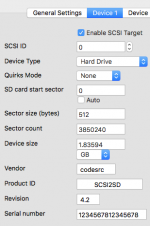
Long story short, I created a new image of 7.5.5 which boots up fine (tested in BasiliskII and according to that website, the portable should be compatible with that OS) but I cant get the Portable to boot. I see that the LED light comes on on the SCSI2SD board then goes away for a second and the moment the light comes back on, I get a sad mac error code 0000000F 00000003. Supposedly, it may indicate that it's an illegal instruction error. I'm having a hard time figuring out if it's the SCSI2SD configuration settings (which I attached) or the portable giving issues.

I do have a Mac SE and Color Classic that I could tear apart and test (since those were going to be the next ones to do) if needed.

Any suggestions?
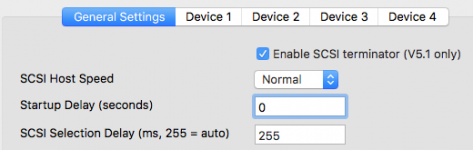
Screen Shot 2020-10-10 at 2.46.31 PM.png

Screen Shot 2020-10-10 at 2.46.06 PM.png

 
What method did you use to write the image to the SD card? I’ve seen this error crop up when the hard disk driver stored on a drive got messed up. 
 

So there may have been an issue when writing that part of the image. 
 

If it were me, I’d grab the 1gb 6.0.8 file and start from there. Even though the Portable can run 7.5.5, provided the RAM’s been upgraded to at least 2mb, I’d sooner start with a simpler system to verify basic functionality. 
 

When I installed a SCSI2SD in my PowerBook 170, I set a 2gb partition size limit using the SCSI2SD configuration software, then initialized it in the machine using a piece of software called LIDO. So if you have the means to create a bootable floppy, I’d recommend doing a fresh install using the Macintosh Portable itself.

 
I recently started to work on the portable again and got the SCSI2SD v5.1 board and included the SD card and the 4 pin molex adapter. I bought the 34-50 pin adapter from ebay (https://www.ebay.com/itm/Macintosh-Portable-34-to-50-pin-SCSI-Hard-drive-Adapter-/312973273392). I cut the yellow 12v wire on the 4-pin molex adapter that you can get with the board and the 34-50 pin adapter since there was that warning that it can fry the SCSI2SD board. 

  
For the record, that warning only exists because people have been known to mis-wire the 12 volt line to 5VDC when making their own cables, and _that_ will fry a SCSI2SD. However, simply providing 12 volts from a normal four-pin cable is perfectly safe. The 12 volt line simply isn't routed anywhere on any version of SCSI2SD.

 
Last edited by a moderator:
What method did you use to write the image to the SD card? I’ve seen this error crop up when the hard disk driver stored on a drive got messed up. 
 

So there may have been an issue when writing that part of the image. 
 

If it were me, I’d grab the 1gb 6.0.8 file and start from there. Even though the Portable can run 7.5.5, provided the RAM’s been upgraded to at least 2mb, I’d sooner start with a simpler system to verify basic functionality. 
 

When I installed a SCSI2SD in my PowerBook 170, I set a 2gb partition size limit using the SCSI2SD configuration software, then initialized it in the machine using a piece of software called LIDO. So if you have the means to create a bootable floppy, I’d recommend doing a fresh install using the Macintosh Portable itself.
I started with my modern Mac (using Sierra) and opened terminal and did the DD method. When that "didn't" work, I used my Windows 10 machine using balenaEtcher. I'll shoot for the 1 GB option for 6.08 since I just created a 2 GB version earlier this morning. I may have a way to create a bootable floppy in case.

 
For the record, that warning only exists because people have been known to mis-wire the 12 volt line to 5VDC when making their own cables, and _that_ will fry a SCSI2D. However, simply providing 12 volts from a normal four-pin cable is perfectly safe. The 12 volt line simply isn't routed anywhere on any version of SCSI2SD.
I read about that. I'm skilled enough to make my own cables.  I didn't want to take a chance though in case but good to know that I technically could have left it.

 
I wonder if Balenaetcher is the source of the problem. I saw it's recommended in the guide you procured the images from; but I've always had really mixed success using Windows to do anything related to classic Macs. I believe the DD tool is available for Windows, or you could go through the process of booting Linux off a thumb drive and using its built in dd command to write the image.

 
If you have access to Patched HD SC or Lido, I have always used that. Granted, I have ONLY Macs, with no PCs, so I have always done this with all legit Mac software. If you can get a 6.0.8 startup disk with HD SC Setup going on a Floppy, try and start with that and use it to format the SD card. That's the only way I've ever gotten it to work well.

 
Last edited by a moderator:
Back
Top