• Hello MLAers! We've re-enabled auto-approval for accounts. If you are still waiting on account approval, please check this thread for more information.

Just purchased M5126 HELP

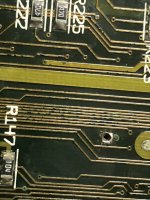
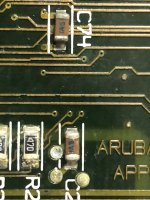
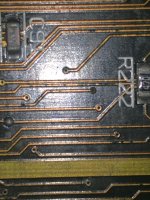
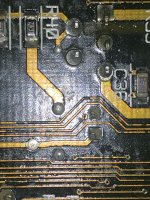
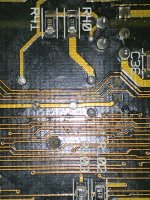
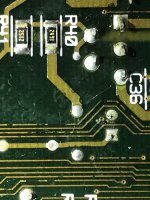
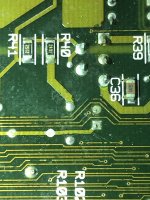
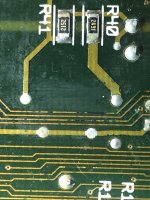
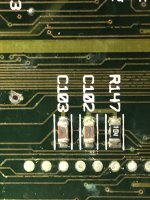
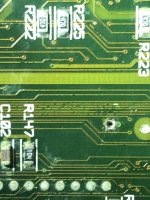
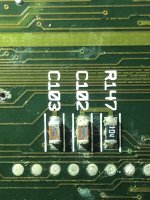
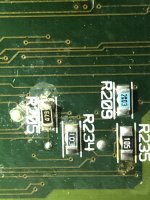
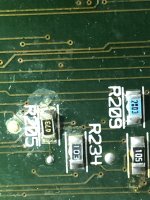
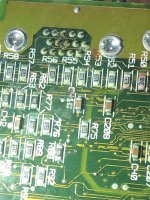
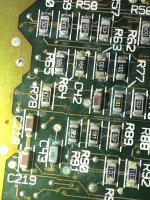
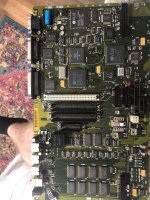
Hello everyone, I apologize ahead of time if I posted this in the wrong forum. This is my first post. To make a long story short, I just bought my first Apple computer I’ve ever owned. It’s a Macintosh Portable M5126. I took it apart the other day to inspect the main board. I know the capacitors all need replacing, but I discovered other areas of concern. On the bottom side of the main board, I discovered deterioration to a substantial amount of traces. I’ve attached photos of the more prominent areas. My question is, could this be surface tarnish, or are these traces completely gone? Any help is GREATLY appreciated. I’ve got a history in cleaning and maintaining game systems, but I’ve never taken on a repair task like this before. Hope to hear from you all soon, thanks.

I want to bring this computer back to life.

Gary.
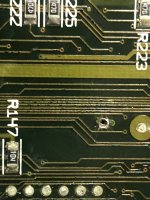
5EB7B4BF-0830-4237-BBAD-32FEDA54EB6E.jpeg

F7472BE7-3EB5-47B1-9EDA-66AB20C5AC3A.jpeg

8FDBE70E-3CC5-483F-9405-783D16FAF14E.jpeg

507205AE-9659-434A-A005-004E4D915E4D.jpeg

84F792E6-5730-4DFF-8D36-766D5731A4D4.jpeg

6EBE17B0-0F32-4C50-A6AA-ECB5DFCAB18D.jpeg

3E76A485-8293-4D14-AE38-CB64DEA5C2E3.jpeg

A6E02AA4-15F8-44CC-8B1E-35B78F4B5123.jpeg

77B698F6-CB9D-4B4F-A4DE-873D686E275F.jpeg

1673FBB7-D79F-422E-BE12-13B0129DA044.jpeg

28BB79C0-6145-4EB1-A2E9-413CA36D6E25.jpeg

77710D4B-F0AC-422C-99F9-2DD9FAEB8473.jpeg

6F88CA9B-F32F-473D-B36D-B9491D02267B.jpeg

897200C0-AF6D-4FA7-9084-E9CCBB90DD84.jpeg

AB10EFB1-61C4-455B-9C84-56A8BF63B73E.jpeg

ECFA2978-5CCF-47DC-BA08-D056F1A34A6D.jpeg

769F03C5-C890-481B-9A3D-2C1641ECAB7E.jpeg

82B4BBF3-C00A-4642-9C18-5B34189F51DC.jpeg

 
Actually, Those are probably mostly okay. But mostly okay is like mostly peaceful, you're probably going to have at least problem trace. I suggest to go ahead and recap it and see if it works, it may in fact work. Who knows? Case in point, I had a SE/30 board I bought on ebay that wouldn't boot because one trace was open by the width of a human hair.

 
Last edited by a moderator:
Actually, Those are probably mostly okay. But mostly okay is like mostly peaceful, you're probably going to have at least trace. I suggest to go ahead and recap it and see if it works, it may in fact work. Who knows? Case in point, I had a SE/30 board I bought on ebay that wouldn't boot because one trace was open by the width of a human hair.
Thanks so much for the response! I’m ordering all replacement electrolytic capacitors. What’s the best way to test continuity on the traces, to ensure which ones are not broken?

 
Well, the schematics are available: https://drive.google.com/drive/folders/0B_Xp3uN-BcxsQjFLRUZqeEw2VFE?usp=sharing

But mostly if I suspect a bad trace I'll uncover both ends by gently scraping or sanding the surface to reveal the copper and then test continuity. But I'd suggest waiting for your caps and then checking it after. You'll also need working battery for it to boot.
Got the through hole axial caps in the mail, the leads are too large and won’t fit through the holes on the board. I measured the original cap lead size, which was 0.65 mm. The ones I got in the mail are 0.80 mm. Does anyone know where to get ones that will fit? 

 
Hello again, 

Since we last chatted, I have since cleaned and recapped the logic board for my M5126. Upon reassembly I confirmed that the battery plug was reading proper voltage to the point that it plugs into the logic board. I tried to boot the system, but It does nothing, as if no power is present. I have looked at the schematics link you previously sent, do you have a link for a backlit M5126 schematics sheet, or perhaps insight on what the problem may be?

Thanks.

 
With the main battery, the 9 volt battery, and the _correct_ A/C adapter all plugged in, hold both the reset and interrupt switches in for 10-20 seconds and see if it will boot when you release.

This has helped with my Portable. Good luck - these can be tempermental...

 
With the main battery, the 9 volt battery, and the _correct_ A/C adapter all plugged in, hold both the reset and interrupt switches in for 10-20 seconds and see if it will boot when you release.

This has helped with my Portable. Good luck - these can be tempermental...
I am using a 6.4 volt battery as a replacement, per other people’s recommendation. I do not have an AC adapter for the computer. I also have a 9 volt battery in place as well. When I hold both the reset and interrupt buttons for that time period, I release and hit a key to boot the unit, but it does nothing.

 
I am using a 6.4 volt battery as a replacement, per other people’s recommendation. I do not have an AC adapter for the computer. I also have a 9 volt battery in place as well. When I hold both the reset and interrupt buttons for that time period, I release and hit a key to boot the unit, but it does nothing.
Sorry it didn't help. I know it resets the power manager (or similar) and has helped my machine when it's been acting up.

 
I dont really have any additional input right now because it could literally be anything. 

if its not turning on, it could be some damaged traces or connections right there at the circuit behind the two side reset/nmi buttons. 

Sometimes it can be the PMGR. it could literally be anything. 

 
Back
Top