• Hello MLAers! We've re-enabled auto-approval for accounts. If you are still waiting on account approval, please check this thread for more information.

Repair a 15" Multiscan

I'm attempting to (safely) diagnose and repair a 15" MultiScan monitor for my 6100.

The symptom is a vertical line - I can see the boot screen/etc change in this 1px wide sliver:
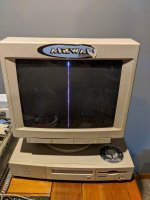
IMG_20200617_204606.jpg

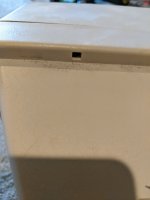
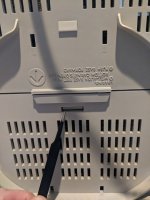
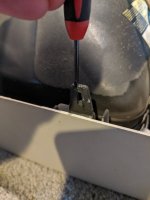
The back cover comes off with two screws and two tabs which I'm not able to determine how they are released:
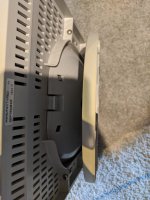
IMG_20200618_103534.jpgIMG_20200618_110622.jpg

If anyone knows how to release those tabs please let me know!

PS: Yes I understand the dangers and am taking precautions as I attempt this repair, I wont continue if I feel it is too difficult or unsafe.
 
Seems like you don't have horizontal deflection.  Check the horizontal connections on the yoke and look at the PC board to see if anything (big transistors or caps) look like they're distressed.  You might have a bad HOT.

 
Ive ran into this problem in the past. 

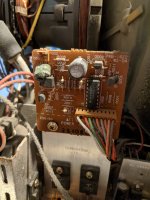
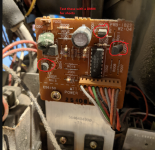
There is a transistor that goes bad on a little tiny daughter card style PCB thats mounted on a heatsink in the rear of the monitor. 

You should check this. (Im going from memory, dating back to 2000, so it can be fuzzy)

 
I just noticed the transistor on the heat sync to the left does not have a middle leg - not sure if that's intended or not. Visual inspection after removing dust, i cant see any apparent damage. capacitor looks a bit bulged.

 
I dont recall it being that board but its been 18 years since I worked on one of these. Can I get an overall picture of the monitor? 

Anyways:

image.png

 
Last edited by a moderator:
What is the number on it?  It may be a diode in a TO-220 case.


Its the damper diode. I think this monitor uses a split stage horizontal design. One stage runs the flyback, the other stage runs the yoke. Its the yoke stage that has failed in some way. I have seen a small signal transistor on one of those little module PCBs fail and cause that horizontal line pulsing through the screen. 

 
Last edited by a moderator:
Well finally got back to this project - I tested all the items marked, none have shorts.

I went further and removed the board from the case so I could get a closer look, and I'm pretty sure the large cap leaked as there was gunk all the way down the board. I cleaned it best I could. Looking closely I can see a bunch of burnt areas on the board near some resistors, and those resistors are burnt out. Not sure If I replace those if it would work. Half debating gutting this and fitting a 15" lcd panel in it.

/monthly_2020_08/large.IMG_20200805_213609.jpg.aa22b06228eaa143e31e4bb974b44f15.jpg/monthly_2020_08/large.IMG_20200805_213557.jpg.b51b0d0af80c992fac37e1d5449c30fd.jpg

 
And a few pictures of the top

/monthly_2020_08/large.IMG_20200806_100430.jpg.3c237cfbea0a9709ed31e02e4024eb93.jpg/monthly_2020_08/large.IMG_20200806_100455.jpg.c7ebe266633722f7da8a028a4dbe909a.jpg/monthly_2020_08/large.IMG_20200806_100505.jpg.b5aff23a04fe9fa29008579c6ca1f07a.jpg

 
i dont see any leaking capacitors, But its going to take some troubleshooting to figure out. It could be a capacitor or resistor that has gone open on the horizontal yoke connections, or the yoke itself. Its not my usual suspect of that transistor failing, then its going to need troubleshot. 

As far as gutting it, I wouldn't gut it as these monitors are rare enough, i have been looking for one myself for a very long time and still haven't found one, and the ones that do pop up are ridiculously priced. And now with covid, shipping prices have tripled recently, so that makes a prospect of me finding one a very expensive adventure. 

 
Last edited by a moderator:
i dont see any leaking capacitors
there was definitely something on the back running down the side (you can see the yellow gunk on the second picture of the back, it ran all the way down and onto the front knobs) It was causing shorts. Maybe not caps, maybe water damage or something else. It was stored in a basement for years.

After I cleaned it I put it all back together and still has a single vertical line of course.

I really like the look of this monitor too - was the one I spent most of my youth staring at :)

If i'm going to do this what would be the first course of trouble shooting? What components should be tested first?

There is a transistor that goes bad on a little tiny daughter card style PCB thats mounted on a heatsink in the rear of the monitor. 
I've added a photo of that back pcb too - though I dont see anything that looks like a transistor on that one.

It may be a diode in a TO-220 case
You are right, it is a diode - the markings on the board below show the diode symbol.

 
Ok, so ohm out the Red/Blue wires on the yoke. make sure you have resistance there. Thats your horizontal windings. Then, follow the traces on those pins at the PCB. one of them probably leads to a big cap. Test this too, if its open, this is the symptom. 

 
In terms of parts, these monitors were available from other PC OEMs sans the Apple branded control door and DB-15 plug. Wish I could remember the other brands it was sold under, its been a long time.

 
Back
Top