• Hello MLAers! We've re-enabled auto-approval for accounts. If you are still waiting on account approval, please check this thread for more information.

Just how many non-standard Video Connectors has Apple forced upon us?

Trash80toHP_Mini

NIGHT STALKER
68040
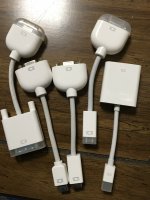
Took a chance at this lot for $25 and am happy I did. The DVI->VGA adapter I can use right off the bat, but there are three other discrete types, only one double?

MacVidAdapters.jpg

I'd have looked up the model numbers, but Apple only bothered printing that on one of the four types!

I guess my question is if there's a JIve era version of Ports and Pinouts? How many of these dang things has Apple had the nerve to foist upon the public? I know it's more than four, but why?

 
I think the bulk of the adapters here were to have a tiny do-it-all port on the computer and simply switch adapters as necessary for whichever standard output was desired. It was annoying that they didn't often keep the same port between computers though, but compact notebook PCs do that kind of crap all the time. I have an old Fujitsu LifeBook that uses a special dongle for the serial port and I've never found one. Good thing I don't really need to use it. Same with some of these compact Sony VAIO notebooks: dongles for video, Ethernet, external floppy, whatever. So I can't hate on the Apple video adapters too much. I mean it's basically the same as using USB-C for everything now: you're still gonna need a lot of adapters for that one port.

However, Apple did enjoy their unique video connectors. The original DB15 that we all know and love can be forgiven because VGA wasn't an industry standard in 1987 when the Mac II came out, and even if it were Apple likely would have wanted to be distinctive and wouldn't have used it. The worst attempts were the HDI45 from the original Power Macs (combination of terrible non-upgradeable video controller and no third-party support? Sign me up!) and ADC (hey, let's overtax the computer's power supply and route all of this juice through the logic board via modified AGP slots and expensive proprietary video cards that can never exceed AGP 4X due to the mods! Great idea!).

 
I know it's more than four, but why?
As I understand it, three of them are electrically the same as VGA, DVI and DisplayPort, respectively.  So while it's ... understandable that those three would be distinct (since they're reduced forms of three existing sockets), the existence of another variant on DVI-D for the MacBook Air is a bit grump-inducing.

 
I'm very happy with this lot, the DVI to VGA dongle should offer flexibility, turning the DVI end of my ADC dongle into VGA. That could make things easier for re-configuring my currently disheveled KVM switch setup. The pair of matched dongles fit my 12" AlBook so they'll come in handy with that generation if I snag another.

The other two are the same thickness, but different widths, so I'll assume that the black coded male connector bridges the gap between the AlBook adapter and the narrower white coded female connector which is a loose fit for the charging cable of my iPhone 5C? If that's DisplayPort it would be a practical solution for the paradigm shift and come in handy as well.

Is Apple still enforcing the bag-o-dongles requirement for flexible expansion portability?

However, Apple did enjoy their unique video connectors. The original DB15 that we all know and love can be forgiven because VGA wasn't an industry standard in 1987 when the Mac II came out, and even if it were Apple likely would have wanted to be distinctive and wouldn't have used it.
In that time frame, you could be right, especially as Apple took forever to introduce VGA compatible output into the lineup.

The worst attempts were the HDI45 from the original Power Macs (combination of terrible non-upgradeable video controller and no third-party support? Sign me up!)  .  .  .
OMG I HATE that dongle. configuring it with a RA adapter might have been excusable, but a 45 degree config would have been of immense help.

.  .  .   ADC (hey, let's overtax the computer's power supply and route all of this juice through the logic board via modified AGP slots and expensive proprietary video cards that can never exceed AGP 4X due to the mods! Great idea!).
Wasn't that one induced by the extreme desktop minimalism of the failed Cubist movement? Ya gotta love putting the PSU on the floor, running enough DC power over a cable heavy enough from there for running power from the Cube, and its VidCard through ADC to the matched StudioDisplays. Cable length from Sub to TAM was workable. But the longer the cable, the thicker it has to be for DC power, which is of course the reason we have an AC grid, not to mention the death defying aspects of the DC grid proposal.
 

Desktops: so far we have two entirely non-standard desktop connections (outside the easily forgiven DA-15)

I'll add semi-standardized 13W3 connector Portrait Display (analogous TPD as well?) Not sure how standardized 13W3 was in the UNIX WorkStation world, but with the Sun compatibility should have been a no-brainer.

PowerBooks: so far we have four non-standard PowerBook connectors. (see below)

Can anyone think of any more?

Title of the thread could be a bit misleading, meant to be wry/tongue in cheek rather than iHate rant. Seriously, does anyone have a handy link to a followup to the Ports and Pinouts document? First page there shows the fourth proprietary connector not yet mentioned, the original PowerBook Video Connector.

edit: just checked contact count of the 5C charging cable to the loose physical fit connector. Too many contacts on the dongle to be a match. Why the heck would Apple come up with a non-keyed, rough physical fit connector that's a pitch mismatched, electrically incompatible and potentially a catastrophic connection? Which came first and might one actually represent use of an industry standard connector?

 
Last edited by a moderator:
The worst attempts were the HDI45 from the original Power Macs (combination of terrible non-upgradeable video controller and no third-party support? Sign me up!)


Oh, yes, that thing.  I bought an Apple AudioVision 14 display and a Power Macintosh 7500 system at the local Apple dealer back in the day.  Now, this was a setup I'd discussed with the salesperson and we (home and work) had purchased all our systems through them at that time, so they knew the display and the Power Mac were all to be used as one system.  Both the display and the system were suited for video work which is what the salesperson knew I wanted.

When it was all ready, picked it up and took it home that night and eagerly set up the system.  Some may recall the Power Mac 7500 was described as the "dream machine" in one Mac magazine.  Maybe more than one.  I don't remember.  Got the computer out of its box and set it up on my desk at home.  Hooked up the keyboard and mouse.  Then, unpacked the monitor and placed it atop the computer.

And then discovered there was no way to actually connect the display to the computer because the plug on the monitor and port on the computer were different.

Oh, and did I mention that was our salesman's last sale?  We wrapped everything up on his last day so he'd get the commission.  (Which means this might have been on a Friday.)

Next business day, go back to the computer store--and, obviously can't talk with our salesperson who is no longer there--and we're like, there's no way to connect the display and the computer.  Oh, yeah, they say, you need a special adapter.  Who sells a complete system without including any necessary adapters!?  Oy.

 
Editorial: Apple isn't forcing anything on you. You're free to buy another kind of computer to avoid having to work with Apple's connection standards.

Anyway, collecting this information would be pretty good wiki content, so I'm going to link to this thread from the wiki rollup/to-do list thread.

In total:

  • DA15 - the regular Mac video connector, whcih isn't standard anywhere else and the connector for which is in fact reused by Ethernet and PC game ports
  • 13W3 - for the portrait, 2-page, and if I remember correctly also the 21-inch Macintosh Color Display - 13w3 as a concept is standardized but different workstation vendors. There's lots of different variation. Separate-sync, composite sync, and sync on green as examples.)
  • S-Video connectors with 12V power in them for running the ATi XClaim VR tuners and the Quicktime Conferencing System video cameras
  • HDI45 - AudioVision 14 and 6100/7100/8100 (combined ADB and audio in/out, the monitors have s-video input but I don't know whether this ever really worked)
  • PC compatibility card output and cable harnesses
  • PowerBook video output - adapter to larger DA15 connector (not counting the entire concept of a duodock as a video adapter/dongle)
  • ADC (which also supplied power to the monitor and USB connectivity)
  • MiniVGA
  • MiniDVI
  • Dual-Link DVI - Apple claims to have invented to dual-link DVI for the 30-inch Cinema Display. They probably didn't invent it but they might have popularized it
  • Original MacBook Air video port
  • Mini DisplayPort (this connector became Thunderbolt 2, and also ended up becoming more or less an industry standard.)
  • Thunderbolt 3 (Also on one or two Mac models as USB Type C but without Thunderbolt credentials.)


Macs have also shipped with:

  • VGA
  • DVI-I, Dual-Link DVI-D
  • HDMI

If you want to count these:

  • iPod/iPhone/iPad 30-pin connector which has analog/HDMI/VGA video output for mirroring purposes
  • iPhone/iPad/iPod Lightning connector, which can mirror video
  • iPad USB Type C output

I feel like I'm forgetting something. 

flexibility, turning the DVI end of my ADC dongle into VGA
What's the overall setup for that look like? ADC -> DVI -> VGA -> VGA monitor (or KVM?)

That might work but it relies on the ADC to DVI adapter providing DVI-I output, which, is a lot but that kind of number of adapters isn't  unprecedented per se. I have a setup where I'm using Apple's DVI to VGA adapter and an Apple VGA to DA15 adapter to run a Multiple Scan 20 on a 2006 macmini, for example.

Is Apple still enforcing the bag-o-dongles requirement for flexible expansion portability?
What ended up happening, at least at my institution, is that for a couple years, Mini DisplayPort, HDMI, and VGA were jointly available on every single portablecomputer on campus, short just a handful of them, so we installed video switchers with all three of those inputs at every lectern and nobody has to carry video adapters.

People who go a lot of places and don't trust the places they go or who have a lot of different scenarios within their own ecosystem (hypothetically let's say I set a macbook air down at like three types of monitors) will need to buy the video adapters to connect their computer to whatever display they have.)

Lots of PC manufacturers followed Apple in offering mDP on notebook computers and small-form-factor computers. It was convenient because it meant the adapters I already had for my Mac worked with my Surface 3 and Surface Laptop, for example.

To be honest, I think the vast majority of actual traveling notebook/laptop users at this point don't really end up needing video adapters. Most people aren't presenting when they're out-and-about, and so they only ever really need to buy adapters for the scenario that they want to "dock" to a bigger display or a TV or whatever at home, so I bet something on the order of 93-97% of 2010 to 2017 MacBook Airs (mDP and TB2 outputs) have never had an adapter conected and the bulk of the ones who have, it was a borrowed or tied-in-place adapter. 

So,, like, it's a little bit of a different situation than in 1996 when primarily executives and traveling salespersons had laptops and a much higher proportion of that population has a need to do presentations.

Both the display and the system were suited for video work which is what the salesperson knew I wanted.
Tangentially - I thought the AV14 would have been discontinued by that time. I wonder if they meant to sell you a Multiple Scan 14 instead.

And, most descriptions I've seen of the AV14 suggest that it's suitable for multimedia consumption but not really multimedia authoring, because by 1994, you really kind of wanted a bigger display, especially at the higher end if you were going to deal with video bigger than 320x240 (which on paper the 7500 can do, especially with a serial-controllable video deck) because 640x480 in total leaves very little room for timelines, a preview, command palettes, etc.

 
Splitting this away from quotes to make it clear this isnt' "to" anyone specifically, and is just me personally waxing poetic for my love of "super weird Apple"

Tangentially 2: I love AudioVision.. I'll agree entirely that Apple implemented it wrong, but it's among my absolute favorite weird Mac things. At this point, I'm absolutely here for, just, totally wackadoodle things Apple did for whatever reason that nobody can figure out, and AudioVision is peak that. My most favorite configuration is an AudioVision 14 as the primary/only display on a 6100 with a DOS card. Imagine buying all that stuff and then finding out you need two adapers for your monitor and you need to use them both alongside the regular PC compatibility mess.

Aside from that, I have a high end love for the idea of using an 8100 with its onboard video on the floor connected to an AudioVision up on a table, with the keyboard/mouse wired into the display. I used my first 840av that way exclusively and it was just beautiful not to have to worry about Apple's criminally short ADB cables. (Longer ones do exist but I've only ever managed to find, like, one of Apple's own, one or two 6-10ft ADB cables and one single ADB-compatible cable even longer than that, in 20+ years that I've been playing with these things, and so AudioVision solved that problem extremely handily.)

If I were working at Apple in 1994, I would probably have tried to get them to build a 16-inch AudioVision display and beefed up the onboard video in at least the 7100/8100, to make it a little more compelling to actually use, and perhaps asked for a non-AV 14-inch HDI14 monitor.

Other Apple monitors, like the 15-inch Studio Display, AppleVisions, Multiple Scan 17+ and Macintosh Color Display 16+ also had solutions to these problems, but they require even more ADB cables (including one long enough to reach from the back of the stand to the computer, for the MCD/MS variations) and so I haven't ended up using them that way, myself, in part because I'm short-ish on ADB cables these days and in part because i did mange at some point to find, like, a 15-foot ADB-compatible cable.

I will say, with that in mind, the AppleVision/ColorSync/Studio solution to this problem (ADB/sound splitting off from the main display cable at the end) is probably the most elegant solution in that you can use it on any compatible Mac without adapters (or with fewer adapters) and can choose which video card to use, etc etc.

Today, USB Type C does most of this pretty handily, and to be honest with LED backlighting at small enough sizes, LCD displays now use little enough power that they can be run off of Type C at typical phone charging power levels, so it's hypothetically possible to power a monitor off of something like a Mac mini. Regardless, though, lots of Type C enabled monitors now have downstream USB hubs for things like headsets and USB keyboards/mice, which handily solves the problem I was describing. (It also helps that Apple started shipping bluetooth in most of its desktops like just around fifteen years ago, and has since gone all-in on wireless keyboards/mice.)

 
I would not count DA15 as "non-standard", because VGA didn't exist back then. Everything but composite video was "non-standard"

 
Sure, to the extent that there "weren't" standards per se (other than just various combinations of BNC cables) - Apple chose a DA15 connector (probably because they had already used it on the IIgs in 1986) and then used it until 1999. (Laptops switched earlier and were in that sense "non-standard" within the Mac universe, except of course that adding VGA to the 2400/3400 was probably to appease PowerBook toting executives and salespersons who didn't want to use another adapter when a projector was set up with only PC cabling.)

I'd count it as non-standard in this context because:

  • Apple chose to use it
  • Chose to continue using it even after VGA was deemed the desktop/microcomputer industry's "standard".
  • Even though it's reasonably well known that the Mac user community would have been beside itself with pure unbridled joy if Apple had switched Macs to VGA in, like, 1992.
  • Every single workstation vendor who had been using multi-BNC connectors or 13w3 switched to VGA (and ultimately DVI-I), mostly before Apple did, aside from long-life products (the Octane/2 for example was introduced in like 1997 and  the platform was still on sale in 2006, but 1996's O2 had switched to VGA, though).


Starting with the primary physical video out port on the Mac here's an attempt to look at the adapters. I'm certain I've missed a bunch... I stopped trying to specify models that use the ports towards the end:

DA15 (Mac II -> Beige PM G3) - Standard-ish :-)   

- Apple Adapter to BNC

PowerBook Video Out  (PB 1xx -> 1400) - Proprietary 

- Apple Adapter to DA15

HDI-45 (PM 1st gen) - Proprietary 

- Apple Adapter to DA15

HD-15/VGA (PB 2400 -> G4, B&W PM G3 -> G4) - Standard 

- Apple Adapter to DA15

ADC (PM G4 -> G5) - Proprietary 

- Apple Adapter to VGA

- Apple Adapter to DVI

DVI (PM G4 -> G5) - Standard 

- Apple Adapter to VGA

iBook Video Out (Clamshell) - Proprietary 

- Apple Adapter to Composite

iBook A/V Port (Dual USB) - Proprietary 

- Apple Adapter to VGA

- Apple Adapter to Composite

iBook Mini-VGA (Dual USB) - Proprietary 

- Apple Adapter to VGA

- Apple Adapter to Composite/S-Video

MacBook Mini DVI  - Proprietary 

- Apple Adapter to VGA

- Apple Adapter to DVI

MacBook Air Micro DVI  - Proprietary 

- Apple Adapter to VGA

- Apple Adapter to DVI

Mini DisplayPort  - Standard

- Apple Adapter to VGA

- Apple Adapter to DVI

- Apple Adapter to HDMI

HDMI - Standard

- No apple adapters?

USB-C - Standard

- Apple Adapter to VGA

- Apple Adapter to HDMI

 
Last edited by a moderator:
Tangentially - I thought the AV14 would have been discontinued by that time. I wonder if they meant to sell you a Multiple Scan 14 instead.
Just looked it up and the AudioVision 14 was discontinued the same day the Power Macintosh 7500 and the AppleVision 1710AV were introduced.  I know for certain I bought the AV14 and PM7500 together and both were brand new.  Maybe I got a better deal on the AV14 monitor because it was discontinued.  I don't remember.  I know an AV monitor was what I wanted.

And, most descriptions I've seen of the AV14 suggest that it's suitable for multimedia consumption but not really multimedia authoring, because by 1994, you really kind of wanted a bigger display, especially at the higher end if you were going to deal with video bigger than 320x240 (which on paper the 7500 can do, especially with a serial-controllable video deck) because 640x480 in total leaves very little room for timelines, a preview, command palettes, etc.
Video authoring is one of the things I bought it for.  And, I am pretty sure the add-on video card I bought later (or around the same time?) handled 640x480.  I think we talked about this in another thread.  I used Adobe Premiere.  I don't recall any problems.  I think you could shrink the video window for viewing and editing and still export to 640x480.  I think there was a limit to the length it would handle which, if I remember right, was more a matter of hard drive size than the 7500's capabilities.

As it was, I didn't end up doing very much video work, not due to any issues I had with the system but I just more or less got sidetracked into BBS and web design and so forth.

 
Oh, forgot one! Some iBooks supported analog video output through their headphone jack using a 3.5mm minijack that was longer and had more connectors than usual. This isn't coo out of the ordinary, but if I'm remembering correctly, it was non-standard even compared to what's typically standard in that particular realm of non-standard (though this is all possibly faulty memory.)

(oops, forgot to hit post and I see Fizzbin added that one. Thank you!)

Just looked it up and the AudioVision 14 was discontinued the same day the Power Macintosh 7500 and the AppleVision 1710AV were introduced.
Makes sense. When it was new in 1993, the AudioVision 14 was like $750 and so by 1995 it was probably a pretty good deal, perhaps even better than the Multiple Scan 15, which would have gotten you okayish speakers and 832x624, but a shadow-mask tube.

So, it probably was a really good deal, and I've had a hypothesis for a fair while that Mac users tended to keep displays through a number of system upgrades anyway. My experience in ~1999-2003 was that it was very tough to find bigger older displays used. It basically took changing to digital technologies and LCDs  for older Apple monitors to shake loose.

Anyway - as to why your dealer had an AV14 ins tock - this is basically the same problem Apple had literally the entire time from 1987-1988 or so to 1999ish which was that there was just always a huge amount of back-stock at retailers and in warehouses. This was "fixed" in 1997 but it took several years to actually resolve, because even at a deal it's kind of tough to sell an old computer once its replacement has launched.

And, yeah, you can do video on 640x480, just that it would've been better on a bigger display - even if you were displaying the video at 320x240 or so.

Keep in mind, I unironically love the AV14, that's just criticism against it that exists. (And, I agree with, generally). Heck, by 1993 or 1994 or so even office workers were starting to want more space for doing things like displaying spreadsheet and presentation or word processing or page layout documents at once, or working on bigger or more involved documents. That was part of the sales pitch of the Multiple Scan 20, which was originally introduced as a high end display and survived as a midrange display into the AppleVision/ColorSync era for a fair bit less than what it originally shipped at.

 
Apple's usage of the DA-15 port for video goes all the way back to the Apple ///, which uses it for digital RGB. I wouldn't call it non-standard as DA-15 ports are available off the shelf from any electronics store. Apple really didn't have to create that video output port on the Powerbook 100 series as VGA would have taken roughly the same space. The same could be said for the silly Mini-VGA port on the iBooks, but VGA wasn't aesthetically pleasing I guess. Dual-link DVI was industry standard, just Apple was one of the first to actually use it. As for mini DisplayPort, Apple created the standard and quickly turned it over to VESA.

 
Starting with the primary physical video out port on the Mac here's an attempt to look at the adapters. I'm certain I've missed a bunch... I stopped trying to specify models that use the ports towards the end:

DA15 (Mac II -> Beige PM G3) - Standard-ish :-)   

- Apple Adapter to BNC

••• DuoDock 1992-1994; Macintosh Portable 1989; Macintosh IIci, IIsi, IIvi, IIvx, 1989-1992; Macintosh Centris & Quadra series, 1991-1993; Macintosh LCLC IILC IIILC III+LC 475 and derivatives, 1990-1993; Workgroup Server 9150 1994; Power Macintosh 6200, 7200, 7500, 8500, 7600, 8200, 6300, 6400, 4400, 7300, 6500, 8600 and derivatives, 1995-1997; Power Macintosh G3 Desktop and Minitower, 1998 (Most Apple video expansion hardware also provided this port, from 1987-1998. This includes HPV/AV cards on 6100, 7100, 8100, PCI cards in 9500 & 9600, and Nubus display cards for early Macintosh II series. Notable exceptions include the Monochrome portrait display/two page display adapters, which use the 13W3 connector.)

PowerBook Video Out  (PB 1xx -> 1400) - Proprietary 

- Apple Adapter to DA15

••• PowerBook 160180, 165, 500 series, 190 (optional), 5300 & 1400 (optional), 1992-1996

HDI-45 (PM 1st gen) - Proprietary 

- Apple Adapter to DA15

••• Power Macintosh 61007100 & 8100, 1994-1995

HD-15/VGA (PB 2400 -> G4, B&W PM G3 -> G4) - Standard 

- Apple Adapter to DA15

••• iMac G3, DV Models only, 1999-2001; PowerBook G3 & G4, 1997-2001; PowerBook 2400c & 3400c 1997; Power Mac G3 & G4, 1999-2002 (Not MDD)

ADC (PM G4 -> G5) - Proprietary 

- Apple Adapter to VGA

- Apple Adapter to DVI

••• Power Mac G4 & G5, 2000-Early 2005 (Some Early 2005 Video cards did not support ADC)

DVI (PM G4 -> G5) - Standard 

- Apple Adapter to VGA

• Apple Adapter to Composite/S-Video

••• Mac mini, 2006-2007; PowerBook G4 15 & 17, 2002-2005 (High-end Early 2005 Models with Dual Link); MacBook Pro 15, 2006-Early 2008 & MacBook Pro 17, 2006-2008 (Dual Link); Power Mac G4 & G5, 2002-2005 (Not Quicksilver; Dual Link available on all G5 models and was standard by Late 2005) 

iBook Video Out (Clamshell) - Proprietary (***This is a common 4-contact 3.5mm jack which adapts to RCA composite+stereo. Pinout may be unique)

- Apple Adapter to Composite

••• iBook 2000 Only

iBook A/V Port (Dual USB) - Proprietary 

- Apple Adapter to VGA

- Apple Adapter to Composite

••• iBook 2001-Early 2002

iBook Mini-VGA (Dual USB) - Proprietary 

- Apple Adapter to VGA

- Apple Adapter to Composite/S-Video

••• iMac G4 & G5, 2002-2005; eMac, 2002-2005; PowerBook G4 12, Early 2003; iBook Late 2002-2005;

MacBook Mini DVI  - Proprietary 

- Apple Adapter to VGA

- Apple Adapter to DVI

• Apple Adapter to Composite/S-Video

••• iMac 17, 20 & 24, 2006-2008; Mac mini, Early and Late 2009; PowerBook G4 12, Late 2003-2005; MacBook, 2006-Early 2009 (except Late 2008 Aluminum)

MacBook Air Micro DVI  - Proprietary 

- Apple Adapter to VGA

- Apple Adapter to DVI

••• MacBook Air Early 2008

Mini DisplayPort  - Standard

- Apple Adapter to VGA

- Apple Adapter to DVI

- Apple Adapter to HDMI

••• Models with Thunderbolt integration also support Thunderbolt Digital Video. iMac 21.5 & 27, 2009-2015; Mac mini, 2009-2014; MacBook Air, Late 2008-2017; MacBook Pro 15, Late 2008-2015 & MacBook Pro 13 & 17, 2009-2015; MacBook, Late 2008 Aluminum & Late 2009-2010

HDMI - Standard

- No apple adapters?

••• Mac mini, 2010-2018; MacBook Pro (Retina models) 2012-2015

USB-C - Standard

- Apple Adapter to VGA

- Apple Adapter to HDMI

••• Models with Thunderbolt integration also support Thunderbolt Digital Video. iMac 21.5 & 27, 2017-Present; iMac Pro 2017; Mac mini 2018; MacBook Air, 2018-Present; MacBook Pro, 2016-Present; MacBook, 2015-2017

This looks comprehensive. I added in specific models, whenever ports were built-in or in standard shipping configuration.

 
Last edited by a moderator:
@jeremywork Thanks for adding all the details I was too lazy to lookup! 
 

Between DVI and Mini DisplayPort there certainly are a “good” amount of proprietary interfaces requiring adapters. I’m pretty sure some of our conference rooms at work still have a bin with ~dozen adapters in them we used to dig through to hook up to projectors. Things definitely got better with Mini Diplayport and especially HDMI. USB-C is now fun but we have solutions that work over the network (WiFi) now which’s makes it less of a big deal. 

 
Last edited by a moderator:
Keep in mind, I unironically love the AV14, that's just criticism against it that exists.
I like it too.  Sometimes wish I had another to use with another Power Mac or as a backup for the 7500.  But, on the other hand, if I had taken $750 back then and bought Apple stock instead, that'd be worth about $140,746.75 today which is an amount the AV14 is almost certainly never going to reach even as a NIB collectible.

 
Last edited by a moderator:
Hah. That's an interesting way to measure stuff, and I take it that you've seen the web site that used to list everything back to 1998 or so and show what it's value in stock would have been if you bought it new. (Kanga ranks highest on that web site, mainly because they didn't go much further back than it.)

The AV14 was one of the first Apple monitor I was able to get my hands on and I have lots of fond memories of using my 840av with it, with a walkman piped to its line in to have some music going on in the background. Those speakers are great.

There's a more general criticism if you look at the AV14 in 1993 of how much more it costs than the 14-inch Macintosh Color Display relative to what basically anyone not using it for some kind of media production would "get out of it" in terms of functionality. The 16-inch Macintosh Color Display would have cost around $1299 at that moment, at least if you were a recipient of Apple's direct-sales catalog in that moment.

So, in that context it admittedly looks pretty gadgety, but if you bought it for a lot less (I don't remember what I got mine for, but it was a really good deal, because in like 1999 they weren't selling for meaningfully more than 13-inch High-Res displays or 14-inch Mac Color Displays.)

 
I didn't mention it for brevity's sake, but I needed to use a VGA adapter cable for HP_Mini. It has a docking connector (vaporware dock) and it never bothered me. Neither has playing with the 12" AlBook/VGA Dongle combo.

As I said this wasn't an iHate session thread, just a bit of bewilderment about the earlier connections, the ones in this grab-bag and curiosity about dongle-gate and where that went. That's why I asked, thanks to all for the information.

 
7ABEB069-57F9-4531-9C1C-6A247C3760C9.jpeg
 

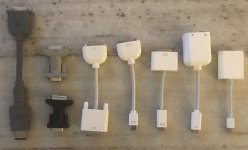
My current Apple video adapter stash:

PowerBook Video Adapter (VID-14 to DA15)

VGA to DA15

DVI to VGA

Mini VGA to VGA

Mini DVI to DVI

Mini DVI to Composite/S-Video

Mini DisplayPort to VGA

 
Back
Top